
Lieferung heute & morgen

Qualitätsgarantie

Willkommens-Angebote freischalten: KOSTENLOSE Lieferung | Bis zu 80 % RABATT | Kostenlose 30-Tage-JoyPlus-Testphase
App herunterladen
A mechanical gaming keyboard should respond precisely during play, feel comfortable for everyday typing and remain reliable for as long as possible. In practice, however, poor purchases are not caused by price or RGB lighting alone. In many cases, it is unsuitable layouts, misunderstood switch technologies or missing compatibility information that lead to disappointment after purchase.
A keyboard with an 8000 Hz polling rate theoretically reports its status to the computer more often than a model with a lower rate. This can be relevant for competitive FPS players. In everyday use, office applications or single-player games, however, the practical difference is often less important than a suitable actuation point, a stable connection and good ergonomics.
The keyboard must also genuinely support this rate when connected by cable. Wireless models are subject to different technical conditions depending on the type of connection.
A mechanical keyboard with hot-swap allows you to replace switches without soldering. What matters, however, is which type of switch is supported. Many conventional hot-swap PCBs accept 3- and 5-pin switches. A Hall-effect keyboard with magnetic switches, on the other hand, uses sensors and is not compatible with conventional mechanical switches.
The AULA WIN60HE explicitly states that only Hall-effect magnetic switches may be used. Standard 3- or 5-pin switches cannot be fitted here and could damage the sockets.
A compact 60% keyboard saves space, but usually omits the arrow keys, function keys and separate navigation cluster. A 75% gaming keyboard retains the essential arrow and function keys, while a TKL keyboard generally does without the number pad. Before buying, you should therefore check which keys you actually need for your everyday work.
The layout is also important for German users: many listings use a US QWERTY layout. The positions of Y and Z, as well as special characters, differ from the German QWERTZ layout. This can be adjusted in software, but it does not change the legends printed on the keycaps.
Linear switches move without a noticeable tactile bump and are often chosen for fast-paced gaming. Tactile switches provide physical feedback when actuated. Clicky variants also produce a distinct sound, which can be disruptive in shared spaces.
With a Rapid Trigger keyboard, resetting a key is not necessarily tied to a fixed point. This can be useful for rapid changes of direction in FPS games. Models with magnetic switches often also allow you to adjust the actuation depth. The setting should suit your own play style, however: an extremely short actuation point can also make accidental inputs more likely.
A gasket-mount keyboard supports the plate on cushioning elements. This can give the keystroke a softer feel. Multiple layers of Poron, IXPE, PET or silicone can reduce resonance inside the case. Descriptions such as “quiet” or “especially soft” should nevertheless not be taken at face value, as the switches, keycaps and desk surface all influence the sound.
PBT keycaps are more resistant to wear and developing a glossy surface than many ABS keycaps. With double-shot or dye-sublimated legends, the lettering is made from a separate material or transferred into the material. For RGB lighting, it is also relevant whether the legends or the sides of the keycaps allow light to pass through.
USB-C wired operation provides a direct connection without battery management. A wireless mechanical keyboard, on the other hand, may combine Bluetooth and 2.4 GHz connectivity. Bluetooth is often suitable for connecting multiple devices and for low-power use, while 2.4 GHz usually operates via a USB receiver.
If you are looking for a keyboard for PC and Mac, check that both operating systems are supported and that the modifier keys can be customised. With programmable software, you should also check whether it works only on Windows or on macOS as well.
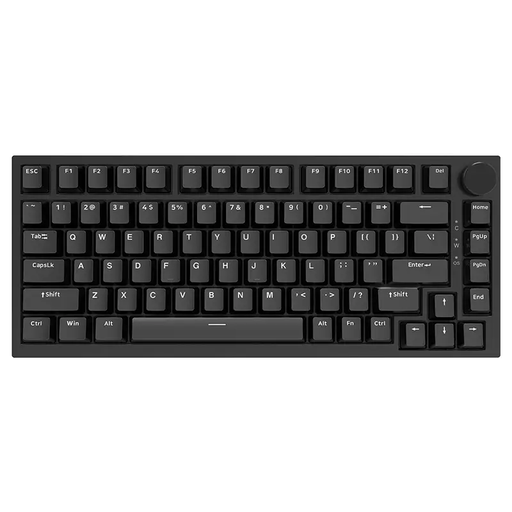
Why this product suits the profile: The 75% layout combines a compact design with arrow and function keys. The wired USB-C connection does not require a battery.
The product specifications explicitly state hot-swap support for 3- and 5-pin switches, as well as a wired connection.
PBT keycaps, gasket construction, volume control and RGB lighting in a 75% format.
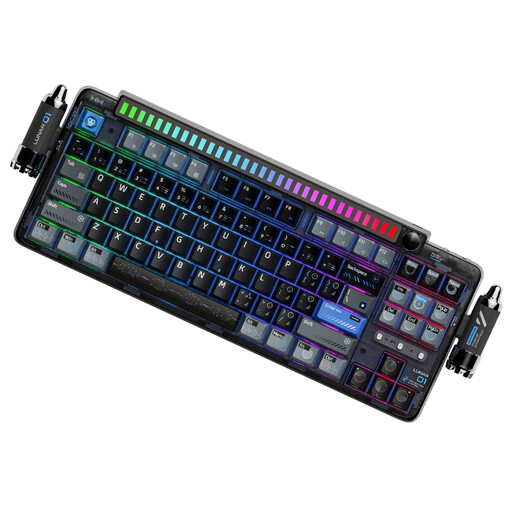
Why this product suits the profile: The 87-key layout, three connection options, programmable controls and gasket construction are suitable for gaming, office work and use with multiple devices.
Bluetooth, 2.4 GHz and USB-C are listed separately. The specifications also mention 5-pin hot-swap support, PBT dye-sublimated keycaps and a 4000-mAh battery.
Tri-mode connectivity, programmable control knob, PBT keycaps and compatibility with Windows, macOS, iOS and Android.
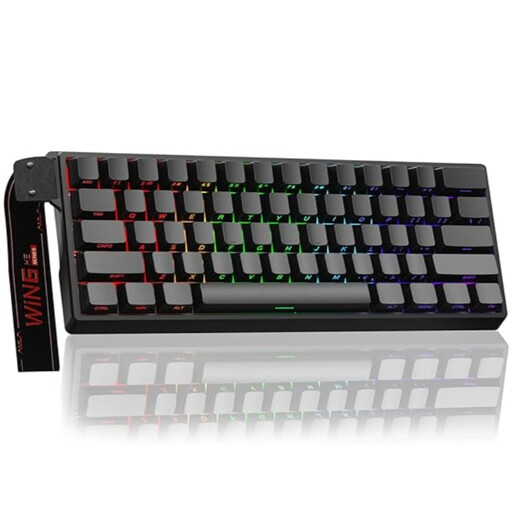
Why this product suits the profile: This model is aimed at users who specifically want to make use of an ultra-compact format, magnetic switches, Rapid Trigger and a high polling rate.
The product information clearly states that only Hall-effect switches may be used and that the keyboard operates via a wired connection.
60% design, adjustable actuation point, Rapid Trigger mode, RGB lighting and a stated 8000 Hz polling rate.
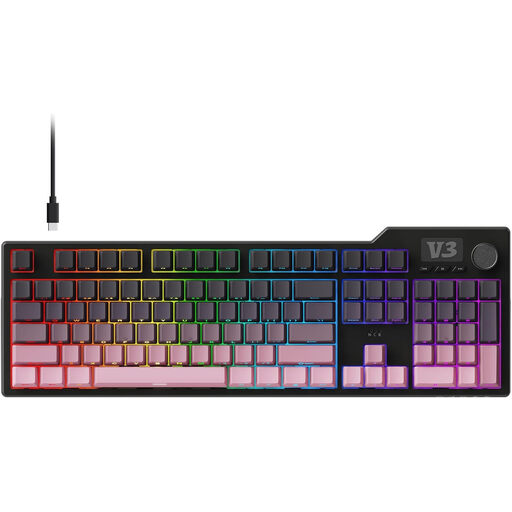
Why this product suits the profile: The 104-key layout with a number pad is ideal for spreadsheets, working with figures, programming and gaming with numerous keyboard shortcuts.
The specifications list gasket mount, five layers of dampening and hot-swap support for 3- and 5-pin switches, rather than making only general comfort claims.
Number pad, volume control, PBT keycaps, RGB underglow and programmable macros.
We have put together a complete, regularly updated list of products that fully meet these strict selection criteria and the safety regulations applicable in the EU.
For FPS games, short actuation distances, linear switches and a Rapid Trigger function may be appealing. A Hall-effect keyboard such as the AULA WIN60HE is suitable only if you specifically want to use magnetic switches, however. For many players, a conventional mechanical keyboard with a reliable USB connection and a well-tuned actuation point is perfectly sufficient.
The lifespan depends on the switches, PCB, hot-swap sockets, keycaps and intensity of use. Manufacturer specifications such as 50 million or 600 million keystrokes are technical rated values and do not guarantee the lifespan of the entire device. Regular cleaning with a soft, dry brush and protecting the keyboard from liquids can help extend its usable life.
RGB lighting does not affect key function and can be dimmed or switched off on many models. In an office, noise levels, layout and ergonomics are particularly important. Clicky switches can be more disruptive in shared workspaces than linear or tactile variants. With a US QWERTY layout, you should also check whether the different key arrangement suits your workflow.