
Lieferung heute & morgen

Qualitätsgarantie

Willkommens-Angebote freischalten: KOSTENLOSE Lieferung | Bis zu 80 % RABATT | Kostenlose 30-Tage-JoyPlus-Testphase
App herunterladen
A mechanical gaming keyboard with a German layout should respond quickly during gaming, remain comfortable for typing and work seamlessly with a German PC or Mac setup. In practice, however, unclear layout descriptions, exaggerated lighting claims and missing information about switches often lead to disappointing purchases.
This guide explains which features really matter before buying a QWERTZ gaming keyboard and who would benefit from a compact 75% keyboard with 81 keys.
A keyboard with a German layout should use the QWERTZ layout. However, it is important to distinguish between the physical key arrangement and the input language selected in Windows or macOS. If these two settings do not match, Z and Y may be swapped, for example, or special characters may appear in unfamiliar positions.
Before buying, you should therefore check:
A 75% mechanical keyboard saves space but often leaves out the separate number pad. With an 81-key keyboard, many function keys and arrow keys are retained, while giving your mouse more room to move across the desk.
So check whether you need a number pad for everyday use. A full-size keyboard may be more practical for spreadsheets, accounting or extensive data entry. For gaming, typing and general PC use, a compact mechanical keyboard is often sufficient.
An RGB keyboard, or a keyboard with rainbow lighting, can make it easier to find the keys in low ambient light. However, it does not replace information about keycap profile, switch type, case construction or connectivity. What matters is whether the lighting can be adjusted and whether the desired brightness and different modes are available.
The German QWERTZ layout is the key requirement for users in Germany. A compact 75% arrangement combines space-saving dimensions with a dedicated area for the arrow and function keys. Also check the measurements if the keyboard needs to fit in a drawer, under a monitor stand or on a small desk.
Red linear switches offer a smooth key press without a noticeable tactile bump or pronounced click. This can be suitable for fast, repeated inputs during gaming. For frequent typists, personal preference is crucial: linear switches provide less tactile feedback than tactile or clicky alternatives.
Marketing terms such as “fast” or “precise” should not be assessed in isolation. Instead, check whether the switch type is clearly specified and whether replacement or swap options are described.
With a gasket-mount keyboard, the mounting plate is not fixed rigidly directly inside the case, but is supported by flexible elements. Together with sound-absorbing mats or an EVA positioning plate, this can affect the key feel and the acoustics of the case. However, the term does not guarantee a particular volume level or typing feel.
Look at the complete specification: mounting style, damping material, keycap material and case construction should be described separately.
A wired gaming keyboard does not require a battery and sends inputs directly via USB. This is particularly suitable for stationary PC workstations and avoids charging breaks. With USB-C, a suitable cable should be included in the box.
A physical volume control is more convenient in everyday use than a keyboard shortcut when you frequently switch between games, music, video calls and films. Nevertheless, check whether the control works across the system or requires special software.
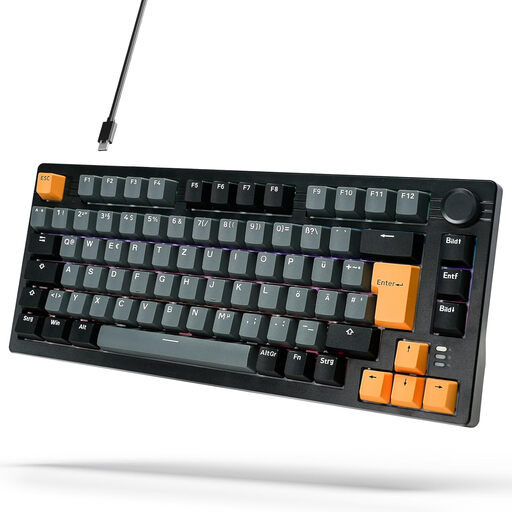
Why this product suits this profile: The K81 combines a German layout, compact 75% design and several features for gaming and everyday typing.
The product details explicitly state German Layout, 81 keys, red linear switches, a gasket-mount design and a volume control. This makes it possible to compare the key buying criteria in advance.
Aluminium case, USB-C connection, 18 lighting modes and stated compatibility with PC, Windows and Mac.
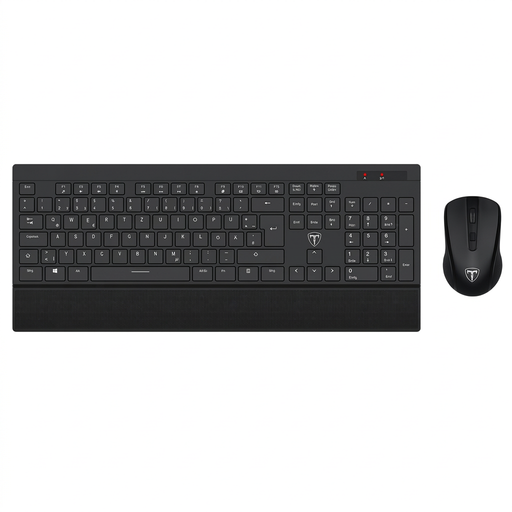
Why this product suits this profile: This set is aimed at users who want to purchase a keyboard and mouse together for office work, working from home and general computer tasks.
The German QWERTZ layout, 105 keys and connection via a shared receiver are clearly specified. However, this is not a mechanical gaming keyboard.
Wireless 2.4 GHz connection, ergonomic design, wrist rest and stated compatibility with laptop, PC and Mac.
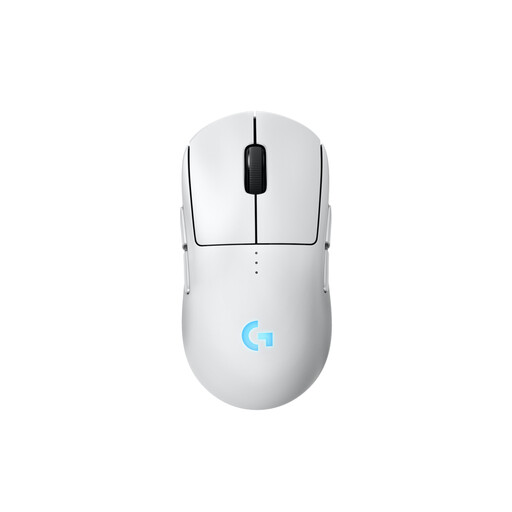
Why this product suits this profile: As a complement to a wired mechanical keyboard, this mouse is suitable for users who need flexible hand control and customisable side buttons.
The mouse is not presented as a keyboard replacement. The sensor, connection, number of buttons and ambidextrous use are specified separately, making it easy to choose a suitable complement.
Symmetrical design, up to four customisable magnetic side buttons and USB-C charging according to the product details.
We have put together a complete, regularly updated list of products that fully meet these strict selection criteria and the safety regulations applicable in the EU.
After connecting the keyboard, you should activate the German keyboard layout in Windows or macOS. With a wired keyboard, simply connecting the USB cable is generally sufficient. Additional software is only required if lighting modes or special functions are configured through it.
A dry microfibre cloth and occasional compressed air used from a sufficient distance are all that is needed for care. Avoid liquids, high temperatures and heavily twisting the cable. Remove keycaps carefully and keep small accessories out of the reach of children.
Yes, provided the model explicitly has a German QWERTZ layout. A 75% keyboard saves space and usually retains the arrow and function keys. The missing number pad may be important for office work involving lots of figures.
Red linear switches do not themselves produce a pronounced clicking sound. However, the actual volume also depends on the keycaps, case, mounting style, damping and typing technique. A gasket-mount construction can affect the typing feel, but does not guarantee a particular volume level.
With a wired model, there is no need for regular charging or battery replacement. The keyboard draws its power via USB. Ongoing costs mainly arise from possible replacement keycaps, switches or a new cable, provided these components are available separately.