
Lieferung heute & morgen

Qualitätsgarantie

Willkommens-Angebote freischalten: KOSTENLOSE Lieferung | Bis zu 80 % RABATT | Kostenlose 30-Tage-JoyPlus-Testphase
App herunterladen
A mechanical gaming keyboard with a German QWERTZ layout should enable fast input, remain comfortable for everyday use and deliver reliable performance over time. For PC gamers, e-sports players and frequent typists in Germany, however, the choice is not determined solely by RGB lighting or switch colour. The layout, form factor, connection and actual feature set are what really matter.
Many disappointing purchases stem from three common marketing traps:
If you regularly write in German, look specifically for QWERTZ-DE, German layout or German QWERTZ. The term “80%”, on the other hand, only describes the keyboard’s size. A TKL gaming keyboard, also known as a tenkeyless keyboard, normally does away with the separate number pad while retaining the function keys and arrow keys.
This saves desk space and can give you more room to move your mouse. For spreadsheet work or frequent number input, however, a number pad remains useful. Before buying, you should also check whether the USB cable is permanently attached or detachable, and whether the keyboard can be used with the desired PC connection.
The CHERRY MX2A RED Switches belong to the category of linear red switches. A linear switch has no tactile bump. The key moves smoothly throughout its travel, which can appeal to users who make rapid repeated inputs or prefer a consistent keystroke.
With mechanical keyboards, “quiet” should not be taken to mean silent. Linear switches still make an audible noise when the keycap hits the switch and when the key is bottomed out. If you play or work in a shared space, you should also consider the keycaps, case construction and any available sound dampening.
The service life stated by the manufacturer is a technical guideline. For the CHERRY XTRFY K4V2 TKL, a lifespan of over 100 million actuations is specified for the switches. This is not a guarantee for every individual component of the entire keyboard. The cable, keycaps and electronic components may show signs of wear independently.
For games involving lots of simultaneous key presses, the following specifications are relevant:
When it comes to lighting, it is worth looking at how it is controlled. According to the product specifications, the CHERRY XTRFY K4V2 TKL offers six-zone RGB lighting, which can be adjusted directly using the function keys. If you would rather not install additional software, this may be a practical advantage.

Why this product suits this profile: This model combines a German QWERTZ layout with a compact TKL form factor, a wired USB-A connection and linear CHERRY MX2A RED Switches.
The layout is explicitly listed as “German QWERTZ”. The specifications also clearly state a 1000 Hz polling rate, full N-Key Rollover and anti-ghosting.
Metal plate, robust case, six-zone RGB lighting and, according to the manufacturer, over 100 million switch actuations.
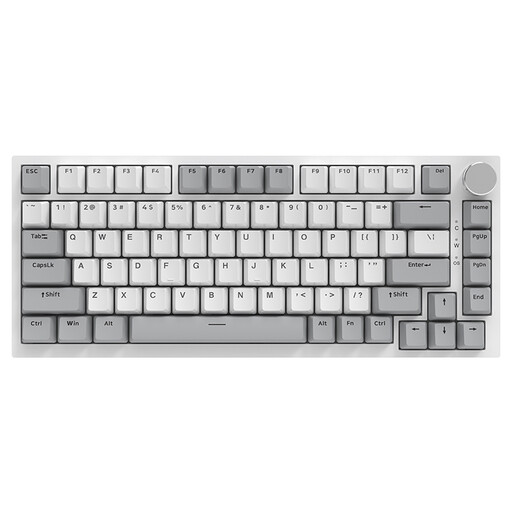
Why this product suits this profile: The 75% form factor saves space and offers additional features such as a volume control, hot-swap support and RGB lighting.
The product data specifies a US QWERTY layout. If you type in German frequently, you should therefore check before buying whether the key arrangement is suitable for you.
Hot-swap design, PBT keycaps, volume control and five layers of sound-dampening material according to the product description.
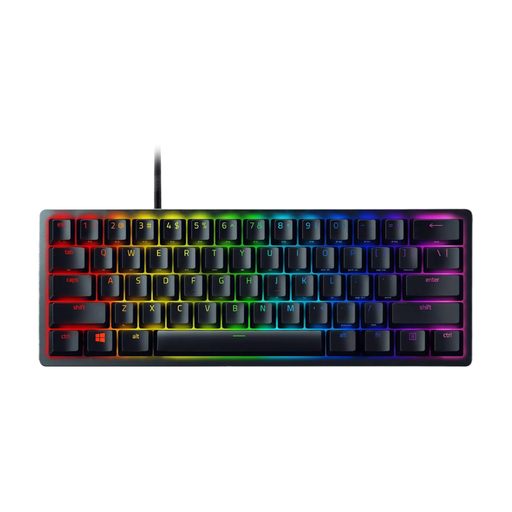
Why this product suits this profile: The 60% format is aimed at users who prioritise maximum compactness and portability over dedicated arrow and function keys.
The product data indicates QWERTY and 60 keys. If you need a German QWERTZ layout or separate arrow keys, you should not choose this model without checking it first.
Detachable USB-C cable, doubleshot PBT keycaps, RGB support and built-in memory according to the product description.
We have put together a complete, regularly updated list of products that fully meet these strict selection criteria and the safety regulations applicable in the EU.
Before ordering a mechanical keyboard, German users should check the following points:
A TKL keyboard can be suitable for gaming if you do not need a separate number pad. Its narrower width creates additional space for your mouse on many desks. Unlike many 60% models, it retains the arrow keys and function keys.
Lifespan depends on the switches, keycaps, cable, electronics and how the keyboard is used. Manufacturer specifications such as those for the CHERRY MX2A RED Switches refer to switch actuations. Spills, dust, forceful bottoming out and mechanical strain can affect the actual service life.
A wired keyboard draws its power through the USB connection. RGB lighting consumption depends on the brightness, colour and activated effects. If you want to reduce energy use, you can lower the brightness or switch the lighting off.