
Lieferung heute & morgen

Qualitätsgarantie

Willkommens-Angebote freischalten: KOSTENLOSE Lieferung | Bis zu 80 % RABATT | Kostenlose 30-Tage-JoyPlus-Testphase
App herunterladen
The search for the right mechanical gaming keyboard can quickly become overwhelming. The market is filled with jargon, marketing buzzwords, and an enormous variety of products. Many users invest in a model that seems impressive at first glance, only to discover after a short time that it doesn't suit their needs. As your Joybuy Product Recommendation Officer, I'll help you identify the common pitfalls and make an informed decision.
A common mistake is confusing "Mechanical-Feel" with genuine mechanical switches. Keyboards with this label are often just basic membrane keyboards designed to mimic the typing sensation of mechanical models. However, they offer neither the precision nor the durability of real mechanical switches and quickly lead to an unsatisfactory experience.
Another pitfall is overlooking the layout. Many attractive deals, especially from international markets, use the American QWERTY layout. For users accustomed to regional layouts like QWERTZ, this leads to constant frustration when typing, as keys like Z and Y, as well as special characters, are positioned differently or are missing entirely.
To find a keyboard that truly suits you, you should focus on a few core parameters instead of being swayed by design alone.
The switch type determines the feel, sound, and response time of your keyboard. The three basic categories are:
The size of the keyboard directly impacts the ergonomics of your setup and the available desk space. Common form factors include:
When making your choice, always check that it is a QWERTZ gaming keyboard to avoid compatibility issues.
Modern mechanical keyboards offer a range of features that can enhance the user experience:
Here are some recommendations tailored to specific user profiles that take the aforementioned pitfalls into account.
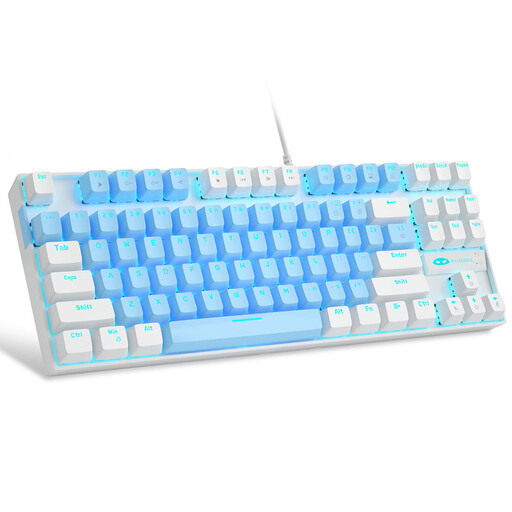
Why it's a good fit: Offers an authentic mechanical typing experience with tactile Blue switches at an accessible price point. It's ideal for discovering the benefits over membrane keyboards without a large investment. The compact 75% format also saves desk space.
This is a true mechanical keyboard, not a "mechanical-feel" imitation. It delivers clear tactile and audible feedback that is missing from many budget gaming keyboards.
Clear tactile feedback from Blue switches; compact TKL keyboard design (87 keys); wired for a stable connection. Note: This model has a US (QWERTY) layout.
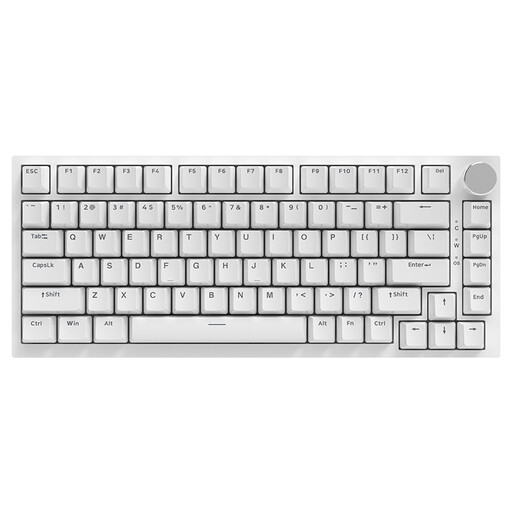
Why it's a good fit: Perfect for users who want to customise their typing experience. The hot-swappable feature and gasket-mount structure allow for sound and feel modifications, which are highly valued in the enthusiast community.
Instead of focusing on superficial gimmicks, this model concentrates on enthusiast-grade features like multi-layer dampening (Poron foam) and hot-swap capability, enabling a deeper, more customisable experience.
Hot-swappable for 3/5-pin switches; gasket-mount structure for a cushioned typing feel; convenient CNC volume knob. Note: This model has a US (QWERTY) layout.
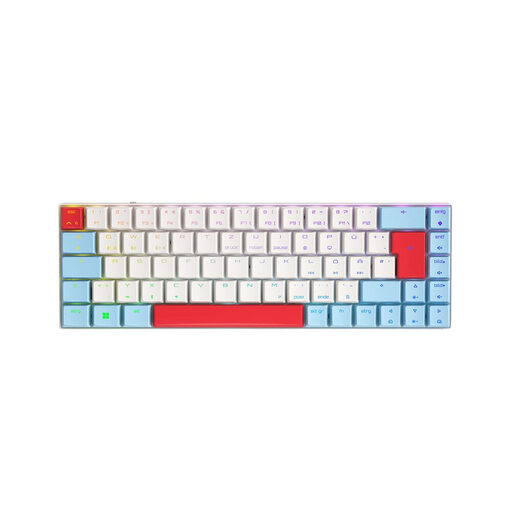
Why it's a good fit: Combines gaming performance with office flexibility. Its tri-mode connectivity (wireless keyboard via 2.4GHz/Bluetooth) and German QWERTZ gaming keyboard layout make it an all-rounder for various devices and use cases.
It solves the layout problem with an explicit German QWERTZ design. The high-quality CHERRY MX Low Profile Speed switches provide a precise and fast response without compromising on versatility.
German QWERTZ layout; flexible tri-mode connectivity; slim low-profile keyboard design; fast CHERRY MX Speed switches.
We have compiled a complete, real-time updated list of products that fully meet these strict selection criteria.
The main difference lies in the technology beneath the keys. A mechanical keyboard uses an individual, spring-loaded switch for each key. This provides precise, tactile feedback and high durability. A membrane keyboard, on the other hand, uses a continuous rubber dome sheet with contact points under the keys. The typing feel is often softer and less precise, and the lifespan is generally shorter.
The lifespan of a mechanical keyboard is often rated by the number of keystrokes per switch. Many manufacturers, such as CHERRY, rate their switches for over 50 or even 100 million keystrokes. With normal use, a well-maintained mechanical keyboard can last for many years, often significantly longer than a membrane keyboard.
Yes, a hot-swappable keyboard can be a great choice for beginners. It offers the flexibility to change the typing feel later on without having to buy a completely new keyboard. If you're unsure whether you prefer linear, tactile, or clicky switches, a hot-swap model allows you to try out different types affordably. The replacement process is usually straightforward and only requires a special tool, which is often included.