
Lieferung heute & morgen

Qualitätsgarantie

Willkommens-Angebote freischalten: KOSTENLOSE Lieferung | Bis zu 80 % RABATT | Kostenlose 30-Tage-JoyPlus-Testphase
App herunterladen
As a Joybuy Product Recommendation Officer, I see every day just how overwhelming the market for PC accessories can be. Many people, especially when searching for a new mechanical gaming keyboard, hit a wall of technical jargon and marketing promises. Layouts, switch types, materials—the options are vast, and making the right choice isn't always easy.
This article is designed to serve as your guide. We'll explain the most important features to look for and present a selection of models that cater to different needs. Our goal is to provide you with an objective basis for your purchasing decision.
To find the right keyboard, it helps to understand a few fundamental characteristics. The following points are crucial for function, ergonomics, and durability.
The size of the keyboard, also known as its layout or form factor, significantly impacts ergonomics and the amount of space on your desk.
A feature that has gained prominence in recent years is hot-swap capability. A hot-swappable PCB allows you to change the mechanical switches without soldering. This offers two key advantages:
The choice of materials and connection type has a direct impact on the tactile feel and daily use.
Based on the criteria above, we have selected three models for you, each with a different focus.
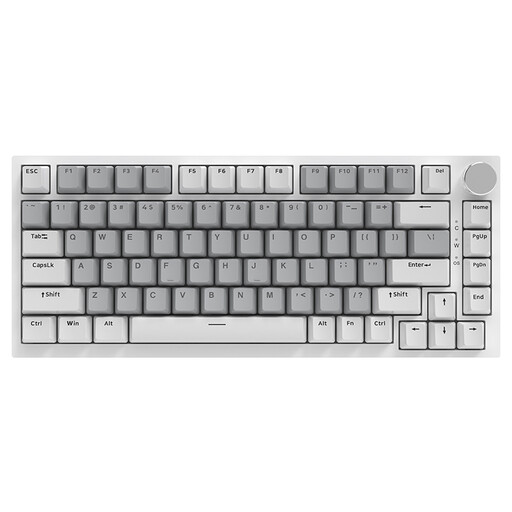
Why It Stands Out: The AJAZZ AK820 combines a popular 75% layout with features often found only in more expensive models. Its gasket-mount structure, where the PCB is cushioned between gaskets, provides a dampened and soft typing experience. The practical CNC-milled metal volume knob allows for quick audio adjustments without interrupting your game or workflow.
Advantages:
Who Is It For? Gamers and heavy typists looking for a compact, customisable, and feature-rich keyboard with a premium typing feel, without breaking the bank.
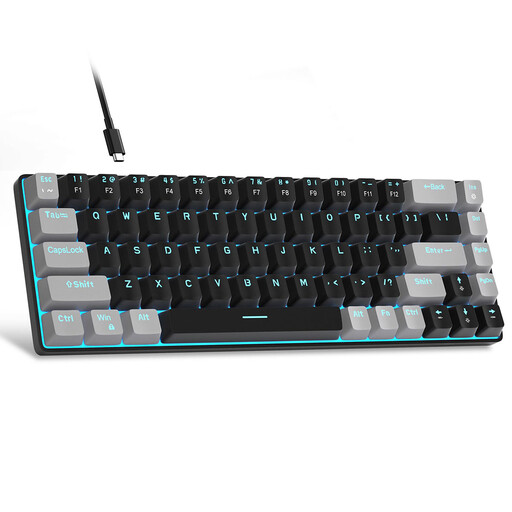
Why It Stands Out: The MageGee MK-Box is an ultra-compact 60% keyboard that is stripped down to the essentials. With only 68 keys, it maximises available desk space while retaining dedicated arrow keys, which is not always the case with 60% layouts. Its strength lies in its simplicity: just plug and play.
Advantages:
Who Is It For? Users with very limited desk space, purists, or gamers looking for a straightforward, portable, and budget-friendly mechanical keyboard as a starter or secondary device.

Why It Stands Out: The AJAZZ AK980 V2 is a powerhouse for power users. Its 98% layout retains the number pad in a compressed form, saving space compared to a full-size keyboard. Its standout features are its tri-mode connectivity (wired, Bluetooth, 2.4G wireless) and the integrated TFT display. This screen can show system information, battery status, or even custom GIFs, and is controlled via the multi-function volume knob.
Advantages:
Who Is It For? Discerning gamers, programmers, and creative professionals who need a keyboard with maximum functionality, flexible connection options, and advanced customisation for a professional setup.
The models featured here cover a broad spectrum, but the market offers many more variations. If you're looking for different layouts, switch types, or designs, you can find a larger selection in our main category.
? Explore our full range of mechanical gaming keyboards here
1. What does hot-swap mean on a mechanical keyboard?Hot-swap means that the keyboard's mechanical switches are not soldered to the PCB. They can be easily pulled out with a special tool and replaced with other compatible switches (usually 3-pin or 5-pin). This allows for easy customisation of the typing feel and straightforward repairs in case of a defect.
2. Are PBT keycaps better than ABS? PBT and ABS are the two most common plastics for keycaps. PBT keycaps are generally considered more durable. They have a slightly rough texture and are less prone to becoming shiny over time from finger oils. ABS keycaps are often smoother and can develop a shiny surface with heavy use, but they are typically cheaper to manufacture. The choice is also a matter of personal preference regarding the tactile feel.
3. Do I need a wired or wireless keyboard for gaming? A wired keyboard guarantees the lowest possible input lag (latency) and an uninterrupted power supply, making it the traditional choice for competitive gaming. However, modern wireless keyboards using 2.4 GHz technology now offer latency that is indistinguishable from a wired connection for the vast majority of gamers. They provide the benefit of a clutter-free desk and more flexibility. Bluetooth is better suited for productivity and connecting to mobile devices.