
Lieferung heute & morgen

Qualitätsgarantie

Willkommens-Angebote freischalten: KOSTENLOSE Lieferung | Bis zu 80 % RABATT | Kostenlose 30-Tage-JoyPlus-Testphase
App herunterladen
The search for a new mechanical gaming keyboard can quickly become overwhelming. The market is flooded with a vast array of models, all touting technical jargon and marketing promises. But not every keyboard advertised as a "gaming keyboard" will actually enhance your gaming experience. Often, ill-considered purchases lead to frustration—whether it's due to the wrong key layout, unpleasant typing sounds, or features that cost more than they're worth.
As your Joybuy Product Recommendation Officer, I'm here to help you navigate these pitfalls. We'll focus on the critical features that define a great mechanical keyboard and cut through the hype.
Common Pitfalls When Buying a Mechanical Keyboard:
To make an informed decision, you should understand three key aspects of a mechanical keyboard: the switch type, the form factor, and important additional features.
Mechanical switches determine the typing feel and acoustics. They can be divided into three main categories:
The size of your keyboard affects not only the space on your desk but also its ergonomics and functionality.
When making your selection, be sure to look for a German QWERTZ gaming keyboard layout to ensure compatibility and a familiar typing experience.
Here are some recommendations tailored to specific user needs that also avoid the pitfalls mentioned above.
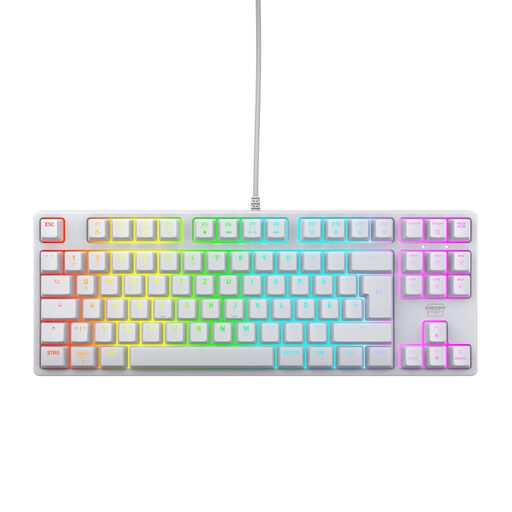
Why This Fits Their Persona: For ambitious gamers who value precision, durability, and a clean setup. The focus is on pure performance without unnecessary software.
It relies on proven CHERRY MX2A Red switches instead of undefined clones and offers a German QWERTZ layout to eliminate compatibility issues from the start.
Compact TKL format for maximum mouse freedom. High-quality, linear CHERRY MX2A Red switches with a lifespan of over 100 million actuations, according to the manufacturer.
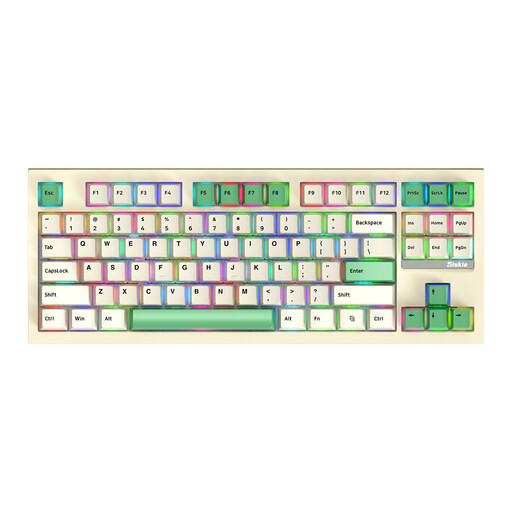
Why This Fits Their Persona: For tech enthusiasts and power users who want to customise their keyboard to their personal preferences and switch flexibly between devices. Note: This model uses a US QWERTY layout.
Thanks to the hot-swap feature, you're not locked into one type of switch. You can replace the switches without soldering, which ensures long-term adaptability and protects against a bad purchase.
Maximum flexibility with tri-mode connectivity (wired, Bluetooth, 2.4G) and hot-swap sockets. The TKL format is a great compromise between compactness and functionality.
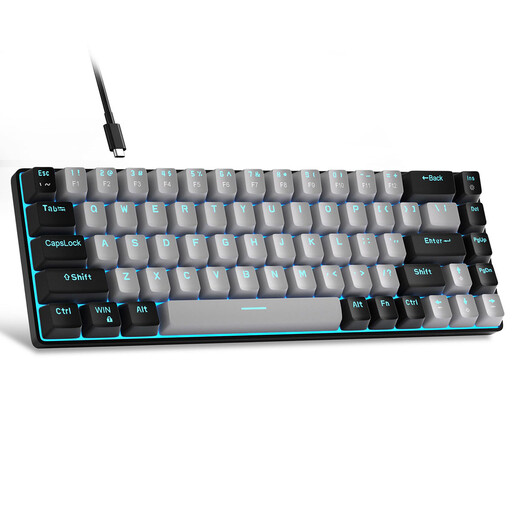
Why This Fits Their Persona: For beginners with a limited budget and desk space who are looking for a responsive mechanical experience. Important: This model has a US QWERTY layout, which may be acceptable for some programmers or users who can adapt.
It avoids high costs for premium features that aren't essential for getting started. It offers a genuine mechanical feel at an accessible price point.
The compact 60% layout saves a massive amount of desk space. The wired connection ensures a stable and lag-free input.
We have compiled a complete, up-to-date list of products that fully meet these strict selection criteria and German safety regulations.
1. What is the difference between QWERTZ and QWERTY layouts? The QWERTZ layout is the standard in Germany and Eastern Europe. The Z and Y keys are swapped compared to the American QWERTY layout. Additionally, the QWERTZ layout provides dedicated keys for umlauts (?, ?, ?) and other special characters like the ?. For users who primarily type in German, a QWERTZ layout is essential to avoid frustration and typos.
2. How long does a mechanical keyboard last? A mechanical keyboard is a long-lasting investment. Most mechanical switches are rated for 50 to 100 million keystrokes, as specified by the manufacturers. In comparison, the rubber domes of conventional keyboards often only last for 5 to 10 million keystrokes. With proper care, a mechanical keyboard can function reliably for many years.
3. Do I need software for an RGB keyboard? Not necessarily. Many RGB keyboards allow you to control lighting modes, colours, and speeds directly via key combinations (usually with the FN key). Software is often only necessary if you want to create complex, custom lighting profiles, program macros, or synchronise the lighting with other devices. For basic use, it is typically optional.