
Lieferung heute & morgen

Qualitätsgarantie

Willkommens-Angebote freischalten: KOSTENLOSE Lieferung | Bis zu 80 % RABATT | Kostenlose 30-Tage-JoyPlus-Testphase
App herunterladen
The search for the right mechanical gaming keyboard can quickly become overwhelming. The market is flooded with technical jargon, marketing promises, and an enormous selection of products. As a Joybuy Product Recommendation Officer, I see every day which factors truly matter and where buyers often fall into common traps. Before you make a decision, you should be aware of the most frequent pitfalls that can lead to a bad purchase.
An informed decision isn't based on marketing, but on understanding the core components.
To make the right choice, focus on three technical features that directly impact performance and user experience.
The switch beneath each key determines the typing feel and response speed. The most common types are:
A more recent development is magnetic switch keyboards. These use Hall Effect sensors to allow the actuation point of each key to be precisely adjusted via software (e.g., between 0.2 mm and 4.0 mm). Features like "Rapid Trigger" enable the key to reset instantly the moment it moves upward, which can provide an advantage in competitive games. For enthusiasts who love to experiment, a hot-swap keyboard is ideal. It allows you to change switches without any soldering.
The quality of the keycaps is crucial for longevity and the tactile experience.
The size of the keyboard should match your desk space and needs.
Always check the keyboard layout before purchasing. Many imported models use the American QWERTY layout, which may differ from your regional standard (e.g., QWERTZ or AZERTY). For added comfort during long sessions, a keyboard with a wrist rest is a worthwhile ergonomic addition.
Here are some models tailored to specific user needs that successfully avoid the pitfalls mentioned.
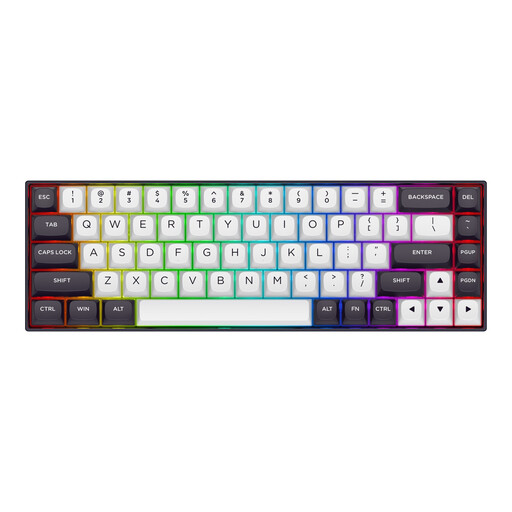
Why This Fits Their Persona: This model is engineered for maximum speed and responsiveness in games like Valorant or CS2. The magnetic switches with Rapid Trigger and the 8000 Hz polling rate are focused on performance, not visual gimmicks. The compact 65% format leaves ample room for mouse movements.
Instead of relying on vague marketing terms, this keyboard delivers measurable performance advantages through its magnetic switch technology and high polling rate. The aluminium top plate ensures stability.
Adjustable actuation point (0.2-4.0 mm) and Rapid Trigger for instant key resets. Sturdy case with an aluminium top plate. Note: Uses US layout (QWERTY).
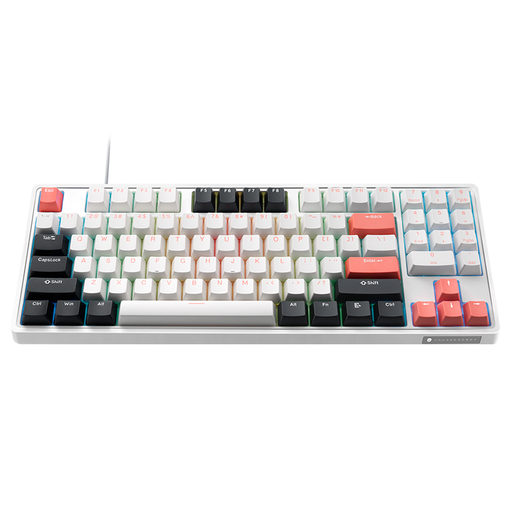
Why This Fits Their Persona: For users who want to customise their keyboard down to the last detail, hot-swap capability is essential. This TKL model allows for swapping both 3-pin and 5-pin switches to try out different typing feels without having to buy a new keyboard.
Instead of a closed ecosystem, this keyboard offers an open platform for modifications. The durable PBT keycaps are a solid foundation out of the box and don't require an immediate upgrade.
Hot-swap sockets for easy switch modifications. Durable double-shot PBT keycaps. Compact TKL format. Note: Uses US layout (QWERTY).
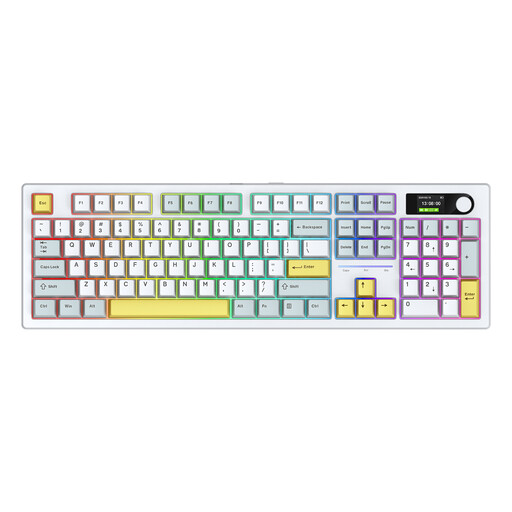
Why This Fits Their Persona: Ideal for users who need one keyboard for gaming, home office, and daily use. The tri-mode connectivity (Bluetooth, 2.4G, USB-C) offers maximum flexibility, while the full-size layout with a number pad boosts productivity at work.
This keyboard provides genuine, practical flexibility instead of superficial features. The large 8000 mAh battery capacity (according to the manufacturer) ensures long usage in wireless mode, making it a reliable work tool.
Tri-mode wireless mechanical keyboard. Full-size layout with number pad. Hot-swappable for further customisation. Note: Uses US layout (QWERTY).
Once you've chosen your keyboard, complete your setup with the right components. From custom keycaps to ergonomic wrist rests, find everything you need to personalise your experience.
1. What is the difference between red, brown, and blue mechanical switches? Red switches are linear and quiet, ideal for fast-paced gaming. Brown switches offer tactile but quiet feedback and are great all-rounders. Blue switches are tactile and produce a loud click, which gives heavy typists clear confirmation.
2. Are wireless mechanical keyboards fast enough for competitive gaming? Modern wireless keyboards that use a 2.4 GHz connection with a dedicated USB receiver offer latency that is virtually indistinguishable from a wired connection. They are perfectly suitable for most gaming scenarios, including competitive play. Bluetooth connections can have higher latency and are better recommended for typing or casual gaming.
3. Why are PBT keycaps a worthwhile investment? PBT is a denser and more durable plastic than standard ABS. PBT keycaps resist the oils from your fingers, allowing them to retain their matte, textured finish for years. This prevents the "shiny" or "greasy" look that often appears on ABS caps after just a few months, ensuring a consistently premium feel and appearance.