
Lieferung heute & morgen

Qualitätsgarantie

Willkommens-Angebote freischalten: KOSTENLOSE Lieferung | Bis zu 80 % RABATT | Kostenlose 30-Tage-JoyPlus-Testphase
App herunterladen
By Joybuy Product Recommendation Officer, August 29, 2026
The search for a new mechanical gaming keyboard can quickly become overwhelming. The market is flooded with technical jargon, marketing promises, and an enormous selection of models. Many users invest in a device only to realize after a few weeks that it's unsuitable for their needs. The most common problems arise from three avoidable pitfalls:
This guide will help you navigate these pitfalls and make an informed decision based on objective criteria.
To find the right mechanical keyboard, you should focus on three core aspects. These are the primary determinants of your device's functionality, comfort, and longevity.
The mechanical switch under each key defines the typing feel and sound profile. The three main types are:
Manufacturers like CHERRY MX have long been the gold standard, but many other brands now offer alternatives of comparable quality or with specialized features.
The keyboard layout is a non-negotiable criterion for users in English-speaking regions. Always check for the correct regional specification, such as "US QWERTY" or "UK QWERTY." Furthermore, the form factor is crucial for ergonomics and desk space:
Modern mechanical keyboards increasingly offer options for personalisation. A hot-swap keyboard is a key feature in this regard. It allows you to change the mechanical switches without any soldering. This means you can adjust the typing feel later, test different switches, or easily replace a faulty one—an important step into the custom keyboard scene.
For connectivity, you can choose between a classic wired connection for minimal latency and a wireless mechanical keyboard. Many models offer "tri-mode" connectivity (Wired, 2.4GHz Wireless, and Bluetooth) for maximum flexibility. Additional features like customisable RGB gaming keyboard lighting or an integrated keyboard with a volume knob can further enhance user comfort.
Based on the criteria above, we have identified several models that are well-suited for specific user profiles.

Why This Fits Their Persona: The ultra-compact 65% layout creates maximum space for the mouse. The fast, linear CHERRY MX2A RED switches and Super-Scan technology (0.5 ms) are designed for instant input registration for competitive play.
Uses a correct regional QWERTY layout and relies on gaming-optimized linear switches instead of loud "clicky" variants that could disrupt concentration.
Extremely low latency thanks to its wired connection and Super-Scan technology. The hot-swap capability also allows for switch replacement for future customisation.
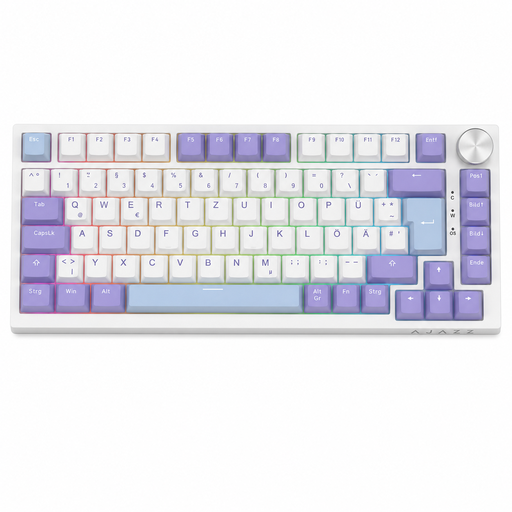
Why This Fits Their Persona: The 75% layout offers an ideal compromise between compactness and functionality, retaining the arrow and function keys. The practical volume knob and balanced switches are equally suited for work and play.
Delivers a full regional QWERTY layout in a space-saving format, avoiding the purchase of a keyboard that is too large or lacks key functions. The Sea-Salt switches are linear and pleasantly quiet.
The gasket-mount structure and a five-layer sound-dampening system provide a soft, muted typing experience. The hot-swap feature allows for easy switch customisation.
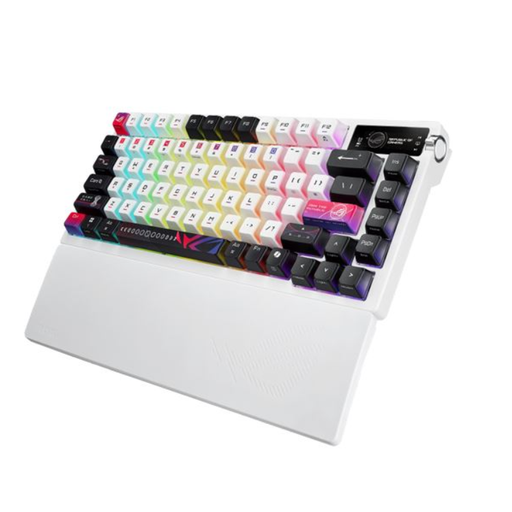
Why This Fits Their Persona: Offers a wealth of premium features that enthusiasts appreciate: a gasket-mount design, multi-layer dampening, hot-swappable ROG NX V2 switches, and an OLED display for maximum personalisation and a superior typing feel.
Focuses on fundamental build quality and modifiability (hot-swap, dampening) rather than superficial marketing gimmicks. The robust metal top case ensures durability.
The tri-mode connectivity offers maximum flexibility. The integrated OLED display with a three-way control knob allows for intuitive control of system settings and media directly on the keyboard.
We've compiled a complete, up-to-date list of products that fully meet these strict selection criteria and local regulations.
"Hot-swap" means that the keyboard's mechanical switches can be replaced without soldering. Using a special tool, often included with the keyboard, you can simply pull the switches out of their sockets and insert new ones. This allows you to personalize your keyboard's typing feel, test different switch types, or easily replace a faulty switch.
This decision depends on personal preference. Linear switches (e.g., Reds) are often preferred for fast-paced games (FPS, MOBAs) because they provide a smooth, quick keystroke without a noticeable bump. Tactile switches (e.g., Browns) offer tangible feedback at the actuation point, which some gamers appreciate in rhythm or precision-based games. There is no objectively "better" choice; it comes down to which feel you prefer.
For regular cleaning, disconnect the keyboard from your computer. Use a keycap puller to remove the keycaps. Dust and crumbs between the switches can be removed with compressed air or a soft brush. The keycaps themselves can be cleaned in lukewarm soapy water (ensure they are completely dry before reattaching them). Wipe the keyboard case with a slightly damp microfiber cloth. Avoid harsh cleaning agents and prevent any liquid from getting into the electronics.