
Lieferung heute & morgen

Qualitätsgarantie

Willkommens-Angebote freischalten: KOSTENLOSE Lieferung | Bis zu 80 % RABATT | Kostenlose 30-Tage-JoyPlus-Testphase
App herunterladen
A mechanical gaming keyboard should deliver fast inputs, feel comfortable to type on, and suit your existing desk setup. In practice, however, unclear product descriptions, unsuitable layouts and overhyped lighting often lead to the wrong purchase. This is especially true when shopping on the international market, so it pays to look closely at the technical specifications rather than just marketing jargon.
Some models use membrane or scissor-switch technology and merely describe a mechanical typing feel. That may be fine for office work, but it doesn’t match the characteristics of a mechanical keyboard with replaceable switches. If you value a defined actuation point, different switch characteristics or hot-swap capability, you should explicitly look for mechanical switches in the technical details.
A 60% keyboard saves space, but usually omits separate function keys, arrow keys and navigation keys. These functions are often only accessible via the Fn key. A 75% keyboard or a compact 82-key keyboard, on the other hand, typically offers a row of function keys and arrow keys. A TKL keyboard generally only drops the number pad, making it more familiar for many users.
Specs like 8,000 Hz or an actuation accuracy of 0.01 mm sound impressive. What really matters, though, is the interplay between switch technology, firmware, USB connection, game and system. With a magnetic Hall-effect keyboard, adjustable actuation and Rapid Trigger can be interesting for certain FPS scenarios. For typing or casual gaming, however, these features aren’t essential.
For users in Germany, a QWERTZ keyboard is often the simpler choice. Special characters, the Y and Z keys, and the position of umlauts match the familiar layout. A US layout can be suitable for certain games, programming environments or users with an international keyboard standard, but it requires adjustment when typing in German.
Check before you buy:
Linear switches move without a noticeable bump. They are often chosen for fast gaming inputs. Tactile switches provide a noticeable resistance during the key travel. Clicky switches also produce a distinct sound and aren’t always suitable for shared spaces.
With a hot-swap keyboard, compatible switches can be replaced without soldering. You need to check whether the circuit board supports 3-pin or 5-pin switches. Hot-swap is especially relevant for keyboard enthusiasts who want to change the typing feel and sound later on.
A wired keyboard doesn’t need a battery and offers a direct USB connection. This is practical for stationary gaming PCs and competitive gaming. A wireless keyboard, on the other hand, creates more desk space and can connect via Bluetooth, 2.4 GHz or both, depending on the model. For multiple devices, multi-device support is useful.
An RGB keyboard is primarily a lighting feature. Pay attention to whether only preset effects are available, or whether individual keys, brightness and speed can be adjusted. A keyboard with a volume control offers a real everyday advantage, because media volume and mute are accessible without a key combination.

Why this product fits the profile: The compact 60% form factor takes up little space and leaves more room for mouse movement. Important: according to the product details, this is a membrane keyboard with a mechanical typing feel, not a classic mechanical keyboard.
The clear labelling of the membrane technology prevents a mechanical typing feel from being mistaken for genuine mechanical switches.
61 keys, wired connection, RGB lighting and support for PC, Mac, PS4 and Xbox One according to the product description.

Why this product fits the profile: The German 82-key layout combines compact dimensions with function keys, arrow keys and navigation keys for both gaming and office work.
The QWERTZ layout reduces the need to adjust when typing in German. Hot-swap for compatible 3-pin switches allows later customisation without soldering.
Wired USB-C connection, RGB lighting, volume control, gasket mount construction and full hot-swap design according to the product details.
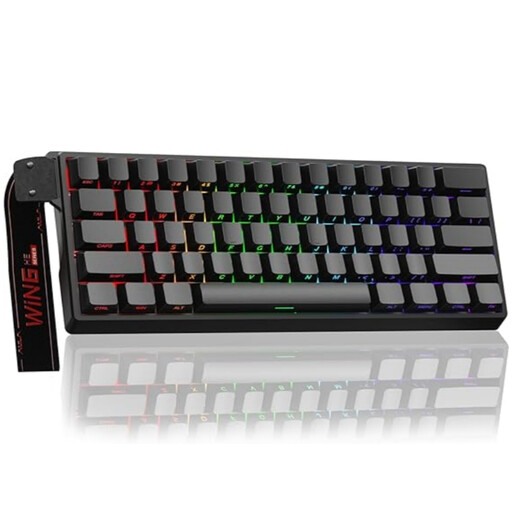
Why this product fits the profile: For FPS players looking for a compact form factor and adjustable actuation, this model combines magnetic switches with Rapid Trigger support.
The relevant gaming features are clearly named: magnetic hot-swap switches, adjustable actuation and Rapid Trigger, rather than vague speed claims.
60% format, RGB lighting, magnetic switches and a stated polling rate of 8,000 Hz according to the product data.
We’ve put together a full, regularly updated list of products that fully meet these strict selection criteria and the safety regulations in force in the EU.
That depends on the space you have available and the keys you need. A 60% keyboard is suitable for users who need plenty of mouse movement and use short key combinations. A 75% keyboard is a balanced compromise between space saving and function keys. If you work with numbers frequently, you should choose a model with a number pad.
The lifespan depends on the switch type, usage, dust, liquids and build quality. Manufacturer figures for key lifespan are guidelines, not a guarantee for every individual component. A hot-swap keyboard can be more easily maintained or customised with compatible switches. Liquids should generally be avoided unless an explicitly confirmed protection rating is stated.
A wired keyboard doesn’t need battery charging and works directly via USB. That’s practical for a fixed PC workstation. Wireless models offer more freedom of movement and can be useful for multi-device use. Before buying, you should check the connection type, battery life, power-saving mode and any potential switching delays.