
Lieferung heute & morgen

Qualitätsgarantie

Willkommens-Angebote freischalten: KOSTENLOSE Lieferung | Bis zu 80 % RABATT | Kostenlose 30-Tage-JoyPlus-Testphase
App herunterladen
A mechanical gaming keyboard can offer plenty of benefits for gaming, writing and work. But with so much choice, it’s easy to end up with the wrong one. Buyers often focus on RGB lighting or a long list of extra features. More important are the switches, layout, connection and compatibility with your setup.
An RGB keyboard mainly changes the look of your setup. It can make it easier to see the keys in low light, and some models let you customise the lighting. But lighting alone has no direct effect on response time, switch feel or wireless stability.
So check whether a keyboard with RGB lighting offers per-key or zone lighting. With per-key lighting, you can usually customise individual keys or groups of keys more precisely.
A wireless mechanical keyboard can connect via Bluetooth, 2.4 GHz or both. Bluetooth is often a good choice for laptops, tablets and mobile phones. A 2.4 GHz keyboard with a USB receiver, on the other hand, is worth considering for many gaming setups, as it creates a direct wireless connection to your PC.
Also check the charging port, whether a receiver is included and whether you can keep using the keyboard via USB-C when the battery runs out. A tri-mode keyboard typically combines a wired connection, Bluetooth and 2.4 GHz.
A QWERTY keyboard uses an English key layout, while a QWERTZ keyboard is more common in German-speaking countries. With QWERTY, the Y and Z keys and some special characters are in different positions. This is often less noticeable when gaming, but can make a real difference when typing in German.
Compact formats also need careful consideration. A compact 96% keyboard often retains the number pad and function keys, while a 65% keyboard gives up more keys to make room for a smaller case. Before buying, check whether it has arrow keys, Home, End and Print Screen.
Mechanical switches vary in actuation force, travel distance and sound. Linear switches move without a noticeable bump, tactile switches provide feedback when activated, and clicky switches also produce a distinct clicking sound.
Noise levels are especially important if you share an office or work from home. Terms such as “silent” aren’t standardised across manufacturers. Keycaps, the case and any sound dampening can also affect how noisy a keyboard is.
A hot-swap keyboard lets you replace compatible switches without soldering. Check whether the PCB supports 3-pin or 5-pin switches, and whether replacement switches are sold separately. Hot-swap doesn’t mean that every switch will automatically fit.
A stable connection is essential for gaming on a PC. For Bluetooth, check which profiles are supported and how many devices the keyboard can remember. With 2.4 GHz, practical points to consider include the USB receiver, range and possible interference.
A large battery alone doesn’t guarantee a particular battery life. RGB brightness, lighting mode and wireless standard all affect power consumption. Models that can be used while charging reduce the risk of interruptions.
A gaming keyboard with a volume knob can come in handy during a game or video call. Check whether the knob only controls volume or can also be used to adjust lighting and profiles.
A low-profile keyboard has flatter keys and often a shorter actuation distance. This can feel more like typing on a laptop, but it won’t suit every hand position. A wrist rest, adjustable feet and the keyboard’s weight can all affect comfort and stability.
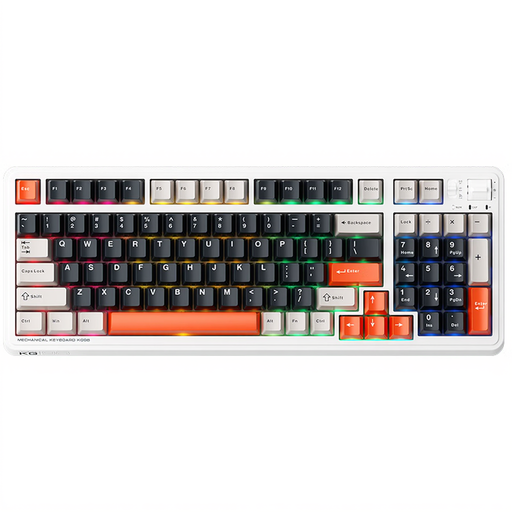
Why it suits this user: The 96% layout with 98 keys combines a compact form factor with function keys, a number pad and navigation keys. Bluetooth, 2.4 GHz and USB-C let you connect to different devices.
The connection options are clearly listed, and the 96% design saves space without losing the number pad entirely.
Hot-swap support, RGB sidelighting and pre-lubricated linear switches, according to the product details.

Why it suits this user: This model combines a 98% layout with hot-swap switches, a volume knob, a TFT display and three connection options.
There’s more to the specification than lighting: switch compatibility, USB-C, Bluetooth and 2.4 GHz are all clearly listed.
10000-mAh battery according to the product details, PBT keycaps, RGB lighting and 3-/5-pin hot-swap support.

Why it suits this user: The German QWERTZ layout, 65% design and low-profile MX Speed switches are aimed at users short on space who want a slim keyboard.
The compact design is described with clear details: 69 keys, a QWERTZ layout and three connection options.
2.4 GHz wireless, Bluetooth, USB-C, per-key RGB, anti-ghosting and N-key rollover, according to the product details.

Why it suits this user: This full-size, low-profile keyboard combines 104 keys and RGB lighting with tri-mode connectivity for use with PC and Mac.
The low-profile design is backed up by 2.4 GHz LIGHTSPEED, Bluetooth and USB-C, so it’s about more than just looks.
Three connection options, programmable G-keys and RGB lighting, according to the manufacturer.
We’ve put together a complete, regularly updated list of products that meet these strict selection criteria and fully comply with the safety regulations in force in the EU.
A QWERTZ keyboard is usually easier for typing in German, as its layout and key legends are designed for German users. You can often type German special characters on a QWERTY keyboard using key combinations, but their positions will differ.
It depends on the wireless standard. For many PC setups, a 2.4 GHz connection with a compatible USB receiver is more practical than Bluetooth. For maximum reliability, it may also be worth using a USB-C cable. Check the battery level, charging options and receiver position too.
Its lifespan depends on the switches, keycaps, PCB, how often you use it and how well you look after it. Manufacturers often give a keystroke rating for individual switches, but this doesn’t guarantee how long the entire keyboard will last. Dust, spills and replacing switches incorrectly can shorten its lifespan. Clean the keyboard appropriately, and disconnect it from the power supply before working on hot-swap switches.