
Lieferung heute & morgen

Qualitätsgarantie

Willkommens-Angebote freischalten: KOSTENLOSE Lieferung | Bis zu 80 % RABATT | Kostenlose 30-Tage-JoyPlus-Testphase
App herunterladen
The search for the right mechanical gaming keyboard can quickly become overwhelming. The market is flooded with marketing buzzwords, countless switch variations, and a dizzying array of designs. Many users invest in a model that fails to meet their expectations after just a few months or was simply the wrong choice for their needs from the start. As your Joybuy Product Recommendation Officer, I'll help you identify the crucial features and steer clear of common purchasing pitfalls.
Before we dive into the technical details, it's important to understand the most common mistakes that often lead to disappointment.
To avoid buyer's remorse, focus on three core aspects that determine the quality and suitability of a mechanical keyboard.
The switches are the mechanical components under each key, and they are the primary determinant of typing feel, noise level, and response speed. The three main types are:
For enthusiasts, there are also hot-swap keyboards. On these models, the switches can be replaced without soldering, allowing for maximum customisation of the typing feel.
The size of the keyboard, also known as the form factor, has a direct impact on ergonomics and the available space on your desk.
A wired keyboard generally offers the lowest latency and a stable connection, making it the preferred choice for esports professionals. Look for solid construction, ideally with a metal plate inside, which provides stability and a premium feel. Features like N-Key Rollover (NKRO) and Anti-Ghosting are standard on gaming keyboards today and ensure that all keystrokes are registered correctly, even during fast and complex inputs.
Here are some recommendations tailored to specific user profiles that take the above criteria into account.

Why This Fits Their Persona: This model combines high-end gaming performance with a practical TKL format. The linear CHERRY MX2A RED switches are excellent for fast-paced games but are also comfortable and not too loud for typing. The German QWERTZ layout and robust build make it a reliable companion for daily use.
It focuses on core features like high-quality switches and a stable metal plate construction, rather than on superfluous extras. It bypasses the layout trap with a correct German QWERTZ design.
High durability thanks to switches rated for over 100 million actuations; space-saving yet functional TKL design.

Why This Fits Their Persona: For users who refuse to compromise. This hot-swap keyboard allows switches to be changed to perfectly tailor the typing feel. The ultra-compact 65% layout maximises mouse space, which can be crucial in competitive gaming. Its super-scan technology ensures extremely fast signal processing.
It justifies its price with tangible technical advantages like hot-swap capability and an extremely low scan rate, rather than relying solely on marketing buzzwords.
Maximum flexibility through hot-swap sockets; extremely responsive input experience; per-key RGB lighting for individual customisation.
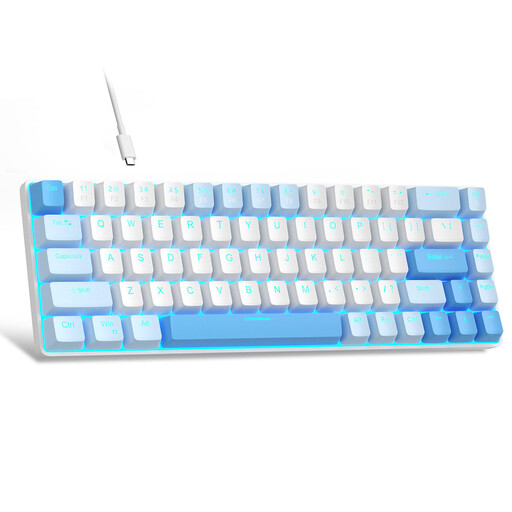
Why This Fits Their Persona: This model offers an affordable entry point into the world of mechanical keyboards. With linear red switches and a very compact 60% format, it delivers the core features gamers look for without breaking the bank. It's a great choice for trying out the mechanical feel.
It's transparent about what it offers: a solid-core mechanical experience without the price premium for brand-name switches or a metal chassis. The focus is clearly on function at an accessible price.
Very compact design and a full mechanical typing feel at a fraction of the cost of premium models. Important note: This is a US QWERTY layout.
We've compiled a complete, up-to-date list of products that fully meet these strict selection criteria and rigorous quality standards.
The lifespan heavily depends on the quality of the switches and the overall build quality. Many brand-name switches, like those from CHERRY MX, are specified for 50 to over 100 million keystrokes per key. With normal use, a well-built mechanical keyboard can last for many years, often significantly longer than traditional rubber dome keyboards.
Linear red switches are very popular in gaming due to their fast and resistance-free actuation. They allow for quick double-taps and fluid control. However, the choice of switch is ultimately a matter of personal preference. Some players prefer the tactile feedback of brown switches to clearly feel the activation of an ability. There is no universally "best" choice here.
No. An RGB keyboard is available in many price ranges today. However, more important than the lighting itself are the quality of the switches and the stability of the construction. A solid keyboard with simple or single-colour lighting is often a better investment than a cheap model that uses a lavish RGB show to distract from a subpar foundation. Always check the core specifications first.