
Lieferung heute & morgen

Qualitätsgarantie

Willkommens-Angebote freischalten: KOSTENLOSE Lieferung | Bis zu 80 % RABATT | Kostenlose 30-Tage-JoyPlus-Testphase
App herunterladen
A mechanical gaming keyboard can deliver precise inputs whether you're gaming, programming or typing. However, models differ significantly in layout, form factor, connectivity and switch technology. If you only focus on RGB lighting or a high key count, you can easily overlook important details.
Many compact models are sold as QWERTY US keyboards. The key arrangement differs from a German QWERTZ keyboard: the Z and Y keys are in different positions, and umlauts and special characters may be missing.
For gaming, a US layout can work depending on the game and your personal habits. However, for German office work, programming or heavy typing, it may take some getting used to. So check the stated language and physical layout carefully before you buy.
A wireless mechanical keyboard can support Bluetooth, 2.4 GHz or both standards. Bluetooth is often suitable for laptops, tablets and multiple devices. A 2.4 GHz keyboard usually uses a USB receiver and is practical for desktop PCs and gaming setups.
What matters isn't just the connection types, but also the switching options, charging port and what's included in the box. A Bluetooth-only model may not come with a USB receiver. A wired USB-C connection can serve as a backup when the battery runs flat.
A gaming keyboard with RGB or an RGB keyboard offers visible lighting effects. However, that tells you little about the switches, key registration or ergonomics. You should also look for anti-ghosting, N-key rollover, replaceable keycaps and a sturdy base construction.
The size description tells you which key areas are included:
For FPS players, a smaller format can free up more space for your mouse. If you regularly enter numbers or use keyboard shortcuts, you'll benefit more from a full-size keyboard or a 96% keyboard.
Mechanical switches determine the feel, feedback and noise:
Manufacturer names like "Red", "Blue" or "Brown" aren't fully standardised. So check the specific description of the model. For office and shared work, a quieter version can make sense, while clicky switches are clearly audible when typing.
A hot-swap keyboard lets you change compatible switches without soldering. Specifications like 3-pin or 5-pin show which switch types fit mechanically. Still, you should check before buying whether the replacement switches you want are actually compatible.
PBT keycaps are considered a more durable option compared to many ABS versions. The mounting, profile and labelling are also important. Anti-ghosting or N-key rollover describes the ability to register multiple key presses correctly at the same time. The exact implementation can vary depending on the model and connection type.
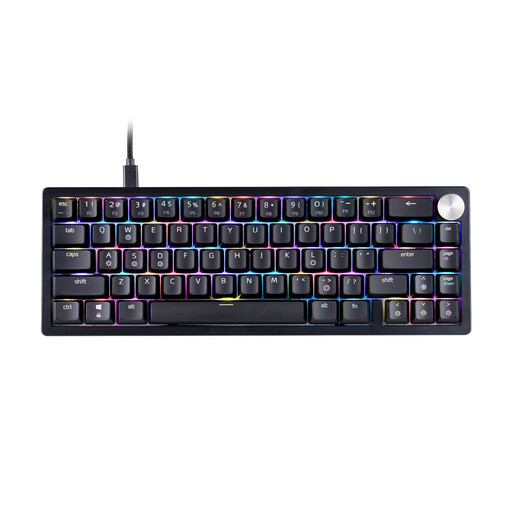
Why this product fits the profile: The compact 65% form factor saves space, while the wired USB-C connection requires no battery maintenance. XPG Red switches and a US QWERTY layout are clearly stated.
The product data clearly states the form factor, connection, switch type and layout. This means your choice isn't limited to just the RGB lighting.
65% form factor, detachable USB-C cable, three-level height adjustment and RGB LED lighting.

Why this product fits the profile: This model combines a 75% layout, hot-swap functionality and three connection types. It suits users who want to switch between PC, laptop and other devices.
Bluetooth, 2.4 GHz and USB-C are listed separately. Compatible 3-pin and 5-pin switches plus programmable controls are also mentioned.
Three connection modes, hot-swap base, 4000 mAh battery and multi-function knob.

Why this product fits the profile: The German QWERTZ layout, low-profile tactile Quiet switches and switching between up to three devices appeal to heavy typists, programmers and office users.
The layout is explicitly stated as German QWERTZ. Bluetooth and Logi Bolt are listed separately, so you can plan the connection to your workstation.
QWERTZ layout, aluminium top case, USB-C charging and automatic white backlighting.

Why this product fits the profile: This mechanical keyboard combines a German 104-key QWERTZ layout with tri-mode connectivity, a number pad and hot-swap functionality.
The product description specifically states the layout, key count and connection options. This makes it easier to assess the model for German workflows.
104-key QWERTZ layout, number pad, TFT colour display, RGB lighting and replaceable switches.
We've put together a complete, regularly updated list of products that fully meet these strict selection criteria and the safety regulations in force in the EU.
For German text and many office applications, a QWERTZ keyboard with German labelling is usually more straightforward. A US QWERTY model can make sense if you're used to that layout or prefer certain international keyboard shortcuts. Check the actual key arrangement before ordering, not just the product name.
The lifespan depends on the switches, keycaps, usage and care. Manufacturers sometimes state specific keystroke figures; these are model and component values and not a guarantee of a particular service life. A hot-swap keyboard can make maintenance easier because compatible switches can be replaced without soldering when needed.
That depends on the connection standard and your specific use. For a desktop gaming PC, a 2.4 GHz connection with a USB receiver often provides a practical wireless solution. Bluetooth is particularly useful for multiple devices and mobile workstations. If you want to avoid charging breaks, look for a wired mode and a USB-C port.