
Lieferung heute & morgen

Qualitätsgarantie

Willkommens-Angebote freischalten: KOSTENLOSE Lieferung | Bis zu 80 % RABATT | Kostenlose 30-Tage-JoyPlus-Testphase
App herunterladen
The search for a new mechanical gaming keyboard can quickly become overwhelming. The market is flooded with countless models advertised with aggressive marketing terms and long feature lists. But not every piece of hardware marketed as a "gaming keyboard" delivers on its promises. As a Joybuy Product Recommendation Officer, I'm here to help you cut through the noise and identify the features that truly matter. In this guide, we'll focus on the facts so you can make an informed decision and avoid costly mistakes.
Many users invest in a keyboard that loses performance or proves impractical after just a few months. This is often due to three common pitfalls:
To avoid falling into these traps, you should focus on three core aspects that determine the quality and longevity of a mechanical keyboard.
The mechanical switches are the heart of any keyboard, defining the typing feel and response time. They are mainly divided into three categories:
Pay attention to the switch lifespan (often rated in millions of keystrokes) and features like factory lubrication ("pre-lubed"), which provides a smoother and quieter typing feel.
The size and arrangement of the keys determine how well the keyboard fits into your workspace and how efficiently you can work.
For users in English-speaking regions, a QWERTY mechanical keyboard is essential to avoid compatibility issues and frustration. Also, check the connectivity options: while a wired connection offers the lowest latency, a wireless gaming keyboard with tri-mode functionality (Bluetooth, 2.4 GHz wireless, USB-C cable) provides maximum flexibility across multiple devices.
Modern mechanical keyboards offer more than just keys. Features like a Hot-Swap PCB that supports both 3-pin and 5-pin switches give you the freedom to change the typing feel later on. A keyboard with a rotary knob is also a practical feature that allows for quick and intuitive control of volume or other system functions without leaving your game or application.
Here are some models tailored to specific user profiles that meet the quality criteria mentioned above.
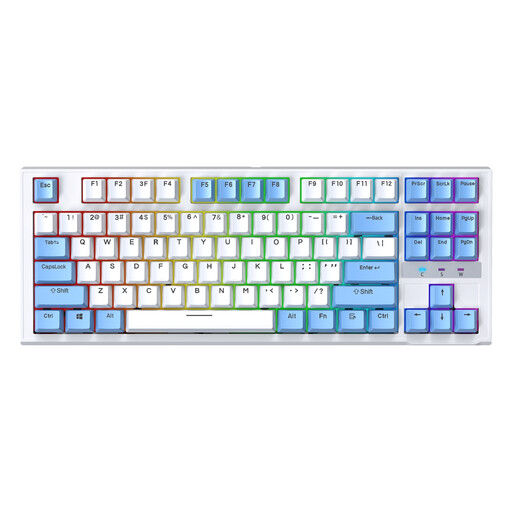
Why This Fits Their Persona: This model is ideal for beginners looking for a true mechanical feel and essential gaming features without the high cost. The compact TKL layout saves desk space, and the wired connection ensures reliable, latency-free performance.
Its hot-swap capability allows you to upgrade the switches later, so you're not locked into the factory-installed ones. As a wired model, it also bypasses the battery issues common in cheap wireless keyboards.
Hot-swap sockets for easy customisation and repairs. The space-saving TKL layout is optimal for gaming setups.

Why This Fits Their Persona: This model is designed for users who need a high-performance keyboard for both gaming and productivity. The 75% layout is compact but retains all essential keys. The rotary knob and the German QWERTZ layout make it an extremely practical tool for daily use in Germany.
Instead of focusing solely on aesthetics, the AK820 offers functional advantages like the rotary knob and a solid gasket-mount construction with sound dampening. This addresses the pitfall of the 'gaming' label lacking substance by providing tangible quality improvements.
Integrated German QWERTZ layout. The multi-function rotary knob simplifies media control. Hot-swap capability offers flexibility.

Why This Fits Their Persona: For enthusiasts who refuse to compromise. This model combines tri-mode connectivity, an informative TFT display, a rotary knob, and comprehensive hot-swap compatibility in a high-quality package. It's a fully-featured base for a custom keyboard.
With a 10,000 mAh battery, it directly addresses the problem of short battery life with RGB use. The hot-swap PCB is compatible with both 3-pin and 5-pin switches, completely avoiding the trap of limited customisability.
Tri-mode connectivity for maximum flexibility. The TFT display shows system information. The large battery capacity ensures long wireless usage.
We have compiled a complete, up-to-date list of products that fully meet these strict selection criteria and rigorous safety standards.
1. What is the difference between red, brown, and blue mechanical switches? Red switches are linear and quiet, ideal for fast-paced gaming. Brown switches are tactile, providing noticeable feedback without a click, making them a great all-rounder for gaming and typing. Blue switches are tactile and clicky, offering loud, satisfying feedback for typing but can be disruptive to others.
2. Is a wireless gaming keyboard suitable for competitive gaming? Yes, modern wireless keyboards that use a low-latency 2.4 GHz connection are perfectly suitable for competitive gaming. The response times are virtually indistinguishable from their wired counterparts. Bluetooth is better suited for everyday tasks or connecting to mobile devices, as it can have slightly higher latency.
3. How do I maintain a mechanical keyboard to extend its lifespan? Regular cleaning is crucial. Use compressed air or a soft brush to remove dust and crumbs. The keycaps can be removed and cleaned separately in lukewarm soapy water (ensure they are completely dry before reattaching them). Avoid spilling liquids on the keyboard, as this can damage the electronics.