
Lieferung heute & morgen

Qualitätsgarantie

Willkommens-Angebote freischalten: KOSTENLOSE Lieferung | Bis zu 80 % RABATT | Kostenlose 30-Tage-JoyPlus-Testphase
App herunterladen
A mechanical gaming keyboard can serve you reliably for many years, whether you’re gaming or typing. The key is to choose a layout, connection and switch type that suit your day-to-day needs. Most poor buying decisions aren’t caused by missing features, but by unclear product information or misjudging how much desk space a keyboard needs.
Many compact models are sold internationally with a US QWERTY layout. The key arrangement differs in several ways, including the positions of Y and Z, special characters and the Enter key. If you’re looking for a German keyboard for everyday use with Windows, look for “ISO-DE”, “DE” or “QWERTZ”. Changing your operating system’s language settings won’t automatically change the keycap labels or their positions.
A mechanical keyboard with RGB may offer different lighting options, such as zone lighting, preset effects or individual lighting settings for each key. Before buying, check whether you can control the lighting using keyboard shortcuts or whether you need software. RGB may also be less visible with opaque keycaps or keycaps with poorly placed legends.
Bluetooth is handy for connecting to multiple devices and using at a desk, while 2,4 GHz typically connects through a USB receiver. For competitive gaming, a wired connection or a dedicated low-latency gaming mode is often easier to assess. When comparing a wireless mechanical keyboard, consider battery capacity, charging port, receiver and supported devices together.
The keyboard’s form factor affects both the space it takes up and how you use it:
For German users, it’s not just the percentage that matters: check for a combination of ISO-DE layout and QWERTZ key arrangement.
Linear switches, such as Red variants, have a smooth keystroke with no noticeable bump. Tactile Brown switches provide a feelable response when pressed, without necessarily producing a pronounced click. Choosing between them comes down to typing feel and your surroundings, rather than being an indicator of quality.
A hot-swap keyboard lets you change compatible switches without soldering. Check whether it supports 3-pin and 5-pin switches. Magnetic switches use a different technology: a keyboard with magnetic switches may support features such as adjustable actuation points or Rapid Trigger. These models aren’t automatically compatible with standard mechanical switches.
Compare the following features together when choosing a keyboard:
A rotary dial can control volume, lighting or other commands. Before buying, check whether its function is fixed or can be customised in software.
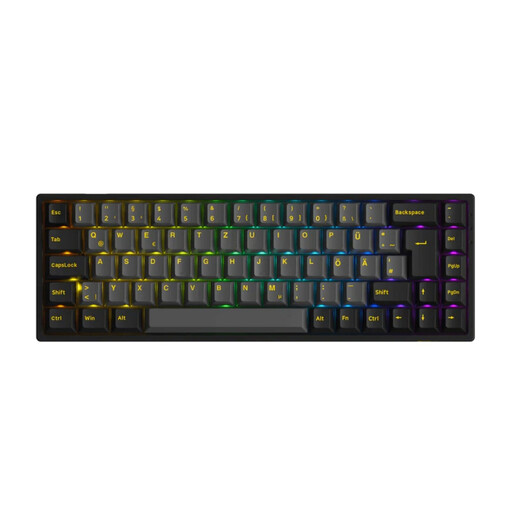
Why this product suits this profile: The 65% format combines compact dimensions with arrow keys, and offers Bluetooth, 2,4 GHz and USB-C connectivity. According to the product details, it also has an ISO-DE layout, RGB lighting and hot-swap support for 3-pin and 5-pin switches.
The clearly specified ISO-DE layout reduces the risk of ending up with an unsuitable US layout. The three connection options let you switch between wired, 2,4 GHz and Bluetooth.
65% layout, 1800-mAh battery, RGB lighting and N-key rollover, according to the product description.
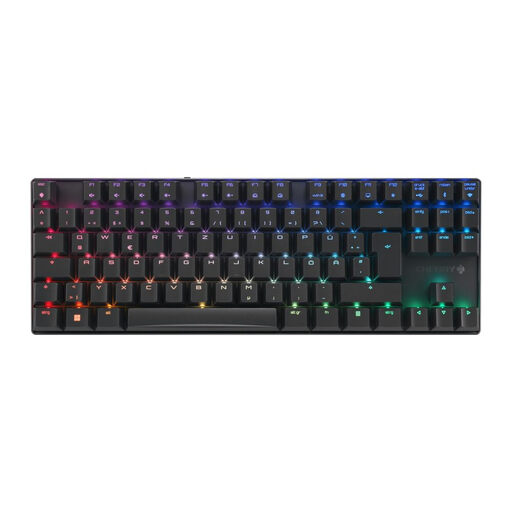
Why this product suits this profile: This TKL model has a German QWERTZ layout, an aluminium frame and three connection options. According to the product details, it also features CHERRY MX2A Brown switches, per-key RGB lighting and a 2800-mAh battery.
The clearly labelled DE layout avoids the common confusion with QWERTY. Wired, 2,4-GHz receiver and Bluetooth connections give you an alternative if the battery runs flat.
TKL design, per-key RGB lighting, anti-ghosting and full N-key rollover, according to the manufacturer.
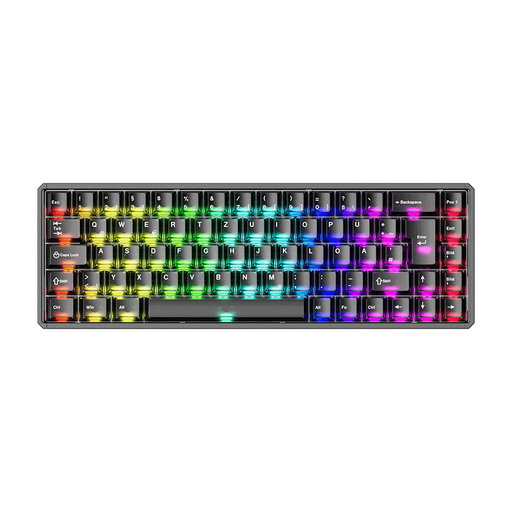
Why this product suits this profile: This ISO-DE model is aimed at users who need Rapid Trigger, magnetic switches and extensive software customisation. It connects via Bluetooth, 2,4 GHz or USB-C.
The product details make it clear that mechanical switches aren’t supported, so you can check compatibility before buying.
Rapid Trigger, adjustable actuation point, SOCD and a stated polling rate of up to 8000 Hz in wired and 2,4-GHz modes.

Why this product suits this profile: The 98% design keeps many of the keys found on a larger layout, and adds a rotary dial and TFT display. According to the product description, it also offers hot-swap, RGB lighting and tri-mode connectivity.
The near-full-size key layout means frequently used navigation keys aren’t limited to Fn combinations. The three modes cover both desktop and mobile use.
97 keys, programmable rotary dial, TFT display, hot-swap and, according to the product details, a 10000-mAh battery.
We’ve put together a complete, regularly updated list of products that meet these strict selection criteria and fully comply with the safety regulations in force in the EU.
For most German Windows setups, an ISO-DE layout with QWERTZ is a good choice. Also check the labels on the special keys and the shape of the Enter key. A US QWERTY model may work technically, but you’ll need to get used to a different layout or change your keyboard settings.
Lifespan depends on the switches, keycaps, electronics and how you use the keyboard. Manufacturers state that some CHERRY switches can withstand over 100 million keystrokes, while other models may be rated for 50 million, for example. These figures are guidelines for switch performance, not a guarantee of how long the entire keyboard will last. Dust, spills and damaged hot-swap sockets can all shorten its lifespan.
RGB lighting uses more power than having the lighting switched off. Actual battery life depends on brightness, lighting effect, connection type and battery capacity. If you’re looking for a wireless gaming keyboard that needs charging less often, compare the stated battery capacity, whether you can use it wired as a backup and whether you can dim or switch off the lighting.