
Lieferung heute & morgen

Qualitätsgarantie

Willkommens-Angebote freischalten: KOSTENLOSE Lieferung | Bis zu 80 % RABATT | Kostenlose 30-Tage-JoyPlus-Testphase
App herunterladen
As a Joybuy Product Recommendation Officer, I see users struggle daily with a deluge of product information. The confusion is especially high when choosing a mechanical gaming keyboard. Many buyers invest in a model that fails to meet their expectations after just a few months. This guide will help you understand the crucial features and avoid common purchasing pitfalls.
The three most common mistakes when buying a mechanical keyboard are:
To make an informed decision, you should focus on three core technical aspects instead of being swayed by marketing buzzwords.
The switch under each key determines the typing feel, noise level, and response speed. The most common types are:
The size of the keyboard affects not only ergonomics but also the available space for your mouse.
When purchasing, pay close attention to the specified layout (QWERTZ for German, QWERTY for US English). For a durable RGB keyboard, the keycaps are also crucial. Double-shot keycaps, where the legend is made from a second piece of plastic, do not wear off and ensure lasting, clear, and even illumination.
Here are some models tailored to specific user needs that take the aforementioned pitfalls into account.
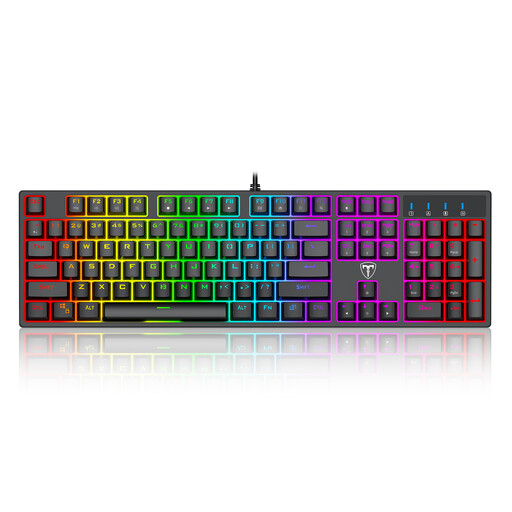
Why This Fits Their Persona: This model offers all the core features of a mechanical gaming keyboard—tactile blue switches, RGB lighting, and anti-ghosting—at an accessible price point. It's a solid choice for getting started in the world of PC gaming without breaking the bank.
Features genuine mechanical blue switches, not just a "mechanical feel." The QWERTY layout is clearly stated, so there's no risk of confusion if you pay attention and it's sufficient for purely gaming use.
Full 104-key layout with multimedia shortcuts and a spill-resistant design for added peace of mind during long gaming sessions.
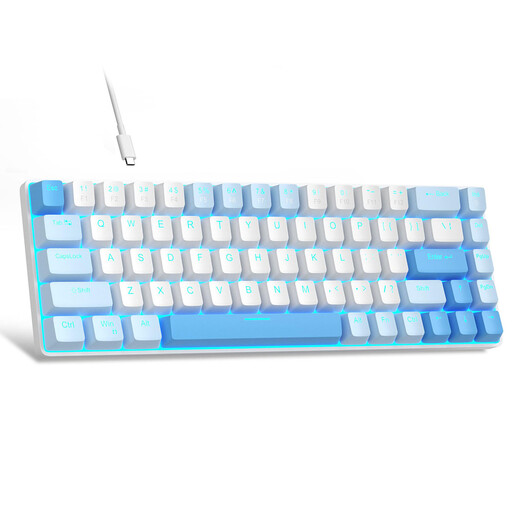
Why This Fits Their Persona: The compact 68-key layout creates maximum space for sweeping mouse movements, which is crucial in fast-paced FPS games. The linear red switches enable rapid, resistance-free keystrokes for high responsiveness.
Specifically offers linear red switches optimized for responsive gaming, rather than a loud "clicky" switch that could be distracting during intense sessions. The compact design is a deliberate choice for more mouse freedom.
Compact design with separate arrow keys (an advantage over pure 60% keyboards) and a detachable USB-C cable for high portability.
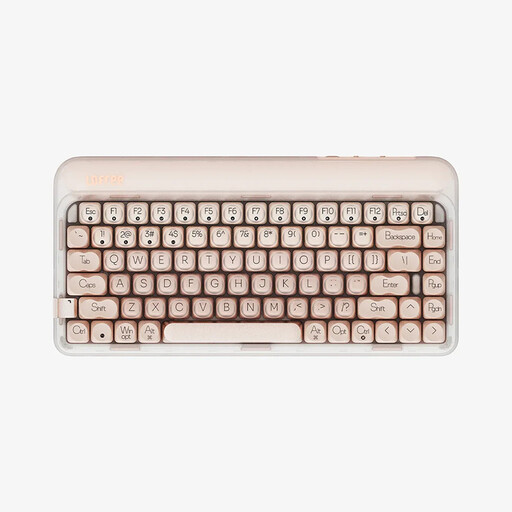
Why This Fits Their Persona: The 75% layout is a compromise between compactness and functionality, ideal for desks used for both work and play. The factory-lubricated linear switches and gasket-mount structure provide a quieter and more pleasant typing experience.
Offers a quieter typing experience than typical blue switches, making it suitable for office environments or multi-person households. The hot-swap capability allows switches to be changed later without soldering if preferences change.
Tri-Mode connectivity (USB-C, Bluetooth, 2.4G) and hot-swappable switches for maximum flexibility and customisation across different devices.
We've compiled a complete, up-to-date list of products that fully meet these strict selection criteria and German safety regulations.
The main difference lies in the technology beneath the keys. A mechanical keyboard uses an individual, spring-loaded switch for each key. This results in higher precision, a better typing feel, and a significantly longer lifespan. A membrane keyboard uses a single rubber membrane under the keys. It is cheaper to manufacture but is less precise and wears out faster.
The lifespan of a mechanical keyboard is typically determined by the durability of its switches. Most mechanical switches, such as those from Cherry, Gateron, or Outemu, are rated for 50 to 100 million keystrokes. With average use, such a keyboard can last for many years, often significantly longer than a conventional membrane keyboard.
If you use the keyboard exclusively for gaming and are comfortable with the US layout, a QWERTZ keyboard is not strictly necessary. However, if you also use the keyboard for everyday tasks like writing, chatting, or programming in German, a QWERTZ layout is highly recommended. It ensures that umlauts (?, ?, ü) and important special characters (e.g., @, €, §) are found in their usual positions.