
Lieferung heute & morgen

Qualitätsgarantie

Willkommens-Angebote freischalten: KOSTENLOSE Lieferung | Bis zu 80 % RABATT | Kostenlose 30-Tage-JoyPlus-Testphase
App herunterladen
A mechanical gaming keyboard can serve you well for many years of gaming, writing and programming. However, flashy lighting, high polling rates or terms like "Gasket Mount" don't automatically lead to the right purchase decision. What really matters is whether the layout, form factor, switches and connectivity suit your everyday needs.
Many listings use mechanical keyboard QWERTZ only in the headline, while product images or technical specifications show a US QWERTY layout. With QWERTY, the "Y" and "Z" keys are in different positions; umlauts and the Enter key may also differ.
So check before you buy:
A US keyboard can be used with German language settings, but the keycap legends won't fully match what you type.
A gaming keyboard with RGB lighting looks striking in product images, but says little about typing feel, stability or durability. Also check the keycap materials, switch type, cable routing and ease of cleaning.
PBT keycaps are a practical choice on many models, as they are described by manufacturers as more wear-resistant than ABS keycaps. However, such a material specification is no guarantee that every keyboard will last the same length of time. Usage, cleaning and print quality are also decisive factors.
A compact mechanical keyboard gives you more mouse space. However, a 60% keyboard usually lacks function keys, arrow keys and navigation clusters. A 75% keyboard integrates these areas in a space-saving way, while a TKL keyboard omits the number pad but largely retains the remaining standard keys.
Before buying, consider whether you regularly:
The percentage roughly describes the form factor in relation to a full-size keyboard:
The right size depends on your desk space and the applications you use. For office and gaming keyboard users, a 75% or TKL form factor is often a good compromise between space saving and direct access to important keys.
Linear switches move down without a noticeable tactile bump. They are often preferred by gamers who want smooth keystrokes. Tactile switches provide a noticeable resistance during the keystroke, while clicky switches also produce a distinct clicking sound.
Pay attention to the following details:
A hot-swap keyboard allows you to replace compatible switches without soldering. Check whether 3-pin, 5-pin or exclusively Hall Effect switches are supported. A Hall Effect keyboard uses magnetic sensors and is not automatically compatible with classic mechanical switches.
A wired mechanical keyboard requires no battery and no wireless pairing. USB-C cables with a detachable connector make transport and replacement easier. For gaming and stationary workstations, a wired connection is a straightforward solution.
A volume control or volume roller can be more practical in games, during video calls or when listening to music than key combinations. Features like anti-ghosting and full-key rollover should be considered as concrete technical specifications, not as a blanket promise of better gaming performance.
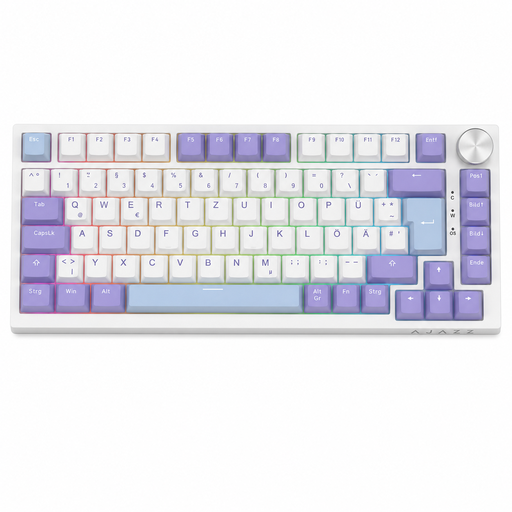
Why this product fits the profile: The 82-key layout combines a reduced footprint with function keys, arrow keys and navigation keys. The German QWERTZ layout is immediately clear for users in Germany.
The product specifications explicitly state the German QWERTZ layout. This makes it easier to distinguish from US QWERTY variants before purchase.
Hot-swap for compatible 3-pin switches, linear Sea Salt switches, RGB lighting and volume control.

Why this product fits the profile: The full layout with number pad is ideal for users who want to combine gaming and office work at one workstation.
The German ISO QWERTZ layout is stated in the technical specifications. The most important functions are not only provided via a compact Fn layer.
CHERRY MX2A Red switches, full N-key rollover, anti-ghosting, Windows key lock and customisable RGB lighting.

Why this product fits the profile: For gamers looking for a 60% keyboard with arrow keys and adjustable actuation point, this model offers a special magnetic switch technology.
The product name explicitly mentions Hall Effect magnetic switches. This makes it clear that standard 3- or 5-pin switches are not assumed.
Adjustable actuation point, Rapid Trigger mode, 8,000 Hz polling rate according to product specification and RGB lighting.
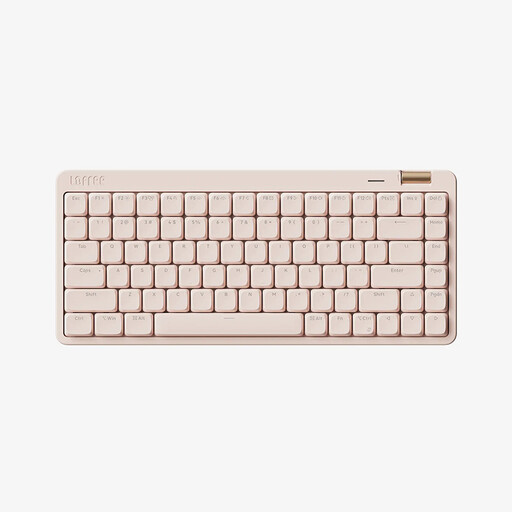
Why this product fits the profile: This model combines a compact 84-key layout with Bluetooth, 2.4 GHz wireless and USB-C cable operation for multiple devices.
The three connection types and 84 keys are clearly specified. This makes it easier to distinguish the feature set from simple 60% models.
Low-profile linear switches, PBT keycaps, volume roller, 2,000 mAh battery and compatibility with Windows, macOS, iOS and Android.
We have compiled a complete, regularly updated list of products that fully meet these strict selection criteria and the safety regulations in force in the EU.
The lifespan depends on the switches, keycaps, usage and care. Manufacturers often quote values of several million to over 50 million keystrokes. This figure describes a technical guideline and does not guarantee an identical service life for every key or component. Replaceable switches and keycaps can improve maintainability.
Yes, provided the noise level, layout and form factor suit your workplace. Linear switches can offer a consistent typing feel; dampened case constructions can reduce resonance. For a German office, a QWERTZ layout, number pad and a comfortable hand position are usually more important than flashy lighting.
A wired keyboard normally draws its power via USB. Consumption increases particularly with permanently active RGB lighting. If you want to keep power consumption low, you can disable the lighting or reduce the brightness. Models without a battery require no separate charging electronics.