
Lieferung heute & morgen

Qualitätsgarantie

Willkommens-Angebote freischalten: KOSTENLOSE Lieferung | Bis zu 80 % RABATT | Kostenlose 30-Tage-JoyPlus-Testphase
App herunterladen
A mechanical gaming keyboard can serve you well for many years when gaming, programming and writing. However, eye-catching RGB effects, high polling rates or terms such as “custom” do not automatically lead to the right purchase decision. The key factors are the layout, form factor, switch technology, connectivity and actual compatibility with your setup.
Many keyboards are offered with a QWERTY US layout. For German users, this can be inconvenient in everyday use: the positions of Y and Z are different, and depending on the version, familiar labels and key arrangements may be missing. Before buying, make sure the product description explicitly states “German QWERTZ” or “German layout”.
An 8000 Hz polling rate may be interesting for certain competitive games. However, it does not automatically make a keyboard more comfortable for office work or intensive typing. Your PC, software and game must also support the feature effectively. For many users, the right layout, a reliable USB-C connection and suitable switches are more important.
A hot-swappable keyboard allows you to replace mechanical switches without soldering. However, you must check whether the PCB supports 3-pin or 5-pin switches. A Hall Effect keyboard has different requirements: its magnetic switches cannot be replaced with conventional 3- or 5-pin mechanical switches. Using the wrong replacement parts can damage the sockets.
The form factor determines which keys are permanently available:
If you regularly enter numbers, you should not give up the number pad solely for the sake of a compact design. For German workstations, the QWERTZ layout is also a key point to check.
Linear switches move smoothly without a noticeable actuation bump. They are often used for fast inputs and gaming. Tactile switches provide noticeable resistance during the key press. This can offer more deliberate feedback when typing.
A Rapid Trigger keyboard with Hall Effect switches detects the key’s position magnetically. Depending on the model, the actuation point and reset behaviour can be adjusted in software. An actuation range of, for example, 0.1 to 4.0 mm is a technical specification, not a general performance guarantee. Buyers should check whether the required software works with Windows or macOS.
A USB-C keyboard provides a wired connection without requiring a battery or pairing. A wireless mechanical keyboard, on the other hand, can be used via Bluetooth, 2.4 GHz wireless or a wired connection. Models with three connection methods are often referred to as tri-mode keyboards.
The following features are particularly relevant:

Why this product suits the profile: The compact 82-key layout combines a German QWERTZ arrangement with arrow, function and navigation keys. The wired USB-C connection does not require a battery.
The product information explicitly states that it has a German QWERTZ layout and a hot-swap function for compatible switches.
82 keys, RGB lighting, gasket-mount construction and a volume control; dimensions are stated as approximately 327 × 136 × 40 mm.

Why this product suits the profile: This model combines gasket-mount construction, PBT keycaps, hot-swap support for 5-pin switches and three connection methods for PC, Mac and mobile devices.
Bluetooth, 2.4 GHz wireless and USB-C are explicitly listed. This allows you to check that your preferred connection method is supported before buying.
4000 mAh battery, programmable control knob, PBT dye-sublimated keycaps and 87 keys in a US layout.
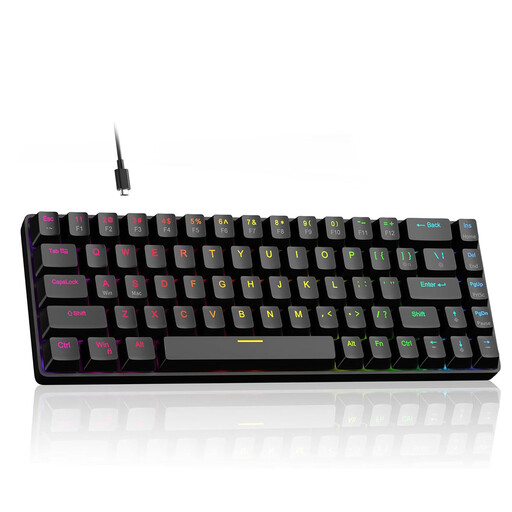
Why this product suits the profile: This Hall Effect keyboard is designed for gamers who want to make targeted use of an adjustable actuation point and Rapid Trigger mode.
The specifications explicitly state Hall Effect switches, an actuation range of 0.1 to 4.0 mm and a wired connection.
60 per cent format with additional arrow keys, RGB lighting, hot-swap function and a stated 8000 Hz polling rate.
We have put together a complete, regularly updated list of products that fully meet these strict selection criteria and the safety regulations applicable in the EU.
Its lifespan depends on the switches, keycaps, usage and care. Manufacturer specifications such as 50 or 100 million keystrokes refer to defined switch ratings and are not a guarantee of the lifespan of the entire keyboard. Dust, liquids and improper switch replacement can damage the PCB and sockets.
Yes, provided that the volume, layout and switches suit the workplace. Linear switches can provide a smooth, consistent typing feel. In shared spaces, you should also consider the damping, keycap material and noise produced when the keys bottom out.
Power consumption mainly depends on the RGB lighting, wireless standard and battery capacity. Bluetooth can be suitable for longer battery life, while 2.4 GHz wireless is often chosen for a direct connection when gaming. If you want to avoid charging breaks, you can use the keyboard with a wired USB-C connection.