
Lieferung heute & morgen

Qualitätsgarantie

Willkommens-Angebote freischalten: KOSTENLOSE Lieferung | Bis zu 80 % RABATT | Kostenlose 30-Tage-JoyPlus-Testphase
App herunterladen
A mechanical gaming keyboard can serve you well for years of gaming, typing and working. However, flashy RGB effects or high battery capacities don't automatically lead to the right purchase decision. What really matters are the layout, switches, connectivity and genuine everyday usability.
British shoppers often encounter typical pitfalls:
For users in the UK, a QWERTY gaming keyboard is usually the straightforward choice. It matches the familiar UK key arrangement and makes typing special characters, punctuation and keyboard shortcuts much easier.
A 75% keyboard like the AJAZZ AK820 saves desk space while retaining the function row, arrow keys and essential navigation keys. This is handy when you need more room on your desk for your mouse.
A 98% keyboard, on the other hand, combines many of the features of a full-size keyboard in a more compact design. The AJAZZ AK980 V2 features a 98% QWERTY layout. If you regularly type in English, check the keycap legends and operating system layout before buying. A QWERTY keyboard can be switched in software, but the key positions and legends remain unchanged.
Mechanical switches differ mainly in actuation feel, travel distance and sound. Linear switches offer a smooth keystroke with no tactile bump. They can be suitable for fast inputs and longer typing sessions, though personal preference remains key.
A hot-swap keyboard lets you replace compatible switches without soldering. This makes future adjustments and replacing individual switches much easier. Before buying, check:
The AJAZZ AK820 features a gasket-mounted construction and multiple layers of sound dampening. These details describe the build but don't guarantee a specific noise level in every environment. Keycaps, desk surface and typing speed also affect the sound.
A USB-C keyboard offers a direct connection with no pairing or battery management required. This is practical for fixed workstations and long gaming sessions. A wireless mechanical keyboard is more flexible and can be used via Bluetooth, 2.4 GHz or cable, depending on the model.
Bluetooth is often suitable for laptops, tablets and smartphones. A 2.4 GHz keyboard typically connects via a USB receiver and can be ideal for desktop PCs and gaming. Before buying, check whether the receiver is included and whether you have enough USB ports available.
A keyboard with a volume control lets you adjust media directly. On the AK980 V2, a rotary knob also handles functions such as lighting, connection settings and volume. The integrated TFT display shows connection mode, lighting and battery level, according to the product description. The stated battery capacity is 10,000 mAh. Actual battery life depends on factors such as RGB brightness, wireless mode and usage.
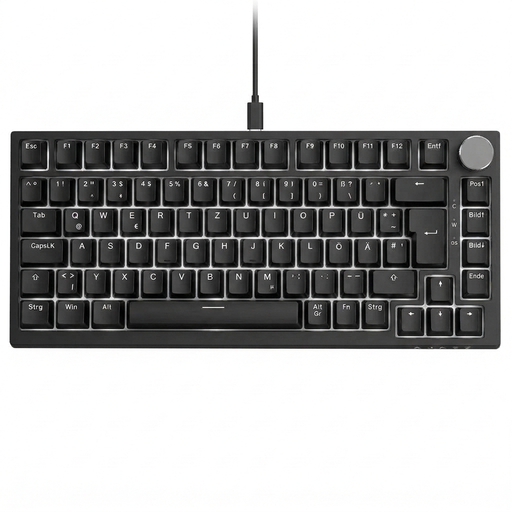
Why this product fits the profile: The compact QWERTY layout with 82 keys is ideal for users who want a space-saving keyboard for the office, home working and gaming.
The clearly stated QWERTY layout reduces the risk of an unfamiliar key arrangement. The wired USB-C connection eliminates battery and pairing concerns.
75% form factor, linear red switches, hot-swap for compatible 3-pin switches, volume control and 20 lighting effects.
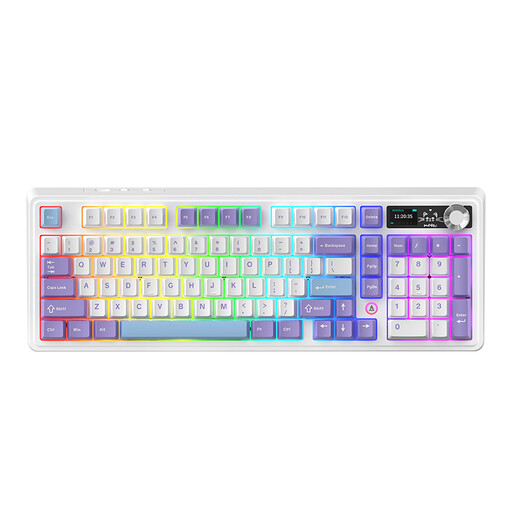
Why this product fits the profile: This model is aimed at users who want to connect multiple devices, work wirelessly and read status information directly on the keyboard.
The connection is clearly specified as Bluetooth 5.0, 2.4 GHz and USB-C cable. The 98% QWERTY layout should be consciously matched to your own typing habits before purchase.
10,000 mAh battery, 3-pin and 5-pin hot-swap, PBT keycaps, RGB lighting, TFT display and multi-function control knob.

Why this product fits the profile: Heavy typists and gamers get a QWERTY layout, a direct connection and volume controls, all without sacrificing a compact design.
The wired version requires no charging. The QWERTY layout, hot-swap function and detachable USB-C cable make the technical specifications transparent.
82 keys, linear Sea-Salt switches, RGB lighting, gasket-mounted construction and rotary knob with mute function.
We've put together a full, regularly updated list of products that meet these strict selection criteria and all applicable EU safety regulations.
Before ordering, check the number of keys, the layout and operating system compatibility. For a wireless mechanical keyboard, also add the receiver, charging port and mode switching to your checklist.
For home working, a volume control can save you time. For gaming, a stable connection, full anti-ghosting and a switch type that suits you are more important than a large number of lighting modes. The RGB function should be switchable or dimmable if you also plan to use the keyboard in a quiet work environment.
If you're also looking for an air fryer 6.5 litre or a pressure cooker for induction hobs, you should evaluate those appliances separately based on material, capacity, temperature range and safety features. The selection criteria for a mechanical keyboard don't apply to kitchen appliances.
The lifespan depends on the switches, keycaps, dust, spills and daily use. The AJAZZ AK980 V2's linear switches are rated for up to 50 million keystrokes. This manufacturer rating describes the switch design and is not a guarantee for the entire keyboard's lifespan.
Yes, provided the noise level and switch type suit your work environment. Linear switches and noise-dampening components can influence the sound output. For shared spaces, you should also consider moderate typing speed and switchable lighting.
That depends on your workspace. Bluetooth is practical for multiple mobile devices, while 2.4 GHz offers a direct wireless connection for a desktop PC. If you want to avoid charging breaks or work exclusively at a fixed desk, a USB-C keyboard can be a straightforward alternative.