
Lieferung heute & morgen

Qualitätsgarantie

Willkommens-Angebote freischalten: KOSTENLOSE Lieferung | Bis zu 80 % RABATT | Kostenlose 30-Tage-JoyPlus-Testphase
App herunterladen
By Joybuy Product Recommendation Officer, August 30, 2026
Choosing a new mechanical gaming keyboard can be overwhelming given the sheer number of models, switch types, and marketing terms. Many users invest in a device that looks promising on paper, only for it to turn out to be a poor choice in practice. This guide focuses on the objective criteria that truly matter and helps you avoid common pitfalls.
Before diving into the details, it's important to understand the most common mistakes that often lead to dissatisfaction.
To avoid these pitfalls, you should focus on three core areas. These define the performance, feel, and longevity of your keyboard.
The mechanical switches determine the typing feel and acoustics. The three basic types are:
The size of the keyboard has a direct impact on ergonomics and the available space on your desk.
Two often-overlooked but critical features are the keycaps and the interchangeability of the switches.
Here are some models that can be considered for different user profiles based on the objective criteria mentioned above.
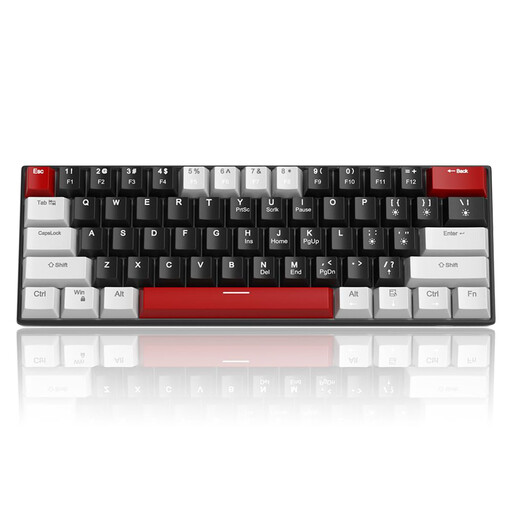
Why This Fits Their Persona: This model focuses on the core functions of a mechanical keyboard. The compact 60% keyboard format is ideal for gaming setups with limited space and offers an authentic mechanical feel without the premium for rarely used features.
It avoids the pitfall of paying for superfluous features. Instead, it offers a solid foundation with a choice of switches (e.g., linear Red switches), allowing the user to focus on the essential typing experience.
The detachable USB-C cable and compact design make it highly portable. The anti-ghosting feature ensures all keystrokes are registered, even in fast-paced gaming situations.
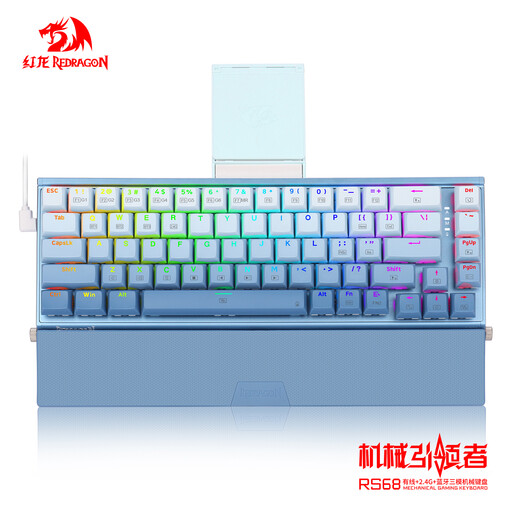
Why This Fits Their Persona: For users who value high-quality materials, flexibility, and customisation. The aluminium case provides stability and a premium feel, while tri-mode connectivity (wired, Bluetooth, 2.4G) offers maximum flexibility across different devices.
The integrated hot-swap PCB is the key feature for avoiding the pitfall of being locked into one switch type. Users can change their switches at any time without soldering to adapt the typing feel to new preferences or replace faulty switches.
The combination of a robust aluminium case and flexible tri-mode connectivity makes this a versatile and durable wireless gaming keyboard. The customisable RGB keyboard lighting completes the package.
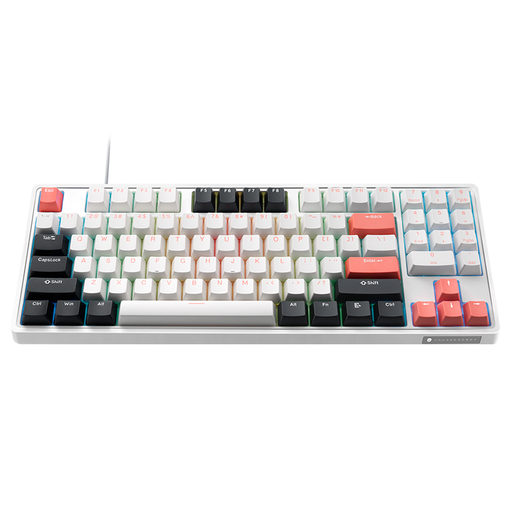
Why This Fits Their Persona: The 89-key layout (a variation of the TKL keyboard) is an excellent compromise for gamers. It saves space for the mouse while still integrating the number pad in a compact form, making it useful for everyday tasks as well.
This model comes equipped with double-shot PBT keycaps. This counters the trap of fast-wearing ABS keycaps. The textured surface and durable legends will withstand even intense gaming sessions.
The combination of hot-swap capability for 3/5-pin switches and factory-lubed stabilisers ensures a high-quality and consistent typing feel right out of the box, with the option for future customisation.
We have compiled a complete, real-time updated list of products that fully meet these strict selection criteria and UK/EU safety regulations.
1. What is the exact difference between Red, Blue, and Brown switches? The main difference lies in the feedback. Red switches are linear, offering a smooth, quiet keystroke. Brown switches are tactile, providing a noticeable but quiet bump at the actuation point. Blue switches are both tactile and clicky, producing an audible click at the actuation point.
2. How long does a mechanical keyboard last? The lifespan of a mechanical keyboard is often determined by the durability of its switches. Most manufacturers rate their switches for 50 to 100 million keystrokes each. With proper care, a mechanical keyboard can last for many years. Models with a hot-swap feature have a potentially even longer lifespan, as faulty switches can be easily replaced.
3. Is a wireless gaming keyboard suitable for competitive play? Modern wireless technologies, especially those with a dedicated 2.4 GHz USB receiver, offer latency that is virtually indistinguishable from wired keyboards. For most gamers, including those in the competitive scene, a high-quality wireless gaming keyboard no longer presents a noticeable disadvantage and offers the benefit of a clutter-free desk.