
Lieferung heute & morgen

Qualitätsgarantie

Willkommens-Angebote freischalten: KOSTENLOSE Lieferung | Bis zu 80 % RABATT | Kostenlose 30-Tage-JoyPlus-Testphase
App herunterladen
A mechanical gaming keyboard can be a great choice for gaming, programming and typing, thanks to its clear tactile feedback, replaceable switches and extra features. But the options can be overwhelming. RGB lighting, high polling rates and compact designs often take centre stage, while important details such as the keyboard layout and the switches themselves get less attention.
If you’re looking to buy a mechanical keyboard in the UK, don’t focus on looks alone. Three common buying mistakes can lead to unnecessary costs later:
For German-speaking users, a QWERTZ keyboard is usually the more straightforward choice. A full set of German key legends makes it easier to type umlauts, punctuation and special characters. If you regularly work with US software layouts or use an international setup, however, you may prefer a US QWERTY keyboard.
When it comes to form factor:
A compact mechanical keyboard gives you more room to move your mouse. But a larger form factor may be more practical for frequent typists and office users who regularly need navigation keys or a number pad.
Linear switches have a smooth keystroke with no noticeable tactile bump. They’re often used for fast typing and gaming. Tactile switches provide a noticeable bump when they actuate. Clicky switches also produce an audible click, which can be distracting in shared spaces.
A hot-swappable keyboard lets you replace compatible switches without soldering. Before buying, check whether the PCB supports 3-pin or 5-pin switches and whether the replacement switches you want are compatible.
Keycaps also affect the typing experience. PBT keycaps are less prone to developing a shiny surface through frequent typing than many ABS keycaps. Actual durability depends on the material thickness, legend-printing method and how much you use them.
A gasket-mount keyboard supports the plate or keyboard assembly on elastic elements. This can give the keys a softer feel when bottoming out. Claims about noise reduction should be understood as a design feature, not a guarantee of a particular sound level.
A wired gaming keyboard with a detachable USB-C cable doesn’t need a battery or wireless pairing. That’s often handy for a permanent PC setup. A wireless mechanical keyboard, on the other hand, gives you more flexibility and can connect via Bluetooth, 2.4 GHz or USB-C. When buying, consider battery capacity, charging method and your preferred wireless connection.
RGB lighting mainly improves visibility and lets you customise your setup. It isn’t a measure of input accuracy. Hall-effect models use magnetic sensors rather than conventional mechanical contacts. Features such as Rapid Trigger and adjustable actuation points are particularly useful for people who need fast repeated inputs and individually configurable controls. Whether these features offer a practical advantage for a particular game or workflow depends on the software, settings and your personal preferences.
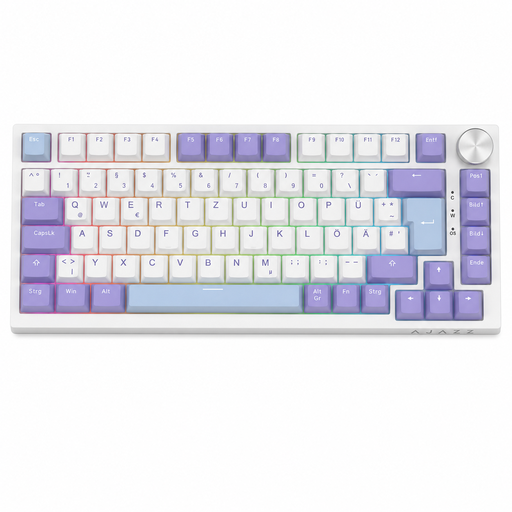
Why this product suits this profile: Its German QWERTZ layout has 82 keys, combining function and arrow keys with a compact design for gaming, office work and everyday use.
The clearly stated QWERTZ layout reduces the risk of accidentally choosing a US keyboard for typing in German. Hot-swap support is compatible with 3-pin switches.
USB-C cable, volume control, RGB lighting and gasket-mount construction, according to the product details.
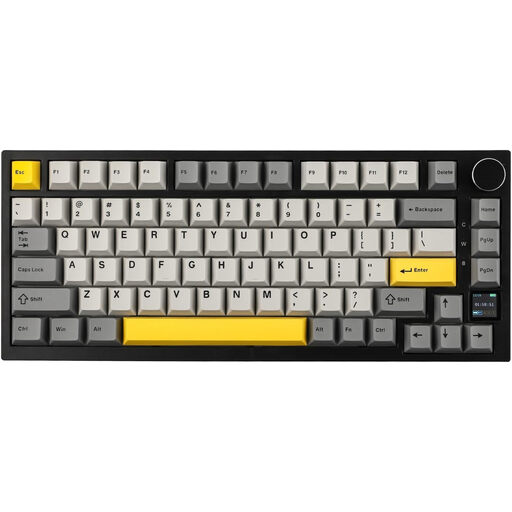
Why this product suits this profile: Its 75% form factor combines a compact design with USB-C, Bluetooth and 2.4 GHz connectivity for use with PCs, Macs and multiple devices.
The three connection options make it clear how you can use the keyboard. Hot-swap support, PBT keycaps and sound-dampening inserts are all specified.
TFT colour screen, volume control, RGB lighting and a 4,000-mAh battery, according to the product description.

Why this product suits this profile: This 65% keyboard is aimed at FPS players looking for a compact design and configurable magnetic switches.
Hall-effect switches and Rapid Trigger are explicitly listed. You can adjust the actuation point from 0.2 to 4.0 mm using the software.
8000-Hz polling rate, according to the manufacturer, a detachable USB-C cable and an aluminium top plate.
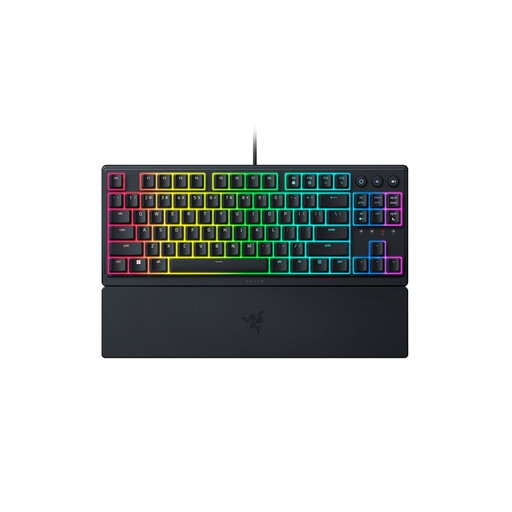
Why this product suits this profile: The German TKL layout leaves out the number pad but retains essential function keys. Its low-profile design may appeal if you prefer shorter key travel.
The QWERTZ layout is clearly stated. Dedicated media keys and a wired USB connection mean no extra pairing or charging is required.
8-zone RGB lighting, a magnetic wrist rest and programmable keys, according to the product specifications.
We’ve put together a complete, regularly updated list of products that meet these strict selection criteria and fully comply with the safety regulations applicable in the EU.
Its lifespan depends on the switch type, construction, usage and care. Many product listings quote several million actuations per switch. This figure is a technical guide, not a guarantee of the lifespan of the entire keyboard. Hot-swappable models are easier to repair if a switch fails, provided compatible replacement switches are available.
Yes, as long as the noise level, layout and form factor are right. Linear or tactile switches are often considered less disruptive than clicky ones. You should also look for a QWERTZ keyboard, a suitable wrist rest and an adjustable height. On many models, you can switch off or dim the RGB lighting.
Power consumption is mainly affected by wireless technology and lighting. RGB lighting can reduce battery life. To conserve the battery, switch off the lighting or use USB-C in wired mode. With a wired keyboard, you don’t need to recharge it at all.