
Lieferung heute & morgen

Qualitätsgarantie

Willkommens-Angebote freischalten: KOSTENLOSE Lieferung | Bis zu 80 % RABATT | Kostenlose 30-Tage-JoyPlus-Testphase
App herunterladen
The search for the right mechanical gaming keyboard can quickly become overwhelming. The market is filled with technical jargon, marketing promises, and a vast number of models that barely seem to differ at first glance. As a Joybuy Product Recommendation Officer, I see every day which factors truly matter and where the most common and costly purchasing mistakes are made. This guide is designed to help you understand objective criteria and make an informed decision that fits your actual needs.
Before we dive into the technical details, it's important to know the most common traps that often lead to disappointment and unnecessary expense.
To avoid these pitfalls, you should focus on three core aspects that directly impact your keyboard's performance and usability.
Mechanical switches can be broadly divided into three categories. The choice depends on your personal preference and usage environment.
The size of your keyboard should match your desk setup and your usage habits.
When making your selection, be sure to choose a keyboard with your local layout (e.g., UK QWERTY) to avoid issues with typing special characters and symbols.
Here are some recommendations tailored to different needs and budgets.
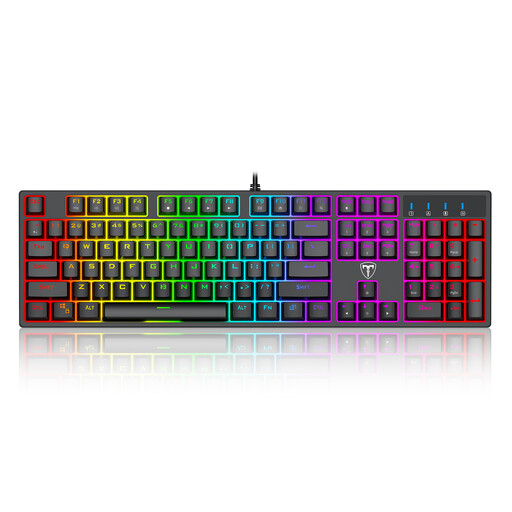
Why This Fits Their Persona: Offers all the fundamental benefits of a mechanical keyboard—tactile feedback and durability—at an accessible price point. Ideal for gamers upgrading from a membrane keyboard without a large budget.
Focuses on core functionality (mechanical keys, anti-ghosting) instead of expensive, often unused extra features. The blue switches provide clear, unmistakable feedback, helping beginners understand the mechanical feel.
Full 104-key layout with number pad; anti-ghosting for precise inputs.
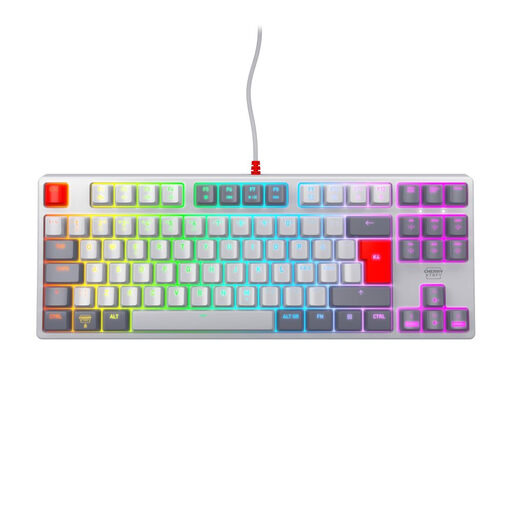
Why This Fits Their Persona: Designed for esports requirements where fast reaction times and maximum mouse space are crucial. The compact TKL format and linear switches are built for performance.
It deliberately omits the number pad (TKL design) to allow for a more ergonomic posture and greater freedom of movement for the mouse—an often-overlooked advantage in competitive gaming. The MX2A Red switches offer fast, resistance-free actuation without the loud click that can be distracting in moments of high concentration.
Genuine CHERRY MX2A Red switches for fast, linear keystrokes; robust TKL design with a metal plate.
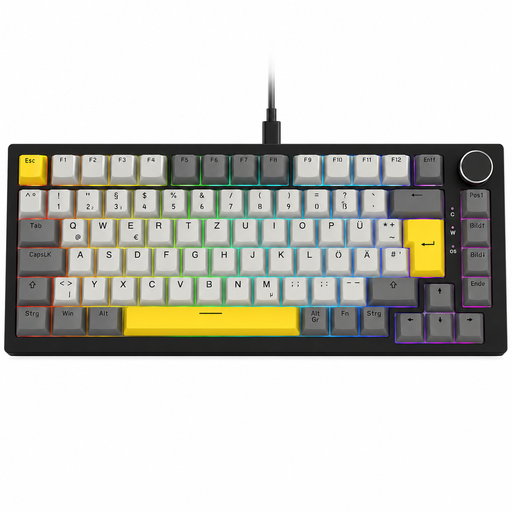
Why This Fits Their Persona: Offers advanced features like hot-swap capability and a gasket-mount structure, allowing users to modify the typing feel and sound to their exact preferences.
It goes beyond standard switches by offering a hot-swappable PCB. Instead of being locked into a single switch type, you can experiment with different switches without having to buy a whole new keyboard. This prevents the "wrong switch" buyer's remorse.
Fully hot-swappable (3-pin); gasket-mount structure for a softer typing feel; convenient volume control knob.
We have compiled a complete, real-time list of products that fully satisfy these strict selection criteria and UK safety regulations.
The main difference lies in their feedback and acoustics. Red switches are linear and quiet, ideal for fast-paced gaming. Blue switches are tactile and produce a loud "click" sound, which many find satisfying for typing. Brown switches are the middle ground: they offer tactile feedback without the loud click, making them well-suited for mixed use in offices or shared spaces.
Yes, for typing in the UK, a UK QWERTY layout is essential. It ensures that keys like the @ symbol, the ? sign, and the large "Enter" key are in their standard positions. Using a different layout, like the US standard, will lead to constant typos and frustration when trying to type common characters.
The lifespan of a mechanical keyboard is typically determined by the durability of its switches. Most manufacturers rate their switches for 50 to 100 million keystrokes each. With average use, such a keyboard can function reliably for many years, significantly outlasting conventional membrane keyboards.