
Lieferung heute & morgen

Qualitätsgarantie

Willkommens-Angebote freischalten: KOSTENLOSE Lieferung | Bis zu 80 % RABATT | Kostenlose 30-Tage-JoyPlus-Testphase
App herunterladen
A mechanical gaming keyboard should deliver precise inputs while remaining comfortable to use every day. Many models boast RGB lighting, wireless connectivity, special dampening layers or particularly durable keycaps. These features are only useful, though, if they suit your desk setup and how you plan to use the keyboard.
A 60% keyboard saves space, but often does away with the function keys, arrow keys and navigation controls. If you regularly code, work with spreadsheets or use keyboard shortcuts, you’ll need to access these functions using the Fn key. A 75% gaming keyboard or 80% TKL keyboard keeps the keys you need while leaving more room for your mouse than a full-size keyboard.
When choosing a wireless mechanical keyboard, it’s worth distinguishing between Bluetooth and 2.4 GHz wireless. Bluetooth works well with laptops, tablets and several office devices. For gaming, a 2.4 GHz connection with a USB receiver or a wired USB-C mode may be a better choice. A tri-mode keyboard typically combines Bluetooth, 2.4 GHz and USB-C. Also check the battery capacity, charging time and whether you can keep using the keyboard in wired mode while it charges.
An RGB keyboard can make individual keys easier to see and offer a range of lighting profiles. But it’s no substitute for suitable switches, sturdy keycaps or solid construction. PBT keycaps, for example, are more resistant to developing a visible shine through frequent use than many ABS versions. The specific material and compatibility with replacement keycaps matter more than the number of lighting effects.
For users in Germany, a mechanical QWERTZ keyboard is usually the more straightforward choice. Among other things, it places Y and Z and the special characters according to the German layout. A mechanical QWERTY keyboard may suit programmers, international working environments or certain games, but you’ll need the right operating system layout and some time to get used to it.
If you enter numbers frequently, don’t give up the number pad just to save desk space. For FPS games that involve large mouse movements, a TKL or 75% model may be more practical.
Linear switches move smoothly, without a noticeable tactile bump. Tactile switches provide a feelable response when activated. Clicky switches also make a distinct sound. The right choice depends on the games you play, your typing style and your surroundings.
A hot-swap keyboard lets you replace compatible switches without soldering. Check whether the circuit board supports 3-pin switches, 5-pin switches or both. Replacing them is straightforward, but handle the sockets carefully, keeping them straight and avoiding excessive force. Hot-swap is particularly useful if you might want to change the typing feel later or replace individual switches.
On a gasket-mount keyboard, the positioning plate sits over dampening elements inside the case. This can make the keystrokes feel softer and reduce vibrations. The actual effect depends on the keyboard’s overall construction, the plate and the foam or silicone layers used.
You should also check:
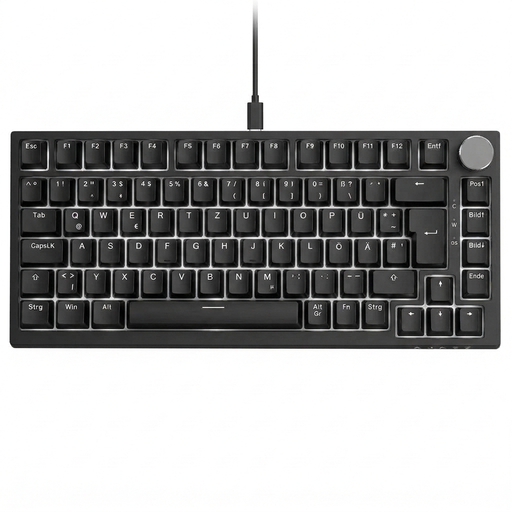
Why this product suits this profile: This wired model offers a German QWERTZ layout, 82 keys, RGB lighting and a volume control. There’s no need to pair it or manage a battery.
The German layout is clearly specified. USB-C connectivity avoids uncertainty around wireless compatibility and interruptions for charging.
82-key QWERTZ layout, hot-swap for compatible 3-pin switches and a multifunction control knob.
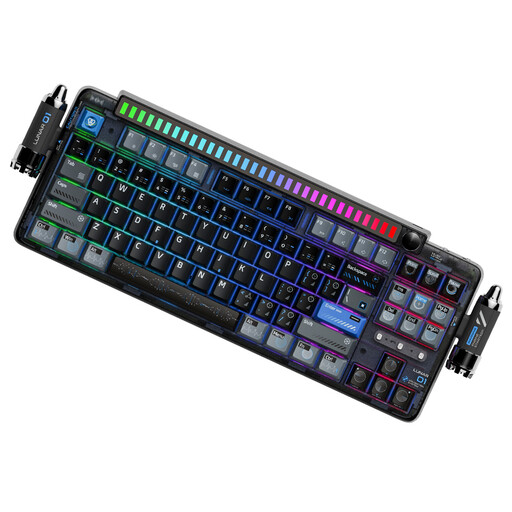
Why this product suits this profile: This 87-key QWERTY model combines a gasket-mount design, hot-swap functionality, PBT keycaps, a programmable control knob, and Bluetooth, 2.4 GHz and USB-C connectivity.
The connection types and 5-pin hot-swap support are clearly specified. PBT keycaps are less likely to develop a shine quickly.
Gasket-mount construction, 4000-mAh battery, three connection modes and programmable controls.
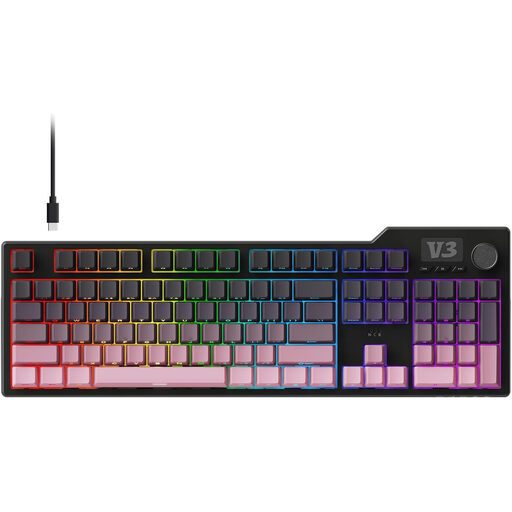
Why this product suits this profile: This full-size model with 104 keys is designed for users who regularly need a number pad, macros and a gaming keyboard with volume control.
The full layout means you don’t have to do without a number pad or navigation keys. The switches can be replaced without soldering.
104 keys, PBT keycaps, gasket construction, five dampening layers, and programmable macro and volume functions.

Why this product suits this profile: This 65% model, with a German QWERTZ layout, low-profile switches and three connection options, suits compact workspaces with a PC, laptop and tablet.
The QWERTZ layout, 2.4 GHz wireless, Bluetooth and USB-C are all clearly listed. The compact design is paired with low-profile switches.
69 keys, per-key RGB, support for up to three Bluetooth devices and CHERRY MX Low Profile Speed switches.
We’ve put together a complete, regularly updated list of products that meet these strict selection criteria and fully comply with the safety regulations in force in the EU.
For most users in Germany, a QWERTZ keyboard is the obvious choice because its labels and key layout match the German layout. Even so, check before buying that the specific model is actually offered as a QWERTZ version. You can change the language settings on QWERTY models, but the key labels will still differ.
A wireless gaming keyboard can be suitable for gaming if it has a low-latency 2.4 GHz receiver and also offers a wired USB-C mode. Bluetooth is handy for connecting several devices, but not every user finds it equally suitable for fast-paced gaming inputs. The battery indicator, charging options and receiver storage are also worth checking before you buy.
Its lifespan depends on the switches, keycaps, circuit board, case and how often you use it. Manufacturer claims such as “millions of keystrokes” usually refer to individual switches and aren’t a guarantee of the durability of the entire keyboard. A hot-swap keyboard can be easier to maintain, as compatible switches can be replaced later. Regular dry cleaning and keeping liquids away from the keyboard help prevent common damage.