
Lieferung heute & morgen

Qualitätsgarantie

Willkommens-Angebote freischalten: KOSTENLOSE Lieferung | Bis zu 80 % RABATT | Kostenlose 30-Tage-JoyPlus-Testphase
App herunterladen
A mechanical gaming keyboard should deliver precise inputs while gaming, feel comfortable when working from home and connect easily to multiple devices. Options range from compact 65% models to full-size keyboards with 104 keys. You’ll also come across terms such as hot-swap, RGB, tri-mode and custom keyboard.
Product names alone, however, tell you little about how well a keyboard will work in everyday use. Three common buying misconceptions often lead to the wrong choice:
If you regularly type in German, look specifically for an ISO-DE keyboard. It includes keys such as Ä, Ö, Ü and ß, as well as the Enter key shape typical of the German layout. Many international models, by contrast, are sold with a US layout. The key legends and positions of some special characters may then differ from the German keyboard layout.
Here are the most common sizes at a glance:
For frequent typists and office users, a German layout is often more important than a particularly compact design. Gamers who want to keep their mouse close to the keyboard may benefit from a 65% or 75% model.
Mechanical switches determine the actuation point, sound and resistance. Linear switches feel smooth as you press them, while tactile switches provide noticeable feedback. Clicky switches tend to make a much louder sound, so they may not be ideal in shared workspaces.
A hot-swap keyboard lets you replace compatible switches without soldering them. Before buying, check:
A custom keyboard with hot-swap functionality gives you more ways to customise it than a model with permanently soldered switches. However, that doesn’t automatically mean you can install any mechanical switch.
A tri-mode keyboard typically combines a USB cable, Bluetooth and 2.4 GHz wireless. These three modes suit different uses:
For wireless models, the product description should give clear details about the battery, charging port and wireless receiver. A stated battery capacity, such as 8,000 mAh, is a technical specification, not a guarantee of battery life.
An aluminium keyboard may differ from a plastic model in weight and stability thanks to its case. Other important factors include the feet, wrist rest, keycap quality and whether you can use the keyboard with a cable when needed.

Why this product suits this profile: This compact 65% keyboard offers Bluetooth, 2.4 GHz wireless and a wired connection. That makes it a good fit for PC gamers and anyone looking to save desk space.
The three connection options reduce the risk of being tied to a single wireless standard. The hot-swap PCB also lets you replace compatible switches.
65% format, RGB backlighting, hot-swap PCB and detachable wrist rest.

Why this product suits this profile: This 75% model is designed for anyone looking for a German layout, customisable components and multiple connection options in an aluminium case.
The ISO-DE layout is clearly specified. Bluetooth, 2.4 GHz and USB-C are also listed, along with a hot-swap PCB for 3-pin and 5-pin switches.
75% layout, aluminium case, 8,000 mAh battery, per-key RGB and VIA compatibility, according to the product description.
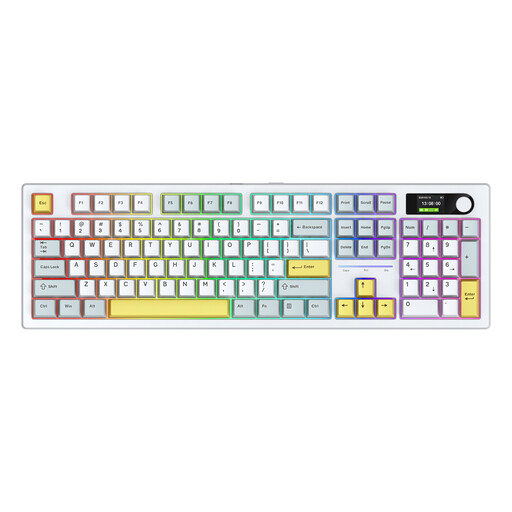
Why this product suits this profile: This full-size keyboard is for anyone who prefers a separate number pad, a colour display and a high-capacity battery for long work or gaming sessions.
The product details specify a full-size design, hot-swap switches, Bluetooth, 2.4 GHz and USB-C. This helps make the connection options clear.
104 keys, RGB lighting, colour display, hot-swap functionality and a stated battery capacity of 8,000 mAh.
We’ve put together a complete, regularly updated list of products that meet these strict selection criteria and fully comply with the safety regulations in force in the EU.
For typing in German, an ISO-DE keyboard with Ä, Ö, Ü and ß is usually the more straightforward choice. You can use the German software layout with a US keyboard, but some key legends won’t match what you type.
It depends on the wireless standard and how you plan to use it. A 2.4 GHz keyboard with a USB receiver is often used with a PC. Bluetooth is better suited to devices such as laptops and tablets. An additional wired mode is useful when the battery needs charging or you prefer a wired connection.
Its lifespan depends on the switches, keycaps, case, care and how often you use it. A hot-swap keyboard can remain customisable for longer because you can replace compatible switches. Liquids, dust and excessive force, on the other hand, can damage the PCB and mechanism.