
Lieferung heute & morgen

Qualitätsgarantie

Willkommens-Angebote freischalten: KOSTENLOSE Lieferung | Bis zu 80 % RABATT | Kostenlose 30-Tage-JoyPlus-Testphase
App herunterladen
A mechanical gaming keyboard can feel noticeably different depending on the switches, layout and connection. Particularly in FPS games like Valorant or CS2, many models boast Rapid Trigger, Hall-effect magnetic switches and an 8000 Hz polling rate. These specifications are relevant, but on their own they don't automatically lead to the right keyboard.
For PC gamers in the UK, a suitable layout, reliable software, compatibility with Windows or macOS, and solid build quality also matter. The selection below will help you put technical specs into perspective and avoid common buying mistakes.
An 8000 Hz polling rate means the keyboard can theoretically send its report to the PC up to 8,000 times per second. That equates to a calculated polling interval of 0.125 milliseconds. In practice, however, the perceived responsiveness also depends on the switch technology, firmware, USB connection, game and system.
If you only focus on the number, you might overlook important settings such as the actuation point or the quality of the driver software.
A Rapid Trigger typically works with Hall-effect magnetic switches. These detect the key's position via magnetic sensors and, on suitable models, allow software-based adjustment of the actuation and reset point.
Standard mechanical switches with metal contacts do not automatically support this function. A hot-swap keyboard is not necessarily compatible with magnetic switches either. Before buying, you should therefore check whether the keyboard supports only Hall-effect switches or also classic 3-pin or 5-pin switches.
A compact 60% keyboard often omits separate arrow, function and navigation keys. This frees up space for large mouse movements, but requires the use of Fn combinations. A 65% gaming keyboard usually offers arrow keys, while a 75% keyboard additionally integrates a compact function row. The 80% keyboard or tenkeyless variant typically retains the function keys but does away with the number pad.
For heavy typists or spreadsheet users, a full-size keyboard with 108 keys can be more practical.
For a keyboard for Valorant and CS2, an adjustable actuation point can be interesting. Some magnetic switch models allow values from around 0.1 to 4.0 millimetres. A short actuation point can support fast inputs, but may be more sensitive to accidental touches. For typing and everyday use, a longer or individually tuned point is often more comfortable.
Look out for the following details:
A wired USB-C keyboard offers a direct connection and doesn't need a battery. With wireless models, you need to distinguish between 2.4 GHz wireless, Bluetooth and wired operation. A tri-mode keyboard combines these three connection types and is ideal for switching between a gaming PC, laptop and tablet.
With wireless keyboards, you should also pay attention to battery capacity, charging port, receiver and potential switching delays. The stated polling rate does not necessarily apply in every connection mode. Often, the highest rate is reserved for wired operation.
For users in the UK, a QWERTY gaming keyboard with ISO-UK layout is usually the most straightforward choice. With US QWERTY models, the Y and Z keys are swapped, and special characters and the Enter key can be arranged differently.
PBT keycaps are more resistant to shiny wear than many ABS keycaps. An RGB mechanical keyboard offers visual customisation options, but doesn't replace good key legends and shouldn't be the sole buying criterion.

Why this product fits the profile: The 87-key layout with a German layout combines arrow and function keys with a more compact footprint. USB-C and Bluetooth connectivity, plus RGB lighting, cover typical gaming and office requirements.
The ISO-DE layout reduces the need to adapt. The hot-swap socket supports 3-pin and 5-pin switches without soldering, according to the product specifications.
QWERTZ layout, PBT keycaps, gasket-mount construction and wired or wireless operation.
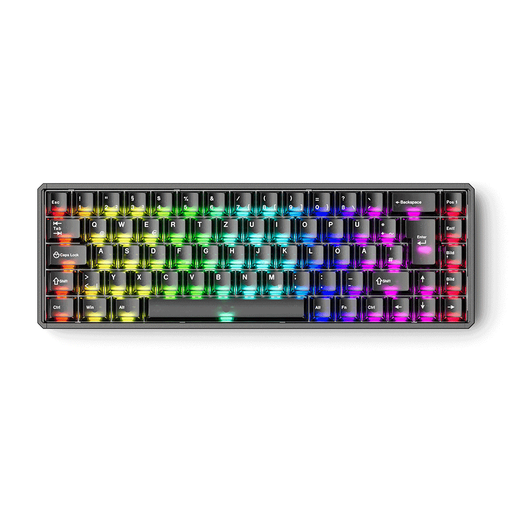
Why this product fits the profile: The ISO-DE QWERTZ layout, aluminium construction and configurable magnetic switch platform appeal to users who want to take control of settings and material choices.
The product specifications explicitly state that classic mechanical switches are not supported. This prevents false expectations when upgrading.
0.005 mm steps for RT adjustment according to the manufacturer, 8000 Hz polling rate, ISO-DE and CNC aluminium housing.

Why this product fits the profile: The full-size keyboard with number pad is aimed at users who use spreadsheets, word processing or productivity applications alongside gaming.
If you frequently need the number pad, you don't have to choose a compact keyboard with Fn layers. The technical specifications list 108 hot-swappable keys and three connection types.
Aluminium housing, leaf-spring mount, RGB lighting, 8000 mAh battery and USB-C, Bluetooth and 2.4 GHz operation.

Why this product fits the profile: The 68-key layout is ideal for players who need arrow keys while also wanting a compact footprint for sweeping mouse movements.
The specifications explicitly mention Hall-effect switches, an adjustable actuation point from 0.2 to 4.0 mm and Rapid Trigger. This clearly identifies the core FPS features.
8000 Hz polling rate according to the product description, aluminium top plate, RGB lighting and detachable USB-C cable.
We've put together a complete, regularly updated list of products that fully meet these strict selection criteria and the safety regulations in force in the EU.
No. It can shorten the polling intervals, but it's only one part of the overall latency. For many users, a suitable layout, reliable firmware and a well-tuned actuation point are more important. With a wired keyboard, you should also check whether the high polling rate is actually available in the desired operating mode.
The lifespan depends on the switches, keycaps, circuit board, usage and care. Hot-swap models make it easier to replace individual switches when they wear out. Liquids, high humidity and improper insertion can damage the circuit board or sockets. For keyboards with a battery, only a suitable USB-C charger should be used.
A 60% keyboard takes up little space, but often lacks dedicated arrow and function keys. 65% models usually offer arrow keys, while 75% and 80% keyboards integrate additional keys for navigation and productivity. For Valorant and CS2, therefore, it's not just the size that matters, but also whether the keys you're used to are accessible without awkward Fn combinations.