
Lieferung heute & morgen

Qualitätsgarantie

Willkommens-Angebote freischalten: KOSTENLOSE Lieferung | Bis zu 80 % RABATT | Kostenlose 30-Tage-JoyPlus-Testphase
App herunterladen
Finding the right mechanical gaming keyboard can quickly become overwhelming. The market is flooded with a multitude of models, all touting technical jargon and marketing promises. However, not every keyboard advertised as a "gaming keyboard" offers the precision and durability necessary for demanding PC gamers or prolific typists. To help you make the right choice, we'll highlight the most common pitfalls and explain the crucial technical features you should look for.
Many buyers invest in products that fail to meet their expectations. This is often due to clever marketing that distracts from fundamental shortcomings.
To make an informed decision, it's essential to understand the core components of a mechanical keyboard.
The heart of any mechanical keyboard is the switch beneath each key. The three most common types differ in their typing feel and acoustics:
The size of the keyboard directly impacts ergonomics and the amount of available desk space.
Modern mechanical keyboards often offer advanced features that enhance user comfort and longevity.
Based on the criteria mentioned, we have identified a few models that are well-suited for specific user groups.
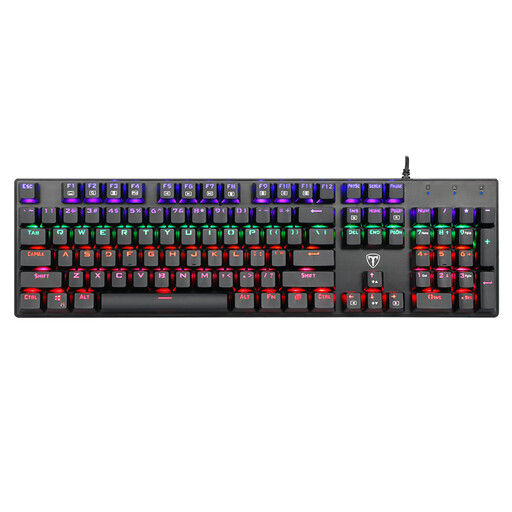
Why This Fits Their Persona: Offers an authentic mechanical typing experience with clicky Blue switches and a full feature set, including a number pad. A solid choice for anyone looking to upgrade from a membrane keyboard without a high investment.
Instead of just focusing on RGB aesthetics, this model delivers genuine mechanical Blue switches and 100% anti-ghosting—core features for precise typing and gaming.
Full 104-key layout with number pad; splash-proof design with drainage holes; 12 multimedia key combinations.
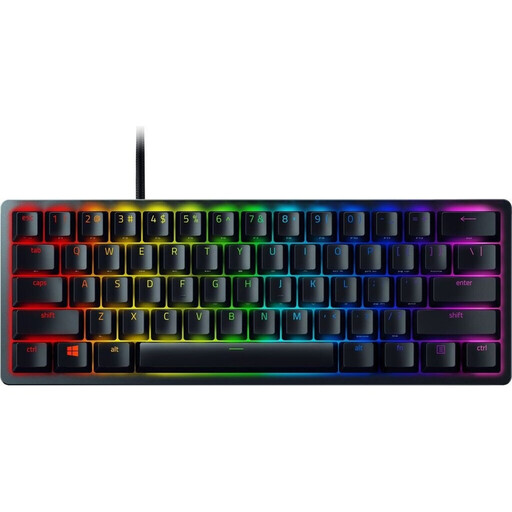
Why This Fits Their Persona: The ultra-compact 60% form factor maximises desk space for mouse movement, while the linear optical switches enable extremely fast and light keystrokes for competitive gaming. The German QWERTZ gaming keyboard layout is an added bonus.
Instead of a compromise, it offers specialised linear optical switches for maximum speed and durable PBT keycaps that won't wear down or get shiny quickly.
Razer Linear Optical Switches for lightning-fast actuation; high-quality doubleshot PBT keycaps; detachable USB-C cable.
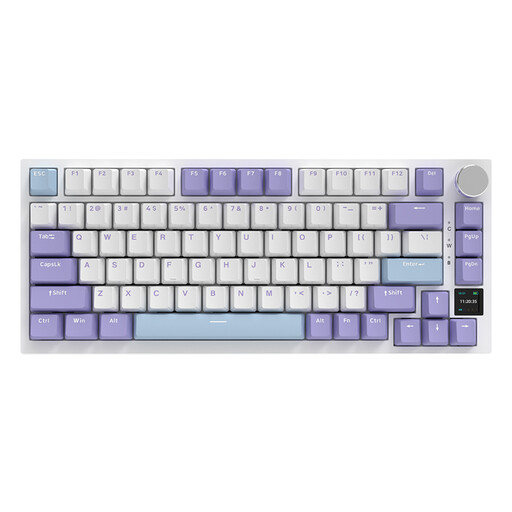
Why This Fits Their Persona: Perfect for users who want to personalise their keyboard. It offers hot-swap capability, tri-mode connectivity, and a TFT display for status updates and GIFs. The gasket-mount structure provides a cushioned, pleasant typing feel.
Goes far beyond standard features, offering a platform for true customisation with its gasket-mount structure and hot-swap sockets, rather than being a closed system.
Hot-swap keyboard for 3/5-pin switches; tri-mode connectivity (Bluetooth, 2.4G, USB-C); interactive TFT colour screen; metal volume knob.
We've compiled a complete, up-to-date list of products that fully meet these strict selection criteria and German safety regulations.
The keyboard layout specifies the arrangement of the letters. The QWERTZ layout is the standard in Germany and Eastern Europe. It differs from the international QWERTY layout primarily in the swapped positions of the "Z" and "Y" keys. Additionally, a QWERTZ keyboard provides direct access to German umlauts (?, ?, ?) and other special characters. Many of the models presented here are designed with a US QWERTY layout, which is often unproblematic for gamers who primarily use the WASD keys. However, programmers or heavy typists should consider whether a QWERTZ layout is more beneficial for their workflows.
The longevity of a mechanical keyboard depends not only on the quality of the switches but also on proper care. Regular cleaning is crucial. Remove dust and crumbs with compressed air or a soft brush. On most models, the keycaps can be removed with a keycap puller and cleaned separately with a mild soap solution. Be careful not to let any liquid get into the housing or the switches.
Modern wireless technologies have largely overcome the latency issues of previous generations. A wireless mechanical keyboard that uses a 2.4 GHz connection with a dedicated USB dongle offers a response time that is indistinguishable from a wired connection for most gamers. The main advantage is a more flexible and clutter-free desk. For professional esports players where every millisecond counts, a wired PC gamer keyboard solution often remains the first choice to eliminate any potential interference.