
Lieferung heute & morgen

Qualitätsgarantie

Willkommens-Angebote freischalten: KOSTENLOSE Lieferung | Bis zu 80 % RABATT | Kostenlose 30-Tage-JoyPlus-Testphase
App herunterladen
A mechanical gaming keyboard should respond accurately during games, feel comfortable to type on every day and work as flexibly as possible with your PC, laptop or tablet. There’s a wide choice, from compact 65% and 75% keyboards to classic full-size models with a number pad. You’ll also find different switches, RGB lighting, hot-swap sockets and several ways to connect.
However, a product name alone tells you little about how well a keyboard will suit your needs. Three common buying misconceptions can easily lead to the wrong choice:
For users in Germany, the QWERTZ layout, with Ä, Ö, Ü and ß, is particularly relevant. Some compact models, however, are sold with a QWERTY keyboard in the US layout. This can suit English-language applications or users with an international keyboard profile, but may take some getting used to when typing in German.
If you work with numbers regularly, don’t underestimate the impact of a missing number pad. For FPS games or smaller desks, however, a compact gaming keyboard can give you more room to move.
Mechanical switches differ mainly in how they actuate, the feedback they provide and the sound they make:
A hot-swap keyboard lets you replace compatible 3- or 5-pin switches without soldering. This is handy if you’re new to custom keyboards, but it doesn’t mean every switch will be compatible. Before you buy, check the socket type, switch size and any spare parts included.
Sound dampening is also worth considering. Gasket-mount designs and layers of foam can reduce vibration and case resonance. They won’t guarantee a quiet keyboard, though, as the switches, keycaps and your typing style also affect the sound.
A tri-mode keyboard typically supports:
For gaming, a USB-C cable or 2.4 GHz connection is often more practical than Bluetooth. With wireless models, it’s also worth considering the stated battery capacity alongside how much you use the lighting. RGB lighting has a greater impact on battery life than having the backlight switched off. So figures such as “up to” should be understood as manufacturer estimates under specific conditions.
If you’re looking for a mechanical keyboard for PC and Mac, also check operating system support, key legends, software and saved profiles. A dial can control the volume, lighting or other functions, but it doesn’t replace full software compatibility.

Why this product suits this profile: The 75% layout combines a compact footprint with arrow keys and a function row. The QWERTY version suits users who deliberately choose a US layout.
Three connection options mean you’re not reliant on just one wireless standard. Hot-swap support lets you change the switches later without soldering.
Tri-mode connectivity, RGB lighting, a volume dial and an 8000-mAh battery according to the product details.
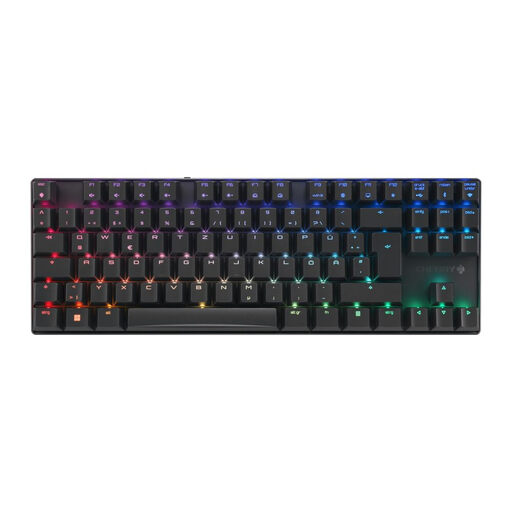
Why this product suits this profile: The German QWERTZ layout, TKL design and aluminium frame make it a compact choice for both office work and gaming.
The specifications clearly list the layout, switch type, connection options, N-key rollover and anti-ghosting. This makes it easier to check whether it suits your needs before buying.
CHERRY MX2A Brown switches, per-key RGB and three connection options, including Bluetooth.

Why this product suits this profile: The German full-size QWERTZ layout with number pad is designed for users who programme, work with spreadsheets, create content and game.
The number pad is retained, while Bluetooth, 2.4 GHz and USB-C cover a range of uses. Hot-swap support lets you customise the switches later.
TFT colour screen, multi-function dial, RGB lighting and a 10000-mAh battery according to the product details.
We’ve put together a comprehensive, regularly updated list of products that meet these strict selection criteria and fully comply with the safety regulations in force in the EU.
It depends on the connection standard. For fast-paced games, 2.4 GHz wireless or USB-C is usually the obvious choice. Bluetooth is particularly useful for office work, tablets and multi-device setups. A tri-mode model offers more flexibility than a keyboard with just one wireless connection option.
Lifespan depends on the switches, keycaps, battery and how much you use it each day. Manufacturers sometimes quote figures such as 50 or 100 million keystrokes for individual switches. This describes how a switch performs under defined conditions; it doesn’t automatically indicate how long the whole keyboard will last. Hot-swap sockets can make maintenance easier, as compatible switches can be replaced.
Lighting requires extra power. Brightness, effects, wireless standard and how often you use the keyboard all affect battery life. If you regularly use a gaming keyboard with a battery while out and about, check the battery life with the lighting on and consider whether you can also use it wired.