
Lieferung heute & morgen

Qualitätsgarantie

Willkommens-Angebote freischalten: KOSTENLOSE Lieferung | Bis zu 80 % RABATT | Kostenlose 30-Tage-JoyPlus-Testphase
App herunterladen
A high-quality mechanical gaming keyboard is an investment in precision, speed, and durability. However, the market is flooded with products whose marketing promises more than the technology delivers. Many users invest in a supposed "gaming keyboard" only to experience a mushy typing feel, worn-out keys, or a defect after just a few months. To help you navigate the options, we'll highlight the crucial criteria and show you how to avoid common purchasing pitfalls.
The most common problems when buying a mechanical keyboard are:
To make an informed decision, it's essential to understand the three core components of a mechanical keyboard. These fundamentally determine the typing feel, functionality, and durability.
Mechanical switches are the heart of every keyboard, defining the typing and gaming experience. They can be divided into three main categories:
The size of the keyboard affects not only the desk space it occupies but also its ergonomics and functionality.
For users requiring a German layout, ensuring it is a QWERTZ keyboard with the correct placement of umlauts and special characters is crucial.
Build quality and feature set are what separate basic models from high-end tools.
Based on the quality criteria mentioned, we have compiled a few models for specific user profiles.

Why This Fits Their Persona: This model is stripped down to the essentials: performance. The compact TKL format creates maximum space for the mouse. The linear CHERRY MX2A RED switches enable extremely fast reactions without any noticeable resistance, which is crucial in fast-paced games.
It relies on proven, durable CHERRY MX switches instead of no-name imitations. The sturdy construction with a metal plate prevents flex and ensures longevity, while the TKL layout is specifically tailored to the needs of gamers.
Linear MX2A Red switches for rapid inputs; compact TKL design for more mouse room; German QWERTZ layout.

Why This Fits Their Persona: This model is ideal for users who need one keyboard for both work and play. The tactile CHERRY MX2A Brown switches provide a pleasant typing experience while still being fast enough for gaming. The solid aluminium case ensures extreme stability and a premium feel.
It avoids the "wrong switch" trap by using versatile brown switches. Instead of a cheap plastic frame, it features a full aluminium case, promising above-average durability.
Tactile MX2A Brown switches for gaming and typing; solid full-aluminium frame; integrated dampening for a quieter keystroke.
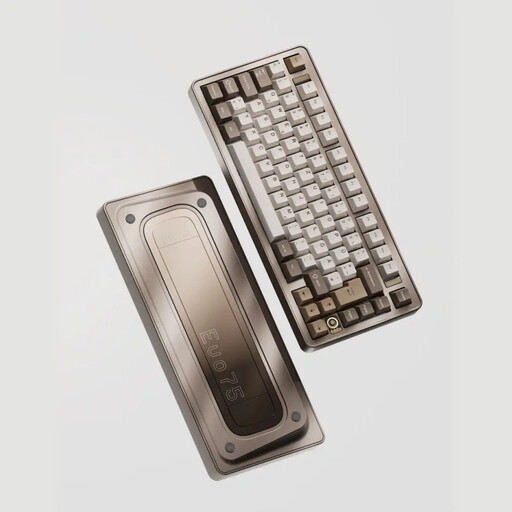
Why This Fits Their Persona: This keyboard is aimed at users seeking ultimate control and a premium experience. The hot-swap capability allows switches to be changed at will. The full aluminium case, tri-mode wireless connectivity, and ISO-DE layout make it a highly customisable and flexible tool.
It is the opposite of a rigid, off-the-shelf product. With its hot-swap feature and VIA compatibility, it offers maximum freedom in customising hardware and software, rather than locking the user into a single configuration.
Hot-swap PCB for easy switch replacement; tri-mode connectivity (Bluetooth, 2.4GHz, Wired); solid aluminium case.
If you're looking for other models that meet these selection criteria, you can find a wide range of mechanical keyboards in our full category.
1. How long does a mechanical gaming keyboard last? The lifespan heavily depends on the quality of the switches and the overall build. High-quality switches like those from CHERRY MX are often rated for over 100 million keystrokes per key, which translates to many years of durability even with intensive use. A sturdy case, ideally made of aluminium, and durable double-shot keycaps also contribute to a long lifespan.
2. What is a TKL keyboard and who is it for?TKL stands for "Tenkeyless" and refers to a keyboard without the side number pad. This more compact format is especially popular with gamers because it leaves more desk space for the mouse. This allows for freer and more precise movements, which is a significant advantage in fast-paced games like first-person shooters.
3. Are wireless mechanical keyboards suitable for gaming? Yes, modern wireless keyboards are absolutely suitable for gaming. Models that use a 2.4 GHz wireless connection offer extremely low latency that is virtually indistinguishable from a wired connection. Bluetooth connections may have slightly higher latency but are more than sufficient for most games and everyday tasks, and they offer the advantage of connecting to multiple devices.