
Lieferung heute & morgen

Qualitätsgarantie

Willkommens-Angebote freischalten: KOSTENLOSE Lieferung | Bis zu 80 % RABATT | Kostenlose 30-Tage-JoyPlus-Testphase
App herunterladen
A mechanical gaming keyboard should deliver precise inputs, suit your play style and perform reliably day in, day out. When choosing, it's not just about buzzwords like "Esports", "Ultra-Speed" or "Premium". What really matters are the actual switches fitted, the layout, the connectivity and the software support.
As Joybuy Product Recommendation Officer, I'll give you a clear, factual breakdown of the key specifications and show you which models suit different usage profiles.
An 8000-Hz polling rate describes how often the keyboard reports its inputs to the computer. This can shorten the theoretical polling interval, but it requires a wired connection, compatible firmware and a supported system. With wireless models, the transmission mode is often different from USB operation.
So a high number on the product page doesn't replace details about the connection type, actual driver support and compatibility with your operating system.
Rapid Trigger typically works with magnetic Hall Effect switches. The actuation is detected by the position of the stem, not solely by a fixed mechanical contact point. This allows you to configure the actuation and reset distance.
It's important to distinguish between:
Not every mechanical keyboard supports these features. Some models are only compatible with magnetic switches, meaning traditional mechanical switches cannot be used.
A gaming keyboard with an aluminium case can feel solid on your desk. However, you should also look at the bottom plate, the mounting style, the stabilisers, the keycaps and the quality of the USB-C port.
Even a premium case won't prevent problems caused by spills, improper hot-swapping or an unsuitable layout. For keyboards with a built-in battery, charging and safety instructions also come into play.
For fast-paced FPS games, magnetic switches with an adjustable actuation point can be appealing. However, a very low setting isn't practical for every use: when typing, you might get accidental inputs if the sensitivity is set too high.
With a classic mechanical keyboard, the switch type, actuation force and actuation distance are more important. Tactile switches like the CHERRY MX2A Brown offer a noticeable bump without an audible click, according to the product specs. That can be a good fit for a mix of gaming and typing.
A 75-percent keyboard usually offers function keys, arrow keys and a compact case. A 65-percent keyboard saves even more space but often omits the function key row. A TKL gaming keyboard keeps the F-keys and arrow keys but leaves out the separate number pad.
For users in Germany, a QWERTZ gaming keyboard with an ISO-DE layout is particularly relevant. This means Ä, Ö, Ü and ß are in their familiar positions. US-QWERTY models may require some adjustment when it comes to labelling and special characters.
A wireless gaming keyboard should clearly distinguish between Bluetooth, 2.4 GHz wireless and USB-C. For gaming, the 2.4 GHz mode is often used, while Bluetooth can be handy for multiple devices. A wired connection is often the simplest choice if polling rate and low transmission latency are your priorities.
With a hot-swap keyboard, you can change switches without soldering. Before swapping, you must turn the keyboard off or disconnect it from the computer. For Hall Effect models, check whether only specific magnetic switches are supported and whether recalibration is needed after a swap.

Why this product fits the profile: The 65-percent layout with 68 keys saves space and offers Bluetooth, 2.4 GHz wireless and wired operation. This makes it a good choice for compact desks and switching between devices.
The three connection types are clearly stated. You don't have to rely on a vague term like "wireless".
65-percent layout, aluminium case, RGB lighting and hot-swap PCB according to the product specs.
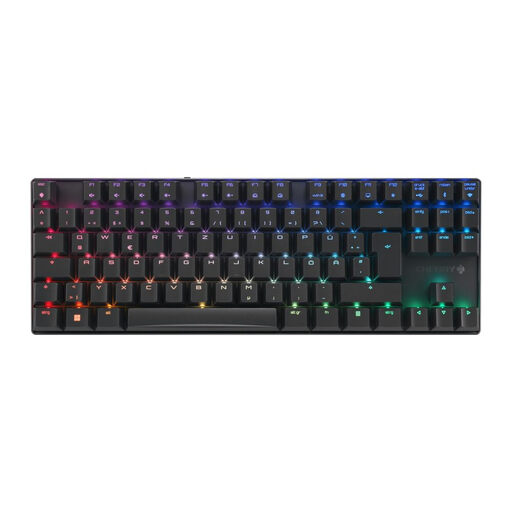
Why this product fits the profile: The German ISO-DE layout, the aluminium die-cast frame and the three connection types appeal to users who combine gaming with office work.
The technical specs list the layout, switch type, connection options and gaming mode separately.
TKL format, CHERRY MX2A Brown switches, per-key RGB, N-key rollover and USB-C, Bluetooth and 2.4 GHz connectivity.
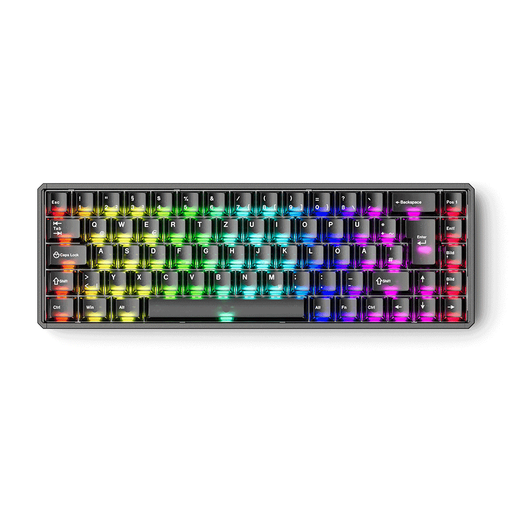
Why this product fits the profile: This model is aimed at FPS players and custom keyboard enthusiasts who need Rapid Trigger, a 68-key layout and finely adjustable inputs.
The product specs explicitly state that traditional mechanical switches are not supported. This reduces the risk of buying the wrong switches.
ISO-DE QWERTZ layout, CNC aluminium case, magnetic switches, Rapid Trigger, SOCD and a stated 8000-Hz polling rate in wired mode.
We've put together a complete, regularly updated list of products that fully meet these strict selection criteria and the safety regulations in force in the EU.
The lifespan depends on the switch type, usage, dirt and mechanical stress. Manufacturer claims like "over 100 million keystrokes" refer to specific switches and are not a guarantee for the entire keyboard. Regularly removing dust, cleaning carefully and keeping the keyboard in a dry place can help maintain reliable operation.
With wireless models, there are no regular running costs beyond the electricity for charging. A faulty battery can affect further use. Wired keyboards avoid this battery wear, but offer less flexibility in where you place them.
Not necessarily. It's particularly interesting if you need an adjustable actuation point, Rapid Trigger or dynamic inputs. For normal typing and casual gaming, a classic mechanical keyboard with a suitable switch type is often sufficient.
Both specs describe different areas. Rapid Trigger concerns the detection and reset of a key, while the polling rate describes communication with the computer. What also matters are the game, your settings, the connection, the firmware and your personal input habits.
There's no one-size-fits-all answer. Switch specifications, keycaps, the PCB, the battery and daily use all affect durability. If you choose a hot-swap keyboard, you can replace compatible switches later without having to replace the entire keyboard.