
Lieferung heute & morgen

Qualitätsgarantie

Willkommens-Angebote freischalten: KOSTENLOSE Lieferung | Bis zu 80 % RABATT | Kostenlose 30-Tage-JoyPlus-Testphase
App herunterladen
A mechanical gaming keyboard should combine fast input, comfortable typing and the features you need. In practice, though, eye-catching RGB effects, high polling rates and impressive battery figures alone don’t guarantee a good purchase. What matters is whether the layout, form factor, switches and connection suit your day-to-day needs.
Many models sold internationally use a QWERTY keyboard layout. For German users, this can mean that the Y and Z keys and special characters are in different positions. Changing the settings in Windows or macOS won’t change the legends on the keycaps. If you regularly type in German, look specifically for a QWERTZ keyboard.
Not every keyboard described as having a “Mechanical Feel” has individual mechanical switches. The MageGee TS91, for example, is described as having a membrane design with a mechanical feel. That may be enough for basic office and gaming use, but it isn’t technically the same as a mechanical keyboard with replaceable switches.
A Rapid Trigger keyboard or Hall Effect keyboard can offer particularly precise actuation adjustments. These features are mainly aimed at players who need very short actuation distances in compatible games. For office work, strategy games or extended typing sessions, layout, noise levels and typing comfort are often more important than a high polling rate.
Also check the actual dimensions. A compact gaming keyboard isn’t automatically more ergonomic if you can only access important commands using key combinations.
Linear switches have a smooth keystroke with no perceptible bump. Tactile switches provide feedback when they actuate, while clicky switches can also make a distinct sound. Consider the noise level if you share an office or use your keyboard late at night.
A hot-swappable keyboard lets you replace compatible switches without soldering. Check whether it supports 3-pin or 5-pin switches. Hall Effect models have different requirements: according to its product details, the AULA WIN60HE is designed exclusively for magnetic Hall Effect switches. Standard mechanical switches aren’t compatible.
Gasket mounts, foam layers and PBT keycaps can affect typing feel, sound and durability. However, these features don’t replace the need to check the layout, connection and software compatibility.
A wired USB-C connection doesn’t need a battery and provides a consistent connection. A wireless gaming keyboard gives you more flexibility, but needs charging and may require an available USB receiver for 2.4 GHz connections.
A tri-mode keyboard typically combines:
Check how many devices you can pair and whether the software works with Windows and macOS. An RGB keyboard or a keyboard with RGB lighting can make the keys easier to see and lets you customise lighting effects, but it also affects battery life. The Alienware AW920K, for example, is rated for up to 42 hours with RGB lighting at 50% brightness and up to 110 hours without RGB.
A dial can control the volume, media playback or custom-programmed commands. It’s especially handy if you often adjust audio settings while gaming, streaming or working.
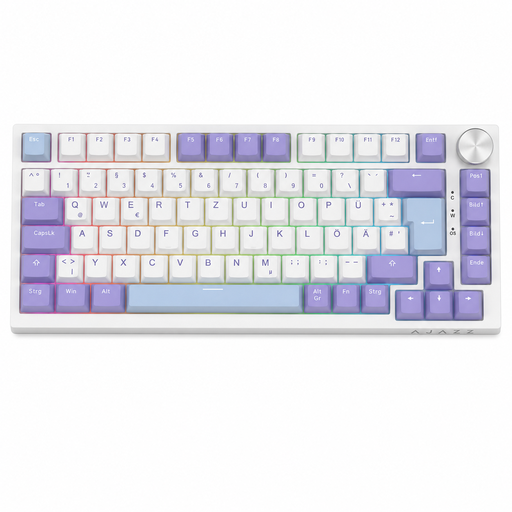
Why this product suits this type of user: Its 75% layout with 82 keys, German QWERTZ layout and USB-C connection combines a compact footprint with essential navigation and function keys.
The product details explicitly specify a German QWERTZ layout and genuine mechanical Sea-Salt switches, rather than simply a mechanical typing feel.
Hot-swap support for compatible 3-pin switches, RGB lighting and a volume dial.
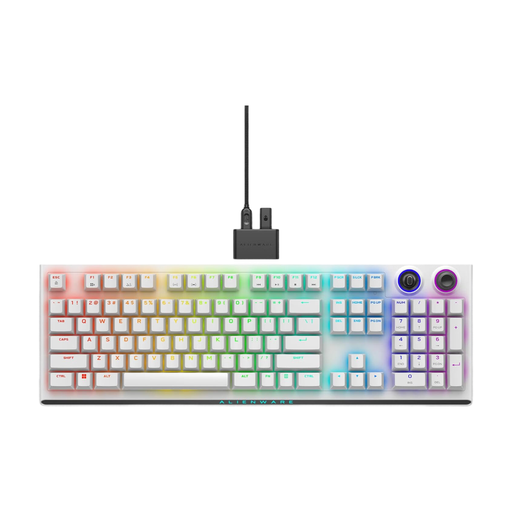
Why this product suits this type of user: This model is for anyone looking for a mechanical gaming keyboard with multiple connection options, programmable controls and durable keycaps.
You’re not limited to a wireless connection: 2.4 GHz, Bluetooth 5.1 and USB-C are all available. The CHERRY MX Red switches and double-shot PBT keycaps are clearly specified.
N-key rollover, anti-ghosting, a programmable dial and connections to multiple devices.

Why this product suits this type of user: Its compact 60% form factor is aimed at players who prefer a smaller footprint and adjustable actuation for compatible applications.
The product description clearly states that only Hall Effect switches can be used. This lets you check the compatibility limits before buying.
Adjustable actuation and Rapid Trigger mode, with a specified polling rate of 8,000 Hz.
We’ve put together a complete, regularly updated list of products that fully meet these strict selection criteria and the safety regulations in force in the EU.
For regular typing, a QWERTZ keyboard is usually more straightforward because the key legends match the German layout. If you’re considering a QWERTY model, check whether a German keycap set and compatible software layout are available.
Lifespan depends on the switch type, how often you use it, exposure to dirt and the quality of its construction. Depending on the model, manufacturers quote figures ranging from several million to over 100 million keystrokes. These are technical ratings, not a guarantee of a particular lifespan. Keycaps, cables, batteries and stabilisers can wear out independently of the switches.
With a wired keyboard, RGB lighting mainly affects USB power consumption. With a wireless gaming keyboard, it shortens the time between charges. Brightness, animations and the number of illuminated keys all affect power use. If you need the longest possible battery life, you can dim or switch off the lighting.