
Lieferung heute & morgen

Qualitätsgarantie

Willkommens-Angebote freischalten: KOSTENLOSE Lieferung | Bis zu 80 % RABATT | Kostenlose 30-Tage-JoyPlus-Testphase
App herunterladen
As a Joybuy Product Recommendation Officer, I see users every day get confused by unclear product descriptions and exaggerated marketing promises. Especially with a mechanical gaming keyboard, the wrong choice can lead to frustration and unnecessary expense. Many models entice you with flashy lighting but hide critical weaknesses in build quality or functionality. This guide will help you separate the wheat from the chaff and find a keyboard that is perfectly tailored to your needs.
Before we dive into the key features, let's highlight the typical traps that often lead to a bad purchase.
To avoid these pitfalls, focus on three fundamental technical features that determine your keyboard's performance and longevity.
The mechanical switches under each key define the typing feel and acoustics. The choice depends heavily on your personal preference and primary use case. The most well-known variants often come from manufacturers like CHERRY MX.
Another important feature is the hot-swappable keyboard. Such models allow you to change the switches without soldering. This offers the flexibility to try out different switch types or easily replace a faulty switch.
The size of the keyboard has a direct impact on your setup's ergonomics and the available desk space.
Solid construction is crucial for longevity. An aluminum case or an integrated metal plate provides stability and prevents the keyboard from sliding during intense use. Also, pay attention to the quality of the keycaps. "Double-shot" keycaps, where the legend is made from a second piece of plastic, are more wear-resistant than simply printed caps. A wired connection via USB remains the standard for a PC gaming keyboard, as it ensures a stable and latency-free signal transmission.
Based on the criteria above, we have identified a few models that represent a smart choice for specific user profiles.
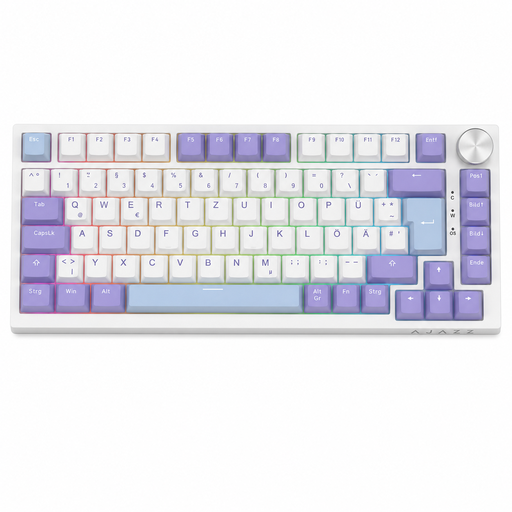
Why This Fits Their Persona: This model is ideal for users looking to enter the world of mechanical keyboards without sacrificing modern features. It offers a thoughtful 75% layout, a practical volume knob, and even hot-swappability at a very accessible price.
The AK820 offers a full German QWERTZ layout and a solid, dampened construction (gasket-mount) typically found only in higher price brackets. It thus avoids the trap of cheap keyboards with unusable layouts and rattly build quality.
Hot-swappable sockets for easy switch replacement; integrated volume knob for quick media control.

Why This Fits Their Persona: Perfect for users who want an extremely durable, high-quality keyboard for both gaming and daily work. The tactile switches are an ideal compromise for both use cases, and the build quality is designed for longevity.
This model counters the "poor build quality" trap with a massive full aluminum frame and high-quality CHERRY MX2A switches. It doesn't skimp on substance, instead investing in stability and a first-class typing experience.
Exceptional stability and durability thanks to the aluminum frame; tactile MX2A Brown switches for precise typing and gaming.

Why This Fits Their Persona: The ultra-compact 65% layout maximizes desk space for the mouse, which is crucial for FPS players who use low mouse sensitivity. Linear switches and a high polling rate are designed for maximum speed and responsiveness in competition.
This model avoids the "overhyped features" trap by focusing on performance-critical aspects. Instead of unnecessary gimmicks, it offers Super-Scan technology (0.5 ms) and hot-swappability, which creates real value for ambitious gamers.
Ultra-compact 65% layout for maximum mouse room; fast, linear MX2A Red switches.
We have compiled a complete, up-to-date list of products that fully meet these strict selection criteria and German safety regulations.
1. How loud is a mechanical keyboard, really? The volume depends almost exclusively on the type of switch used. Clicky switches (e.g., Blue switches) are intentionally loud. Tactile (e.g., Brown switches) and especially linear switches (e.g., Red switches) are significantly quieter. A quiet mechanical keyboard with linear or special silent switches can be used in an office environment without any issues. Additionally, small rubber rings (O-rings) placed under the keycaps can further dampen the sound of bottoming out.
2. What does "hot-swap" mean on a keyboard? A hot-swappable keyboard has special sockets on the PCB that allow you to remove and replace the mechanical switches without soldering. This offers two main advantages: First, you can customize the typing feel of your keyboard by installing different types of switches. Second, you can easily replace a faulty switch yourself, which significantly extends the keyboard's lifespan.
3. Do I need special software for an RGB keyboard? Not necessarily. Many keyboards with RGB keyboard lighting allow you to control basic effects (colors, brightness, patterns) directly via key combinations (e.g., FN + function keys). Optional software, like the CHERRY UTILITY Software, is typically needed for advanced customizations, such as programming per-key lighting, creating complex macros, or synchronizing the lighting with other devices. However, it is usually not required for basic functions.