
Lieferung heute & morgen

Qualitätsgarantie

Willkommens-Angebote freischalten: KOSTENLOSE Lieferung | Bis zu 80 % RABATT | Kostenlose 30-Tage-JoyPlus-Testphase
App herunterladen
By a Joybuy Product Recommendation Officer, August 29, 2026
The search for a suitable mechanical gaming keyboard with a German QWERTZ layout can quickly become overwhelming. The market is saturated with technical jargon, marketing promises, and a vast array of models. Many users invest in a keyboard only to find after a few months that it doesn't meet their needs, or that its advertised features offer little practical value.
This guide is designed to help you understand the key features and avoid common purchasing pitfalls. We will focus on objective criteria so you can make an informed decision based on technical facts, not advertising slogans.
Before we dive into the technical details, it's important to be aware of three common traps that often lead to buyer's remorse:
To make the right choice, you should focus on a few crucial technical parameters.
The keyboard layout determines not only the number of keys but also its footprint on your desk.
The switches are the heart of any mechanical keyboard. The most common types are:
Modern keyboards offer much more than just standard features.
Here are some models that are suitable for specific user profiles based on objective features.
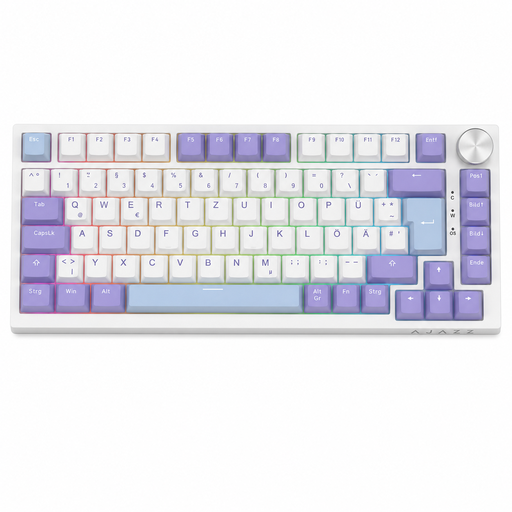
Why This Fits Their Persona: This model offers features often reserved for more expensive keyboards, such as hot-swap capability, a gasket-mount structure, and a volume knob. Its compact 75% format with a German QWERTZ layout is ideal for gaming setups with limited space.
Instead of relying on resource-hungry software, this model focuses on tangible hardware advantages. The gasket-mount construction objectively improves the typing feel and acoustics compared to basic tray-mount keyboards.
Full hot-swap capability for 3-pin switches and a dedicated rotary knob for volume control offer high practical value and extensive customisation options.

Why This Fits Their Persona: This model combines a full 104-key layout with a number pad for productivity with flexible, wireless tri-mode connectivity (Bluetooth/2.4G/USB-C) and gaming-oriented features like a TFT colour screen.
It focuses on functional versatility rather than purely cosmetic gimmicks. The hot-swap capability and gasket-mount structure provide long-term value through easy maintenance, customisability, and a superior typing feel.
The combination of a full layout, tri-mode connectivity, and an integrated TFT screen for status display makes it a versatile tool for both work and play.

Why This Fits Their Persona: Ideal for users who need maximum desk space for their mouse and prefer a minimalist setup. The compact 65% layout and slim low-profile build are optimised for performance-oriented and design-conscious users.
This model is built on the proven quality and clearly defined performance metrics of CHERRY MX Low Profile Speed switches. Instead of vague marketing terms, you get switches with a demonstrably short travel distance and linear characteristics for rapid response.
The combination of an ultra-compact 65% form factor, low-profile design, and flexible tri-mode connectivity delivers high performance in a minimal footprint.
We have compiled a complete, up-to-date list of products that fully meet these strict selection criteria and German safety regulations.
Linear switches have a consistently smooth keystroke and are often quieter, making them popular for fast-paced gaming. Tactile switches provide a noticeable but quiet bump at the point of actuation. Clicky switches add an audible click to this bump, which many prolific typists appreciate.
Yes, a hot-swap keyboard can be very useful even for beginners. It offers the flexibility to try out different switch types without having to buy an entirely new keyboard. It also simplifies repairs if a single switch fails, which can extend the keyboard's lifespan.
For many gamers, especially in fast-paced games like first-person shooters, a compact layout like TKL (Tenkeyless) or 75% is advantageous. Omitting the number pad creates more desk space for wide mouse movements. This can improve ergonomics and in-game responsiveness. However, for strategy games or productivity tasks that require the number pad, a full-size layout remains a solid choice.