
Lieferung heute & morgen

Qualitätsgarantie

Willkommens-Angebote freischalten: KOSTENLOSE Lieferung | Bis zu 80 % RABATT | Kostenlose 30-Tage-JoyPlus-Testphase
App herunterladen
A mechanical gaming keyboard with a QWERTZ layout needs to offer more than eye-catching RGB lighting. For German-speaking users, correctly positioned special characters, a suitable form factor, reliable connections and switches that match their intended use are particularly important. If you fail to check these points before buying, you may end up paying for features that offer little benefit in everyday use.
Some listings use terms such as “German keyboard” or “German gaming keyboard”, even though the version shown or actually delivered has a US QWERTY layout. This is particularly common with compact models in a 60% or 65% form factor. Before buying, check that the keycap labelling, product variant and information about the German QWERTZ keyboard layout all match.
The positions of Z and Y, the umlauts Ä, Ö and Ü, and the German Enter key are particularly important. With a mechanical QWERTZ keyboard, the software mapping may also differ from the physical layout.
A polling rate of 8,000 Hz means that the keyboard reports data to the computer more frequently. However, this does not automatically result in a noticeable advantage in every game. The operating system, game engine, USB connection and the actual switch technology also affect responsiveness.
With a Rapid Trigger keyboard or Hall Effect keyboard, actuation is additionally detected using magnetic sensors. Depending on the software, these models allow you to adjust the actuation point. This feature is not essential for word processing or casual gaming, but it can be relevant for users who specifically prefer short actuation distances.
A hot-swap keyboard allows you to replace switches without soldering. This is convenient, but not every PCB accepts every switch. The AJAZZ AK820, for example, is described as supporting compatible 3-pin switches, while other models support both 3-pin and 5-pin switches. A Hall Effect keyboard, on the other hand, requires suitable magnetic switches. Standard mechanical switches are not automatically compatible.
The form factor determines which keys are included as standard:
A compact gaming keyboard gives you more room to move your mouse. However, if you regularly work with spreadsheets, text formatting or keyboard shortcuts, you should not choose based solely on the smallest width.
Linear switches move without a clearly noticeable tactile bump. They are often preferred by gamers who want consistent key presses. Tactile switches provide noticeable feedback when actuated. Clicky switches also produce a distinct sound and are not always suitable for shared spaces.
Descriptions such as “mechanical feel” or “mechanical typing feel” do not necessarily refer to a mechanical keyboard. The MageGee TS91 model, for example, is described as a membrane keyboard with a mechanical typing feel. If you want genuine mechanical switches, look for details such as mechanical switches, hot-swap sockets or a specific switch name.
A wired keyboard with USB or USB-C requires neither a battery nor wireless pairing. This reduces potential connection issues and makes it suitable for desktop gaming PCs and workstations. A detachable USB-C cable can make transport and cable management easier.
A keyboard with a volume control gives you quick access to media volume. At a suitable brightness, RGB lighting improves the visibility of the lettering, but it cannot replace a correct layout or suitable switches. For a keyboard for PC and Mac, you should also check whether special functions, software and key mapping work with both systems.

Why this product suits this profile: The 82-key layout combines a German QWERTZ layout with function keys, arrow keys and navigation keys. This makes it suitable for those getting started with mechanical keyboards, as well as for gaming and everyday office work.
The product description explicitly states QWERTZ, 82 keys and compatibility with 3-pin hot-swap switches. This makes it easier to check the key details before buying.
Wired USB-C connection, volume control, RGB lighting and hot-swap functionality.
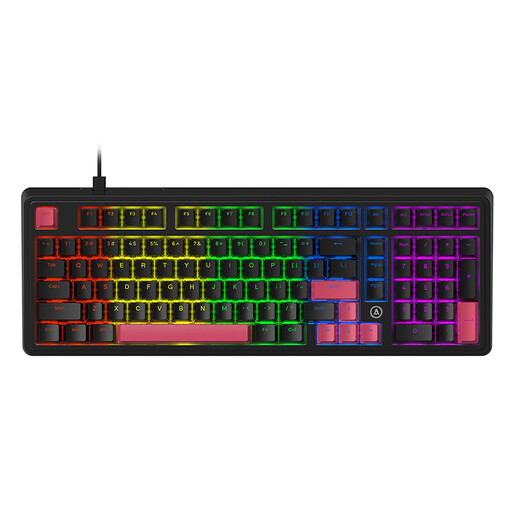
Why this product suits this profile: The 98% form factor provides more keys than a typical 75% keyboard while remaining more compact than a traditional full-size model. It is aimed at users looking for customisation options and extensive features.
The product details specify hot-swap support for 3-pin and 5-pin switches, as well as several layers of sound dampening. Compatibility should still be checked before replacing the switches.
PBT keycaps, linear pre-lubricated switches, gasket structure and five specified dampening layers.
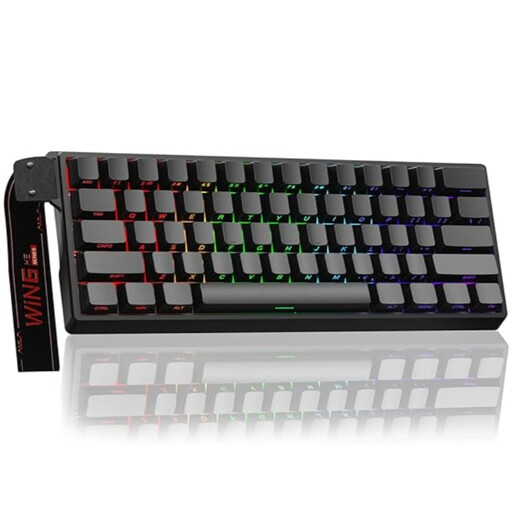
Why this product suits this profile: The compact 60% form factor, magnetic switches and adjustable actuation appeal to users who need little desk space and have a specific interest in Rapid Trigger technology.
The details explicitly state that only Hall Effect switches are compatible. This makes it clear before buying that the wrong switch selection should be avoided.
Magnetic switches, hot-swap design, adjustable actuation point and Rapid Trigger mode according to the product details.
For the AULA and other 60% models, you should also check whether the selected variant has a German QWERTZ layout. Some versions are offered with a US layout.
We have put together a complete, regularly updated list of products that fully meet these strict selection criteria and the safety regulations applicable in the EU.
A 75% keyboard is practical for many users because the function keys, arrow keys and navigation keys remain directly accessible. A 60% keyboard saves more space but requires Fn combinations. If you frequently enter numbers, choose a version with a number pad or a full-size keyboard.
Lifespan depends on the switches, keycaps, PCB, cable and usage. Manufacturer specifications for individual models sometimes state up to 50 million keystrokes for certain switches. This figure is a technical guideline, not a guarantee of the lifespan of the entire keyboard. Dust, liquid and excessive force can shorten its service life.
A wired keyboard normally draws its power via USB. RGB lighting increases consumption compared with having the lighting switched off, but it does not require a separate battery. If you want to reduce energy use, you can adjust the brightness and lighting effects or disable the lighting.