
Lieferung heute & morgen

Qualitätsgarantie

Willkommens-Angebote freischalten: KOSTENLOSE Lieferung | Bis zu 80 % RABATT | Kostenlose 30-Tage-JoyPlus-Testphase
App herunterladen
A mechanical gaming keyboard QWERTZ should enable fast input while retaining the familiar German key labels. In practice, however, searches often return models with US layouts, unclear switch specifications or lighting features that prove less relevant in everyday use than expected.
As a Joybuy Product Recommendation Officer, I filter the most important product data according to transparent criteria. This makes it easier to determine whether a German gaming keyboard really suits your setup, playing style and workspace.
Many compact models are advertised as gaming keyboards but feature a QWERTY US layout. The positions of “Z” and “Y”, special characters and the shape of the Enter key differ from the German standard. While this can sometimes be adjusted for gaming, it can quickly lead to typing errors when writing in the office or working from home.
Before buying, look specifically for “German QWERTZ”, “QWERTZ DE” or “German layout” in the technical specifications. The language used in the product description alone is not sufficient proof.
Some models use membrane or dome switches and merely describe a mechanical typing feel. This can be a sensible option for budget-conscious users, but it does not correspond to the way a mechanical keyboard with individually replaceable switches works.
If you are looking for a genuine mechanical keyboard, look for details such as Mechanical Switches, the switch type, hot-swap compatibility and the supported pin count. For example, according to its product data, the uRage Exodus 220 TKL is a membrane keyboard. It therefore should not be considered equivalent to a mechanical gaming keyboard.
A mechanical keyboard with RGB may offer visual customisation, but it does not automatically improve typing accuracy. The key layout, switch characteristics, anti-ghosting and connection to the computer are more important.
For an RGB keyboard for PC, you should also check whether the lighting only offers preset effects or whether individual keys, brightness and speed can be adjusted. Onboard memory is also useful if the keyboard is used with several Windows PCs.
The main keyboard formats differ considerably:
Linear switches provide a smooth keystroke without a noticeable tactile bump. They are often chosen for fast-paced gaming inputs. Tactile switches provide feedback when activated, while clicky variants can be clearly audible.
A hot-swap keyboard allows compatible switches to be replaced without soldering. Pin compatibility must be checked: some models support 3-pin switches, while others support both 3- and 5-pin switches. Hall Effect keyboards such as the AULA WIN60HE use magnetic switches and are not automatically compatible with conventional mechanical switches.
A wired USB-C gaming keyboard does not require a battery and offers a straightforward connection. The cable length and the position of the connector are relevant when planning your desk setup. Anti-ghosting and N-key rollover help the keyboard correctly register multiple keys pressed at the same time.
An integrated volume control is particularly useful for gaming, video conferences and streaming. With a keyboard with volume control, check whether the dial also supports muting when pressed. Adjustable feet and a suitable wrist rest can affect typing comfort, but they do not replace an ergonomic sitting position and regular breaks.
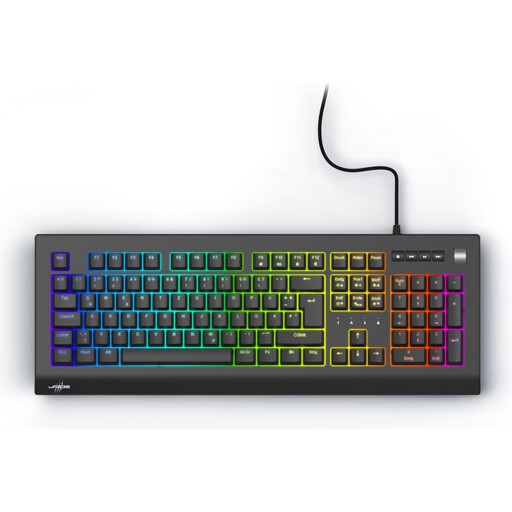
Why this product suits the profile: This full-size model combines a German layout with a number pad, making it suitable for users who want to use one keyboard for gaming and everyday office tasks.
The product data explicitly lists QWERTZ DE, mechanical Outemu Red switches and a 100% layout. This makes the layout and switch technology easier to assess.
Number pad, volume dial, programmable keys, RGB lighting and N-key rollover.

Why this product suits the profile: The compact 82-key layout retains function keys, arrow keys and navigation keys, while also creating more space for mouse movement.
The specifications list a German QWERTZ layout, hot-swap support for compatible 3-pin switches and a USB-C connection. This means the switches can be replaced without soldering.
Gasket construction, five layers for noise reduction, RGB lighting, volume dial and full-key hot-swap.

Why this product suits the profile: For users who switch between gaming, office work and mobile workspaces, this model offers a 75% layout as well as wired, Bluetooth and 2.4 GHz connectivity.
The product details specify QWERTZ DE, hot-swap support for 3- and 5-pin switches and a USB-C mode. For wireless use, battery life and wireless mode should be checked against the current offer details before buying.
Three connection options, 75% layout, replaceable switches, RGB lighting and volume control.
We have put together a complete, regularly updated list of products that fully meet these strict selection criteria and the safety regulations applicable in the EU.
Yes. A German QWERTZ layout is particularly practical when the same keyboard is used for gaming, emails and word processing. TKL and 75% models save space, while full-size keyboards offer a number pad for spreadsheets and entering numbers.
Lifespan depends on the switch type, usage and build quality. Manufacturers often specify a certain number of keystrokes, such as up to 50 million for some models. This figure is a technical guideline, not a guarantee of the lifespan of the entire keyboard. Cables, stabilisers, keycaps and electronics can wear out independently.
A wired RGB keyboard normally draws its power via USB. Consumption depends on the brightness, the number of illuminated keys and the lighting mode. On wireless models, activated RGB lighting will generally reduce the available battery life. If you want to work for a long time without charging, you can dim or switch off the lighting.