
Lieferung heute & morgen

Qualitätsgarantie

Willkommens-Angebote freischalten: KOSTENLOSE Lieferung | Bis zu 80 % RABATT | Kostenlose 30-Tage-JoyPlus-Testphase
App herunterladen
A mechanical gaming keyboard should provide precise inputs, feel comfortable to type on and fit your desk. In practice, three common buying mistakes often lead to the wrong choice: buying a compact keyboard only to find that it’s missing important keys, mistaking a US layout for a German one, or assuming that RGB lighting means better performance.
This buying guide explains which specifications really matter and which models suit different needs.
In Germany, the QWERTZ keyboard is standard. On a US QWERTY keyboard, the Y and Z keys are in different positions, and the special characters, Enter key and key labels also differ. This can take some getting used to when typing in German, entering passwords or using keyboard shortcuts.
A US layout may suit gamers, programmers or users of international software. However, if you regularly type in German, look specifically for “German Layout”, “QWERTZ” or “German layout”.
A 60% keyboard usually omits the function keys, arrow keys and separate navigation cluster. A 65% keyboard often adds arrow keys, while a 75% keyboard also includes a row of function keys. A TKL keyboard typically leaves out only the number pad.
Before buying, check whether you’ll need the F keys, arrow keys, Home, End or Page Up and Page Down in everyday use. For many people, a 75% mechanical keyboard offers a practical balance between saving space and ease of use.
RGB lighting, “Gaming Mode” and a high polling rate don’t, on their own, tell you how comfortable a keyboard will be to use. Important factors include:
If desk depth is limited, compact mechanical keyboards in 60%, 65% or 75% layouts are worth considering. If you need plenty of room for your mouse while gaming, doing without the number pad can help. For spreadsheets, accounts or lots of number entry, a full-size keyboard with a separate number pad is more practical.
A 75% keyboard often strikes a better balance than a 60% model: it keeps the arrow keys and function row but leaves out the number pad.
With traditional mechanical switches, a keypress is registered as the physical switch moves. Magnetic gaming keyboards with Hall Effect switches instead detect the position of the switch. Depending on the model, you can adjust the actuation point and reset behaviour using software.
A Rapid Trigger keyboard can register a key again after only a small amount of upward movement. This is particularly useful for quick changes of direction in compatible games. Specifications such as a 0.1 mm actuation point or an 8,000 Hz polling rate are useful technical details, but they’re no substitute for suitable in-game settings, reliable software and a suitable connection.
A gasket-mount keyboard uses flexible gaskets to support the plate or PCB. Combined with foam layers, this can affect the typing feel and sound. It isn’t an automatic guarantee of quality: the overall construction, switches, keycaps and build quality still matter.
A keyboard with a volume knob makes it easier to control media directly on the device. For streaming, video calls or gaming, a dial is often quicker to use than a keyboard shortcut.
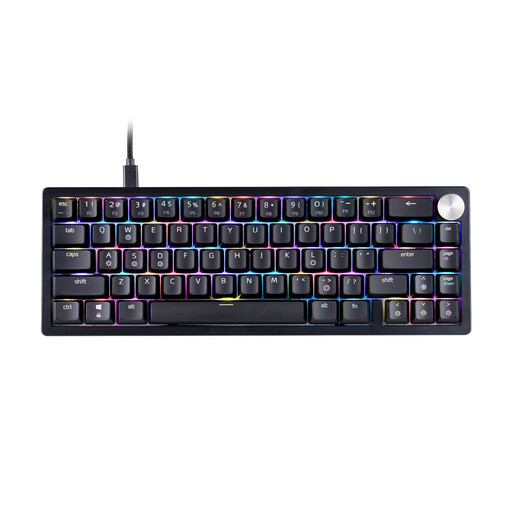
Why it suits this user: The 65% layout saves space while retaining the important arrow keys. Be sure to check that you’re happy with the US QWERTY layout before buying.
The product specifications list the form factor, switch type, RGB lighting and USB-C cable separately. This makes it easier to check the size and features before buying.
65% layout, XPG Red switches, RGB LED lighting, three-stage height adjustment and detachable USB-C cable.

Why it suits this user: For those looking to use one keyboard for gaming, working from home and connecting to multiple devices, this model combines a 75% layout with tri-mode connectivity.
Its three connection options – Bluetooth, 2.4 GHz and USB cable – mean you don’t have to rely on just one type of connection. The layout retains the arrow and function keys.
Hot-swap support for 3- and 5-pin switches, 4,000 mAh battery, 16.8-million-colour RGB and a multifunction knob.

Why it suits this user: This 65% model is aimed at users looking for a compact keyboard for fast-paced PC games, with an adjustable actuation point.
The specifications explicitly mention magnetic switches, an adjustable actuation point and Rapid Trigger. This makes the functionality clearer than vague claims about response speed.
Hall Effect switches, adjustable actuation point from 0.2 to 4.0 mm, Rapid Trigger, 8,000 Hz polling rate and USB-C.

Why it suits this user: The German QWERTZ layout makes this keyboard a good fit for frequent typists, programmers and anyone switching between gaming and productive work.
The product is clearly labelled as German QWERTZ and uses a wired USB-C connection. That means no confusion over the layout and no need to plan around battery life.
82 keys, QWERTZ layout, hot-swap support for compatible 3-pin switches, gasket mount, RGB lighting and a volume knob.
We’ve put together a complete, regularly updated list of products that meet these strict selection criteria and fully comply with the safety regulations in force in the EU.
Yes, as long as the noise level and layout are right for you. Linear switches or dampened cases can work well in shared spaces. A gasket-mount keyboard with foam layers may alter the sound, but it’s still important to be considerate of others.
Its lifespan depends on the switches, keycaps, cable, battery and how often you use it. Hot-swap models let you replace compatible switches without replacing the entire keyboard. Spills, heavy dirt build-up and damaged USB ports can shorten its useful life, regardless of the manufacturer’s claims.
A tri-mode keyboard offers Bluetooth, 2.4 GHz and USB-C, making it suitable for use with multiple devices. For competitive gaming, players often use a wired connection or 2.4 GHz mode. Check the battery capacity, charging time, wireless range and how to switch between connection modes.