
Lieferung heute & morgen

Qualitätsgarantie

Willkommens-Angebote freischalten: KOSTENLOSE Lieferung | Bis zu 80 % RABATT | Kostenlose 30-Tage-JoyPlus-Testphase
App herunterladen
A mechanical gaming keyboard should register your inputs accurately, suit your setup and remain practical during long gaming or typing sessions. But there are plenty of models to choose from, often making similar promises: RGB lighting, ultra-fast response times, “ergonomic” designs or flexible switch options. Not every advertised feature will actually matter for the way you use your keyboard.
This buying guide explains what PC and console gamers, streamers, content creators, home workers and frequent typists in the UK should look for. We focus on QWERTZ gaming keyboards, form factor, switch type, connectivity and extra features.
A compact keyboard may look like a German model in photos, but actually have a US QWERTY layout. The positions of Z and Y, as well as special characters, differ significantly. If you regularly type in German, look specifically for “DE”, “German” or QWERTZ. The number of keys alone won’t tell you how they’re arranged.
An RGB keyboard can look great, but lighting is no substitute for the right switch or a reliable connection. What matters is whether you can adjust brightness and effects, and whether the lighting is compatible with any software you plan to use. Some models only have single-colour backlighting, even when the product images show colourful effects.
A 60% or 65% keyboard saves space, but often does away with the function row, navigation keys or arrow keys. A 75% keyboard usually offers a better balance: it’s compact but retains important controls. If you work with numbers in the office, you may still need a separate number pad.
For German-speaking users, checking for a genuine QWERTZ layout comes first. Then make sure the form factor suits your desk and how you plan to use the keyboard:
Check the listed dimensions too. A few centimetres can make a difference if you have a narrow desk or a large mouse mat.
Mechanical switches mainly differ in how they feel when pressed, how loud they are and how much force they need. Linear switches move without a noticeable tactile bump and are often chosen for fast inputs. Tactile switches provide feedback when activated, while clicky switches also make a distinct clicking sound.
A hot-swappable keyboard has sockets for replaceable switches. Compatible 3-pin or 5-pin switches can be changed without soldering. Check that the exact compatibility is listed in the product description before you buy. Hot-swap does not automatically mean every switch will fit.
The case, plate, stabilisers and sound-dampening materials also affect the build and noise level. Descriptions such as “Five-Layer Sound Insulation Pad” refer to a specific feature, but are not a standardised measurement of noise.
A wireless mechanical keyboard gives you more freedom to move, but needs charging or batteries and must be paired with your chosen device. Bluetooth is particularly useful for connecting to multiple devices and for mobile workstations. A 2.4 GHz connection usually uses a USB receiver. For long gaming sessions, a wired USB-C connection can be a good choice, as you won’t need to keep an eye on the battery level.
Check for:
A rotary dial for volume control can make things easier when gaming, streaming or working. Even so, check whether turning and pressing the dial trigger different functions.
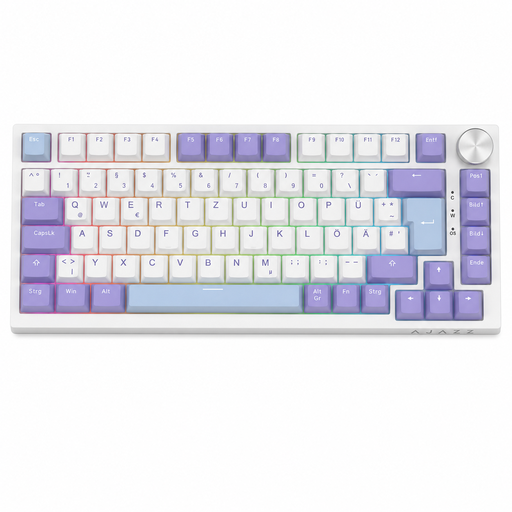
Why this product suits this type of user: The German QWERTZ layout, 82 keys and wired USB-C connection make it a straightforward choice for gaming, office work and everyday use.
The product specifications explicitly state that it has a German QWERTZ layout. The wired connection avoids interruptions for charging or pairing.
75% layout, linear Sea-Salt switches, hot-swap support for compatible 3-pin switches, RGB lighting and a volume control.
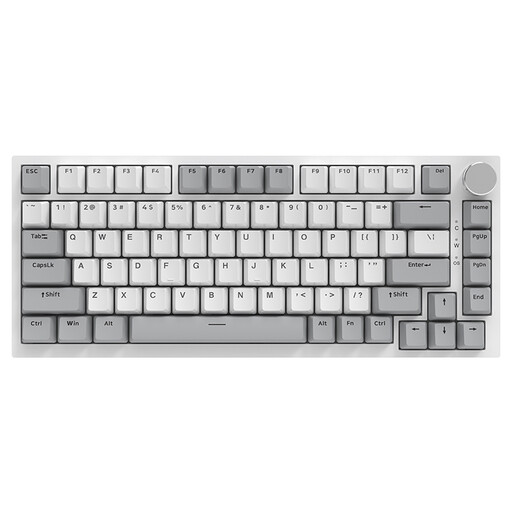
Why this product suits this type of user: If build quality and customisation matter more to you, this model offers a gasket mount, PBT keycaps and several layers of sound-dampening material.
The specifications list hot-swap sockets for 3-pin and 5-pin switches. This means you can change them later without soldering the PCB.
PBT keycaps, gasket mount, five sound-dampening materials, RGB lighting and a CNC-machined volume control.

Why this product suits this type of user: Competitive FPS players may appreciate its compact 68-key design, magnetic switches and adjustable actuation point.
The actual technical specifications state that it has a US layout. If you need QWERTZ, make sure you choose a different model before buying.
Magnetic Hall Effect switches, Rapid Trigger function, adjustable actuation from 0.2 to 4.0 mm and an 8,000 Hz polling rate, according to the product description.
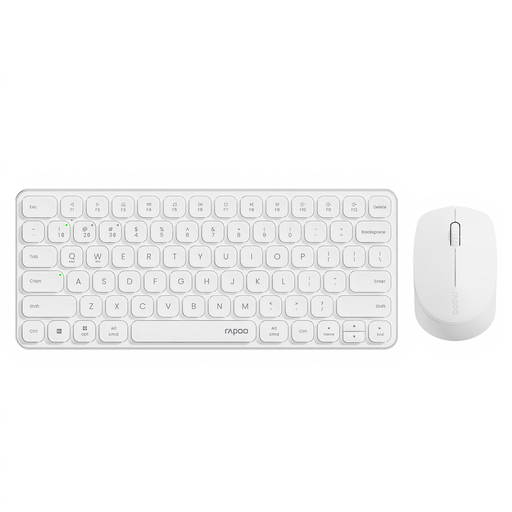
Why this product suits this type of user: This keyboard and mouse combo is designed for users who switch between a PC, tablet and other devices.
The connection options are clearly listed as 2.4 GHz and Bluetooth 4.0 and 5.0. This makes it easier to check compatibility with your devices before buying.
Support for up to four devices, quiet scissor keys, multimedia hotkeys and a mouse with adjustable resolution up to 2,400 dpi.
We’ve put together a complete, regularly updated list of products that meet these strict selection criteria and fully comply with the safety regulations in force in the EU.
A keyboard is just one part of your workstation. Choose a gaming mouse to suit the space available on your desk, your grip style and your preferred connection. For communication, the connection, microphone position and platform compatibility of a gaming headset matter more than whether it simply claims to offer surround sound. A mouse mat, USB hub or wrist rest can also be a useful addition to your setup.
For longer sessions, it’s important to maintain a neutral posture, set your desk to the right height and take regular breaks. The term ergonomic keyboard is not a single, standardised technical category. Check specific features such as tilt feet, keyboard height, a wrist rest and key spacing instead.
Yes, as long as the noise level, layout and form factor suit your working environment. Linear or dampened switches are often less noticeable than clicky switches. Choose a QWERTZ layout for typing in German. Volume controls and multimedia keys can also be useful in the office.
Lifespan depends on the switch type, how often you use it, exposure to dust or liquids, and how well you maintain it. Manufacturers often specify a number of keystrokes, but this usually refers to the switches and not necessarily the entire device. A hot-swappable keyboard can be easier to maintain if you have compatible replacement switches.
Power consumption depends on the connection, lighting and battery capacity. RGB lighting generally uses more power than having the LEDs switched off. For battery-powered models, check the battery type and stated battery life. If you want reliable use without charging breaks, a wired mechanical keyboard remains a practical option.