
Lieferung heute & morgen

Qualitätsgarantie

Willkommens-Angebote freischalten: KOSTENLOSE Lieferung | Bis zu 80 % RABATT | Kostenlose 30-Tage-JoyPlus-Testphase
App herunterladen
A mechanical gaming keyboard can provide many years of reliable service for gaming and typing. However, the layout, switch technology and connection must suit your setup. Poor purchases are often caused not by missing features, but by confusing product descriptions and unsuitable priorities.
A compact gaming keyboard takes up less space for mouse movements, but depending on its design, it may omit important keys. A 60% gaming keyboard usually lacks function keys, arrow keys and separate navigation keys. A 65% model often adds arrow keys, while a 75% gaming keyboard also includes a dedicated row of function keys.
If you regularly write texts, work with spreadsheets or use keyboard shortcuts, check whether a 75% layout or an TKL keyboard at 80% of the standard size would suit you better. For users who need a number pad, a full-size keyboard such as the Exodus 600 remains a practical choice.
Models with 8,000 Hz advertise extremely short polling intervals. According to product information from Redragon and AJAZZ, 8,000 Hz corresponds to a theoretical interval of 0.125 milliseconds. In practice, however, the input latency you perceive also depends on the USB connection, firmware, operating system, game and monitor.
A high polling rate can be appealing to competitive FPS players. For office applications or casual gaming, layout, typing feel and reliable software are often more important.
With a hot-swap keyboard, switches can be replaced without soldering. What matters is which switches are supported. A conventional PCB for 3-pin or 5-pin switches is not automatically compatible with magnetic switches.
A Hall-Effect keyboard uses magnetic sensors. Models such as the AULA WIN60HE, Redragon M68 and AJAZZ AK820 MAX HE require compatible Hall-Effect or magnetic switches. Standard mechanical 3-pin or 5-pin switches must not be fitted in these keyboards unless the manufacturer explicitly permits it.
For German users, a QWERTZ gaming keyboard is usually the simplest choice. The key labels and positions of Y, Z, umlauts and special characters then match the German keyboard layout.
Several compact models in the range, on the other hand, use a US QWERTY layout, including the AULA F75 MAX, AULA F75 PRO, XPG SORCERER MINI and Redragon M68. A US layout may be suitable for international games, programming or switching between several devices. If you write a lot of German text every day, bear in mind that you will need to adapt and that the key labels differ.
Linear red switches have no noticeable tactile bump and are often chosen for fast inputs. Tactile switches provide noticeable feedback when actuated. The volume also depends on the case, keycaps, sound dampening and typing force.
With a rapid-trigger keyboard, the key reset is detected before the key has returned fully to its original position. On Hall-Effect models, the actuation point can often be adjusted using software. According to the product information, the ranges vary by model, for example from 0.2 to 4.0 millimetres on the Redragon M68 or from 0.1 to 2.0 millimetres on the AJAZZ AK820 MAX HE. These figures describe the available adjustment range, but do not replace checking the software, compatibility and your personal typing feel.
A wired gaming keyboard does not need charging and provides a consistent connection. A detachable USB-C cable makes transport and cable management easier. A wireless mechanical keyboard offers greater flexibility, but needs to be charged. Tri-mode models combine USB, Bluetooth and 2.4 GHz wireless connectivity.
For daily use, a stable base, adjustable feet, enough space for your hand position and a comfortable key height are also important. A keyboard with a volume control adds convenience if you frequently adjust media volume.

Why this product suits this profile: The 82-key QWERTZ layout retains function keys, arrow keys and navigation keys. The wired connection requires no battery or pairing, so it is ready to use straight away.
The German layout prevents the common confusion with US QWERTY. Hot-swap supports compatible 3-pin mechanical switches and is not the same as compatibility with Hall-Effect switches.
QWERTZ layout, RGB lighting, volume control and detachable USB-C cable.
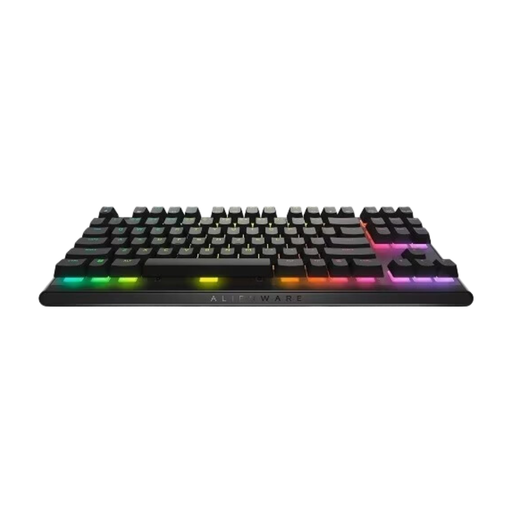
Why this product suits this profile: The TKL design reduces the width without sacrificing arrow keys or function keys. This model is aimed at users who value programmable keys and an established software environment.
The product description specifies CHERRY MX Red, N-Key Rollover, anti-ghosting and three adjustable height levels. This makes the specification clearer than a vague claim such as “gaming performance”.
Detachable USB-C cable, programmable keys, onboard profiles and per-key RGB lighting.
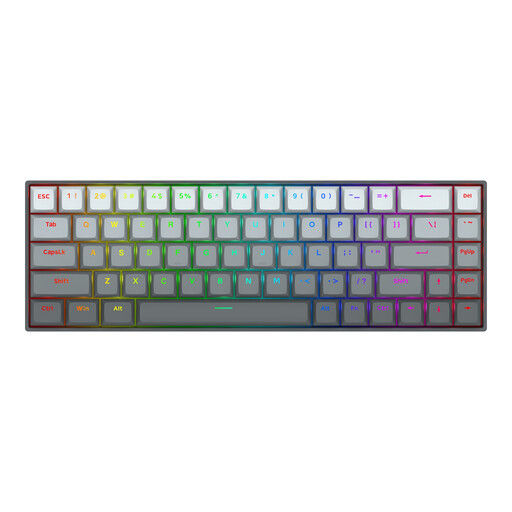
Why this product suits this profile: The 65% design provides arrow keys while taking up little space. Magnetic switches, adjustable actuation and rapid trigger are particularly appealing to FPS players.
The switch technology is explicitly described as a linear Hall-Effect type. Buyers should still check whether the software supports all functions on their operating system.
An 8,000 Hz polling rate according to the product information, an adjustable actuation point from 0.2 to 4.0 millimetres and a detachable USB-C cable.
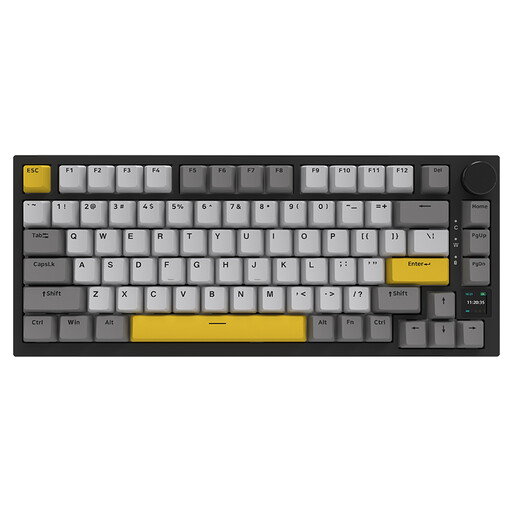
Why this product suits this profile: The combination of USB, Bluetooth and 2.4 GHz wireless connectivity is ideal for users who switch between a PC, laptop and other devices.
The connection options are clearly separated. If you need maximum stability, you can use USB-C; wireless options are available for switching between workspaces.
75% layout, 4,000 mAh battery according to the product information, RGB lighting, TFT display and volume control.
We have put together a complete, regularly updated list of products that fully meet these strict selection criteria and the safety regulations applicable in the EU.
A 60% or 65% keyboard creates extra space for wide mouse movements. If you need arrow keys and a row of function keys, a 75% or TKL keyboard offers greater flexibility. The choice depends on the game, the keyboard shortcuts you use and the amount of desk space available.
Lifespan depends on the switch type, manufacturing quality, usage and care. For individual switches, manufacturers often quote figures in millions of keystrokes. These figures are product specifications measured under defined conditions and are not a guarantee of a particular service life. Dust, liquid and damaged USB-C ports can shorten the keyboard’s lifespan.
A wireless mechanical keyboard needs energy for its battery, wireless connection and, where applicable, RGB lighting. Switching the lighting off or reducing its brightness extends battery life. A wired model does not need charging and is usually easier to set up for stationary gaming PCs.