
Lieferung heute & morgen

Qualitätsgarantie

Willkommens-Angebote freischalten: KOSTENLOSE Lieferung | Bis zu 80 % RABATT | Kostenlose 30-Tage-JoyPlus-Testphase
App herunterladen
The search for a new mechanical gaming keyboard can quickly become overwhelming. The market is saturated with technical jargon, marketing promises, and a vast array of models. Many users invest in a keyboard only to discover after a few weeks that it doesn’t suit their needs. This guide will help you understand the critical features and avoid common purchasing pitfalls.
As a Joybuy Product Recommendation Officer, I analyse product data to provide you with objective, practical advice. My goal is to offer you an informed basis for your decision that goes beyond superficial marketing claims.
Before we dive into the key specifications, let's look at three widespread issues that often lead to disappointment:
@ and ". An careless purchase here leads to daily frustration.To find the right mechanical keyboard, you should focus on three fundamental technical features. These are what ultimately determine the typing feel, functionality, and ergonomics.
The switches beneath each key define the typing feel and acoustics. There are three main characteristics:
The size of the keyboard directly impacts the available space on your desk. Common form factors include:
For users in the UK, checking for a proper ISO-UK (QWERTY) layout is crucial to ensure a hassle-free experience.
Modern keyboards offer more than just basic input. Important additional features include:
Here are a few models tailored to specific user profiles that meet the criteria discussed.
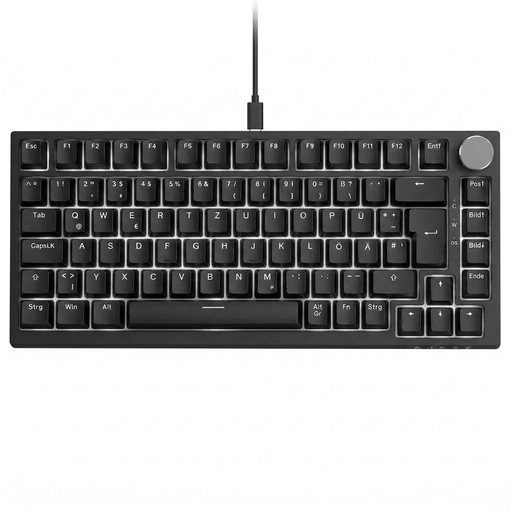
Why This Fits Their Persona: This model is ideal for beginners looking for a reliable mechanical keyboard without compromising on core functionality. It offers a proper UK layout and useful features at an accessible price point.
With its explicit UK QWERTY layout, it sidesteps the most common pitfall for UK buyers. The linear red switches are a solid starting point for gaming and everyday tasks.
A practical volume knob and hot-swap capability for 3-pin switches offer convenience and initial customisation options that are not a given in this price range.
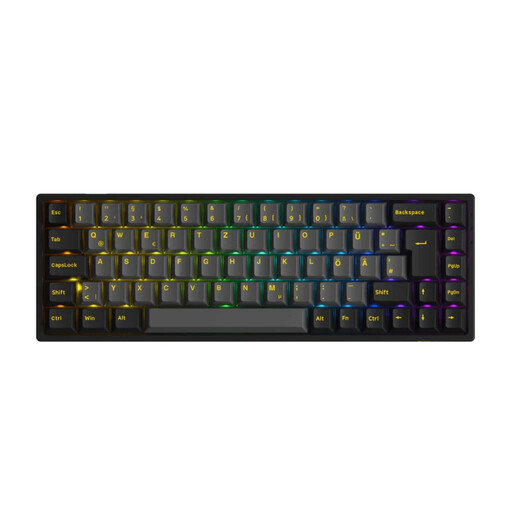
Why This Fits Their Persona: For users who want to customise their keyboard down to the last detail. This model provides the technical foundation to swap switches and the flexibility to connect wirelessly with various devices.
The hot-swap PCB is compatible with both 3-pin and 5-pin switches, thereby avoiding the limitation trap. The correct ISO-UK layout also prevents compatibility issues.
The tri-mode connectivity (Bluetooth, 2.4G, USB-C) offers maximum flexibility for use with a desktop, laptop, or tablet. The high-quality PBT keycaps are durable and resistant to wear.
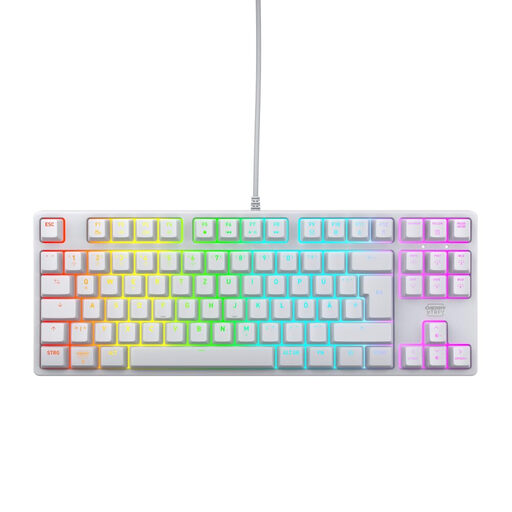
Why This Fits Their Persona: Designed for gamers for whom reaction speed and precision are the top priority. Its compact form factor and high-quality components are engineered for performance.
This model uses the tried-and-true CHERRY MX2A RED switches, a known quantity for linear, fast performance, avoiding vague marketing terms. The TKL form factor is a deliberate design choice for more mouse room.
The combination of a 1000Hz polling rate and Full N-Key Rollover ensures every input is registered instantly and accurately. The robust construction with a metal plate guarantees longevity.
We have compiled a complete, real-time list of products that fully satisfy these strict selection criteria and UK safety regulations.
1. What is the difference between 3-pin and 5-pin hot-swap keyboards? A 3-pin hot-swap PCB can only accommodate switches that have two metal contacts and a central plastic post. A 5-pin PCB is backward-compatible and can also accept switches with two additional plastic guide pins. These provide more stability and are standard on many custom switches. Therefore, 5-pin compatibility offers you a significantly wider selection for personalisation.
2. How long does a mechanical keyboard last on average? The lifespan is often rated in millions of keystrokes per switch. Common ratings are between 50 and 100 million keystrokes. With normal use, a well-built mechanical keyboard can last for many years. The switches are the most durable component, while the keycaps may show signs of wear sooner, depending on the material (ABS vs. PBT).
3. Do I need software for an RGB keyboard? Not always. Many keyboards, like the CHERRY XTRFY K4V2 TKL, allow you to control the RGB lighting (effects, brightness, speed) directly via key combinations (e.g., using the Fn key). Other models, especially those with more complex effects or synchronisation features, require manufacturer software for full configuration. Check the product description if software-free control is important to you.