
Lieferung heute & morgen

Qualitätsgarantie

Willkommens-Angebote freischalten: KOSTENLOSE Lieferung | Bis zu 80 % RABATT | Kostenlose 30-Tage-JoyPlus-Testphase
App herunterladen
The search for the right keyboard can be a challenge. Many users of standard membrane keyboards find they lack precision, a satisfying typing experience, and long-term durability. A mechanical keyboard offers a significant upgrade in terms of tactile feel, response time, and robustness.
This article serves as your guide. We'll explain the key features to look for and present a selection of models for various applications—from gaming to professional office use.
To find the right model for your needs, a few technical aspects are crucial.
The heart of any mechanical keyboard is the switches beneath the keycaps. They determine the typing feel and sound level. The three main types are:
Consider how and where you will use the keyboard. A wired keyboard offers a lag-free connection and never needs charging, making it ideal for a stationary mechanical gaming keyboard. A wireless mechanical keyboard, on the other hand, ensures a clutter-free desk and greater flexibility. Modern models often offer multiple connection modes like Bluetooth and 2.4 GHz wireless.
Also, pay attention to the QWERTY layout, the standard for English-speaking regions, to ensure seamless use.
For many enthusiasts, the appeal of mechanical keyboards lies in their customisability.
Here is a selection of models that cater to different needs and preferences.
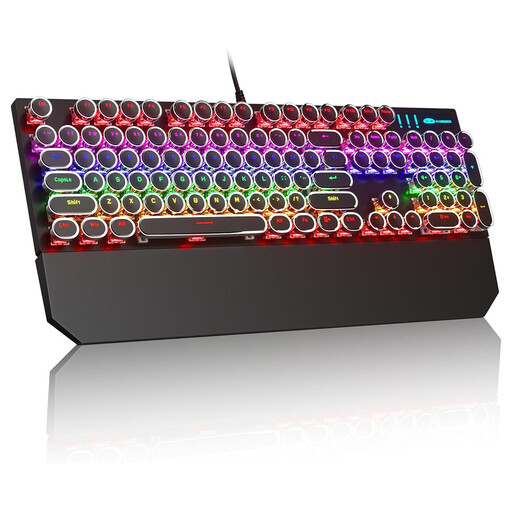
Why it stands out: This model combines a striking retro aesthetic with the functionality of a modern gaming keyboard. The round, typewriter-style keycaps and blue mechanical switches deliver a unique tactile and audible experience with every keystroke.
Pros:
Who it's for: Gamers and users looking for an eye-catching retro keyboard with precise, audible feedback for their setup.

Why it stands out: The AJAZZ AK980 V2 is a powerhouse of features for demanding users. It offers tri-mode connectivity, hot-swap capability, and an integrated TFT display for showing system information or custom GIFs. The practical rotary knob allows for quick control of volume and other functions.
Pros:
Who it's for: Keyboard enthusiasts, programmers, and power users who want a highly customisable hot-swap keyboard with maximum connectivity and modern features.

Why it stands out: The Logitech MX Mechanical is designed for professional use. With its low-profile, quiet tactile switches ("Tactile Quiet"), it offers the precise feel of a mechanical keyboard without adding to the noise of a busy office. The smart backlighting and multi-device capability make it a tool for productive work.
Pros:
Who it's for: Professionals, developers, and creatives in the office or at home who need a quiet, high-quality, and wireless mechanical keyboard for productive workflows.
Our selection covers various use cases, but the market for mechanical keyboards is vast. If you're looking for different layouts, switch types, or designs, you're sure to find the right model in our full collection.
Explore our entire selection of mechanical keyboards here
Compared to conventional membrane keyboards, mechanical keyboards offer several advantages: greater durability, with a lifespan often exceeding 50 million keystrokes per switch; higher precision due to a clearly defined actuation point; and better tactile feedback, which enhances the typing experience. They also often feature a modular design that allows for customisation.
No. The noise level depends entirely on the type of switch used. While "clicky" switches are designed to produce a loud click, linear and especially special "quiet" tactile switches are designed for use in quiet environments like an open-plan office.
A hot-swap keyboard allows the user to easily exchange the mechanical switches without needing to solder. This provides maximum flexibility to customise the typing feel and acoustics of the keyboard by using different types of switches.