
Lieferung heute & morgen

Qualitätsgarantie

Willkommens-Angebote freischalten: KOSTENLOSE Lieferung | Bis zu 80 % RABATT | Kostenlose 30-Tage-JoyPlus-Testphase
App herunterladen
The search for a new mechanical keyboard can quickly become overwhelming. The market is flooded with models that advertise with aggressive marketing buzzwords and flashy aesthetics. However, not every keyboard marketed as a "gaming keyboard" offers the performance and longevity one expects. As your Joybuy Product Recommendation Officer, I'll help you identify the crucial features and avoid common purchasing pitfalls.
Many buyers invest in keyboards that lose their quality after just a few months or prove to be impractical. The three most common problems are:
To avoid these problems, you should focus on the technical fundamentals that define a good mechanical keyboard.
Instead of being swayed by marketing promises, you should examine three core aspects. These are the primary determinants of the typing feel, longevity, and versatility of your future keyboard.
The way the circuit board (PCB) and switch plate are mounted inside the case has an enormous impact on the typing feel and sound profile.
A hot-swap keyboard is equipped with special sockets that allow you to change the mechanical switches without any soldering. This is a game-changing advantage for two reasons:
A modern wireless mechanical keyboard should offer more than just one connection type.
Based on the criteria above, we have identified a few models that are particularly well-suited for different user profiles.

Why This Fits Their Persona: This model is ideal for users who want to enter the world of mechanical keyboards without sacrificing future-proof features. It combines a German layout with the most important features for enthusiasts.
The hot-swap capability bypasses the pitfall of soldered switches. If a switch is faulty or the typing feel isn't right, it can be easily replaced without any technical expertise.
Offers a Gasket Mount structure for a soft typing feel and features a German QWERTZ layout, which is not a given in this price range.

Why This Fits Their Persona: For gamers and professionals who refuse to compromise. The full-size layout with a number pad, combined with modern features, makes it the perfect all-rounder for productivity and gaming.
The Tri-Mode keyboard avoids the pitfall of slow wireless connectivity. The low-latency 2.4 GHz option is optimised for gaming, while Bluetooth offers flexibility for other devices.
Combines a full German QWERTZ layout with a Gasket Mount, hot-swap functionality, a TFT display, and a practical control knob.
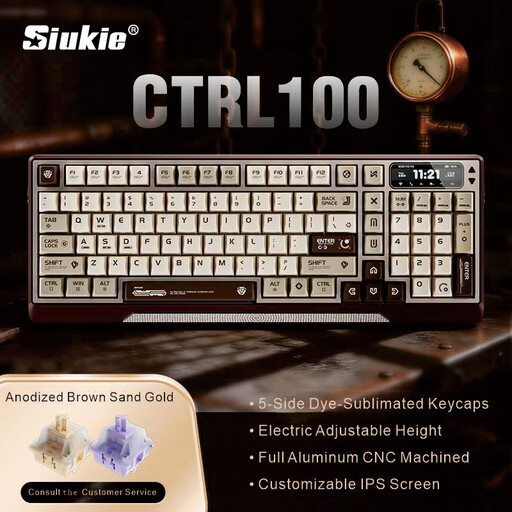
Why This Fits Their Persona: For users who value exceptional materials, innovative technology, and a flawless typing experience. This is less a simple tool and more a statement piece for your desk.
The solid, CNC-milled aluminium case is the direct opposite of cheap plastic builds. Here, quality isn't hidden—it's the central feature of the product.
The combination of a CNC aluminium case, Gasket Mount, and a unique motorised height adjustment offers an unmatched tactile feel and ergonomics.
We've compiled a complete, up-to-date list of products that fully meet these strict selection criteria and German safety regulations.
1. What is the advantage of a Gasket Mount keyboard? A keyboard with a Gasket Mount offers a noticeably softer and quieter typing feel. The gaskets inside isolate the switch plate from the case, which reduces vibrations and harsh bottom-out sounds. The result is a more comfortable and acoustically pleasing experience, especially during long periods of use.
2. How long does the battery of a wireless mechanical keyboard last? Battery life varies greatly depending on the model, battery capacity, and use of RGB lighting. Compact models with smaller batteries (e.g., 1800 mAh) often last from a few days to a week with moderate use. Models with very large batteries, like the AJAZZ AK35I V4 with 10,000 mAh, can last for several weeks without charging, especially if the lighting is dimmed or turned off. As a rule of thumb: active RGB lighting is the biggest power consumer.
3. Do I need technical knowledge for a hot-swap keyboard? No, not at all. Hot-swap keyboards are perfect for beginners. Swapping the switches requires no soldering or technical expertise. Using the included tool, you can easily pull out the keycaps and then the switches, and simply press new ones in. This allows anyone to customise the feel of their keyboard easily and safely.