
Lieferung heute & morgen

Qualitätsgarantie

Willkommens-Angebote freischalten: KOSTENLOSE Lieferung | Bis zu 80 % RABATT | Kostenlose 30-Tage-JoyPlus-Testphase
App herunterladen
A mechanical keyboard differs from conventional membrane keyboards primarily in its construction. Beneath each keycap is an individual mechanical switch responsible for actuating the keystroke. This design provides more precise tactile feedback, greater durability, and more consistent performance over millions of presses. Selecting the right model depends on individual requirements for acoustics, haptics, layout, and connectivity.
The decision to purchase a mechanical keyboard should be based on an analysis of specific technical features. These parameters significantly determine its functionality and user experience.
The switch is the core component of any mechanical keyboard. The three fundamental types are:
The size of the keyboard affects ergonomics and the amount of desk space it occupies. Common formats include:
The connection method is crucial for flexibility and performance.
Modern keyboards often offer other features that expand their functionality.
Based on technical specifications and practical utility, we have compiled a selection of models for various use cases.
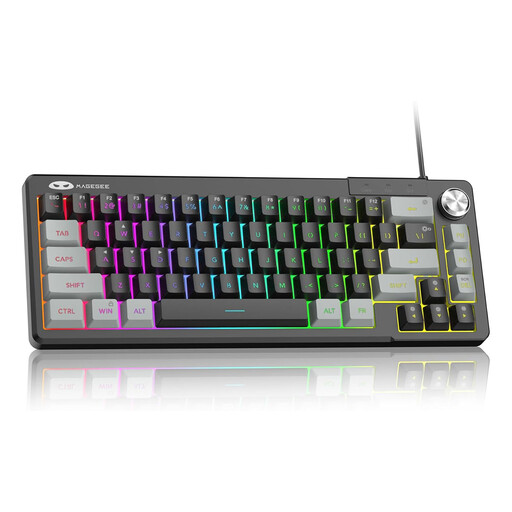
Why We Recommend It The MageGee TS68 is an ultra-compact 60% layout model designed for maximum space efficiency. It uses membrane technology that emulates a mechanical feel to simulate tactile feedback. The integrated rotary knob for volume control and the customisable RGB backlighting make it a functional option for gaming setups with limited space.
Pros
Who It's For This model is suitable for gamers and home users looking for a very compact, backlit keyboard with practical extra features like a volume knob, who value a space-saving design.

Why We Recommend It The Logitech MX Mechanical is designed for professional users. It combines the precision of mechanical switches with a low-profile, quiet operation. The low-profile Tactile Quiet switches enable fast and comfortable typing. The smart backlighting, which adapts to ambient light, and multi-device connectivity for up to three devices make it a powerful tool for productive work environments.
Pros
Who It's For Ideal for developers, creatives, and professionals in office or home-office settings who need a quiet, high-performance wireless keyboard for PC and Mac and frequently switch between multiple devices.
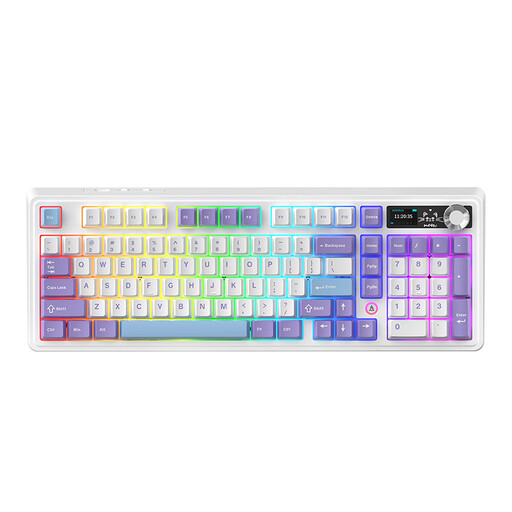
Why We Recommend It The AJAZZ AK980 V2 targets enthusiasts and power users. It offers tri-mode connectivity (Bluetooth, 2.4G, Wired), hot-swappable sockets for easy switch replacement, and a gasket-mount structure for a cushioned typing feel. The integrated TFT display for status updates and the programmable rotary knob provide a high degree of customisation and control.
Pros
Who It's For This model is for keyboard enthusiasts, gamers, and professional users who appreciate maximum customisation, versatile connectivity, and advanced features like a display and hot-swappable sockets.
The models presented cover specific use cases. If your requirements differ, you can find a broader selection of models with different switches, layouts, and features in our magic keyboard category.
1. What is the advantage of a mechanical keyboard over a regular one? The main advantage lies in its precision, durability, and tactile feedback. Each keystroke is registered by an individual mechanical switch, resulting in a more consistent and reliable typing experience. Furthermore, mechanical switches have a significantly longer lifespan, often specified for 50 million keystrokes or more.
2. Which switches are best for gaming? Linear switches are often recommended for gaming. Their smooth, resistance-free travel allows for fast and repeated inputs, which can be advantageous in fast-paced gaming situations. Tactile switches can also be a good choice if noticeable feedback without a click is preferred.
3. How do you clean a mechanical keyboard? For cleaning, the keycaps should be carefully removed with a keycap puller. The caps can be cleaned in a mild soap solution and then dried completely. The case and the spaces between switches can be cleared of dust and debris with compressed air and wiped with a slightly damp cloth. The keyboard must be disconnected from the computer before cleaning.