Joybuy Insights

Mechanical Keyboard Buyer’s Guide: Avoid Costly Mistakes

The search for the right mechanical keyboard can quickly become overwhelming. Manufacturers advertise with a flood of technical jargon, and many models marketed as "gaming keyboards" prove inadequate for demanding applications. The result is often a costly mistake that not only strains your wallet but also dampens your typing or gaming experience.

As a Joybuy Product Recommendation Officer, I'm here to help you find objective criteria for your decision. This guide will show you the most common marketing traps and explain which technical parameters truly matter, so you can make an informed choice.

The 2 Most Common Pitfalls When Buying a Mechanical Keyboard

Before we dive into the technical details, let's look at two common pitfalls that often lead to dissatisfaction.

  1. The "Mechanical-Feel" Trap: Some manufacturers promote budget-friendly membrane keyboards with the misleading term "mechanical feel." These models do not have genuine mechanical switches and offer neither the precision nor the durability of a true mechanical keyboard. The typing experience is often mushy, and the response time is insufficient for fast typing or gaming.
  2. The Layout Mix-Up (QWERTZ vs. QWERTY): A frequent mistake in online shopping is choosing the wrong keyboard layout. For the German-speaking market, the QWERTZ keyboard layout is essential for typing umlauts (?, ?, ü) and special characters directly. A US layout (QWERTY) leads to constant frustration in daily use and requires cumbersome key combinations. Therefore, always check the product description explicitly for "German QWERTZ Layout."

Core Parameters That Define Your Decision

To find the right keyboard for your needs, you should evaluate three key aspects: the switches, the form factor, and the connectivity.

1. The Switches: The Heart of the Keyboard

The switches are the primary determinant of the typing feel, noise level, and response speed. There are three main types:

  • Linear Switches: These switches offer a smooth, resistance-free keystroke from top to bottom. They are often quieter and allow for very fast, repetitive inputs, making them a great choice for a gaming keyboard. Well-known examples include Cherry MX switches in the Red variant.
  • Tactile Switches: With these switches, you feel a slight resistance (a "bump") at the actuation point without a loud click. This feedback confirms the input and makes tactile switches an all-rounder for prolific typists and office users. The MX Brown variant is a classic here.
  • Clicky Switches: This variant combines tactile resistance with a distinct audible click. They provide the most precise feedback but can be perceived as disruptive in a quiet environment like an open-plan office or at night.

For users who prefer a quiet keyboard, linear or tactile switches with additional dampening are a suitable option.

2. Form Factor and Layout: Perfectly Suited for Your Desk

The size of the keyboard has a direct impact on ergonomics and the available space on your desk.

  • Full-Size (100%): The standard format with a numpad, function keys, and arrow keys. Ideal for users who frequently enter numbers.
  • TKL (Tenkeyless, 80%) Keyboard: A compact keyboard without the numpad. It saves space and allows for a more ergonomic posture, as the mouse can be positioned closer to the keyboard.
  • Compact Form Factors (75%, 65%, 60%): These layouts further reduce the size by combining or removing keys. They are optimal for minimalist setups or mobile use but require a short adjustment period to access secondary functions.

3. Connectivity and Customisation

Modern keyboards offer more than just a cable connection.

  • Connectivity: A wireless keyboard offers flexibility and a clean setup. Models with multi-device functionality can connect to multiple devices (PC, laptop, tablet) via Bluetooth or 2.4 GHz wireless. For competitive gaming, a wired connection or a low-latency 2.4 GHz mode is preferable.
  • Hot-Swappable: A hot-swappable keyboard allows you to change the mechanical switches without soldering. This is a major advantage for enthusiasts who want to try out different switch types or easily replace faulty ones.
  • Lighting: An RGB keyboard offers customisable lighting effects. This is primarily an aesthetic feature but can also be used to highlight specific keys (e.g., WASD for gaming).

Recommended Picks for Different Users

Here are three recommendations tailored to different use cases that avoid the pitfalls mentioned.
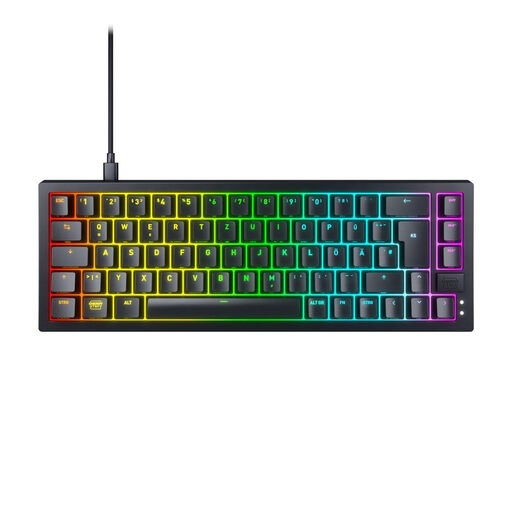
MATCH FOR: Competitive Gamers
CHERRY XTRFY K5V2 Compact Wired Mechanical Gaming Keyboard

CHERRY XTRFY K5V2 Compact Wired Mechanical Gaming Keyboard

Why This Fits Their Persona: This model is designed for gamers who need maximum performance in a small footprint. The compact 65% layout creates ample space for the mouse, while the linear switches and rapid scan technology ensure immediate in-game reactions.

How It Avoids the Trap

It bypasses the "mechanical-feel" trap by using genuine CHERRY MX2A RED switches. Furthermore, it is explicitly specified with a German QWERTZ layout, which prevents layout-related purchasing errors.

Key Advantage & Pros

The super-scan technology (0.5 ms) and hot-swappable switches for easy customisation offer a clear advantage for performance-oriented users.
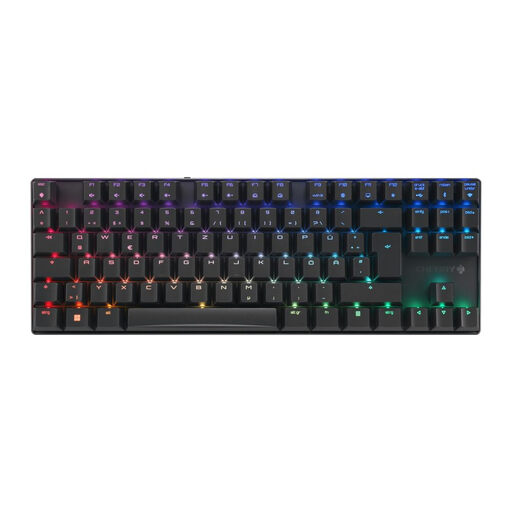
MATCH FOR: Flexible Multi-Device Users
CHERRY MX 8.2 TKL Wireless Gaming Keyboard, MX2A Brown Switches

CHERRY MX 8.2 TKL Wireless Gaming Keyboard, MX2A Brown Switches

Why This Fits Their Persona: Perfect for users who switch seamlessly between a PC, laptop, and tablet. The triple-mode connectivity (2.4GHz, Bluetooth, Cable) offers maximum flexibility, while the tactile switches provide a comfortable typing experience for long workdays.

How It Avoids the Trap

This model is a true wireless keyboard with high-quality mechanical switches (MX2A Brown), not just one with a "mechanical feel." The explicit German QWERTZ layout prevents compatibility issues.

Key Advantage & Pros

The combination of a TKL keyboard format, a sturdy aluminium frame, and versatile triple-mode connectivity makes it a durable and flexible workhorse.
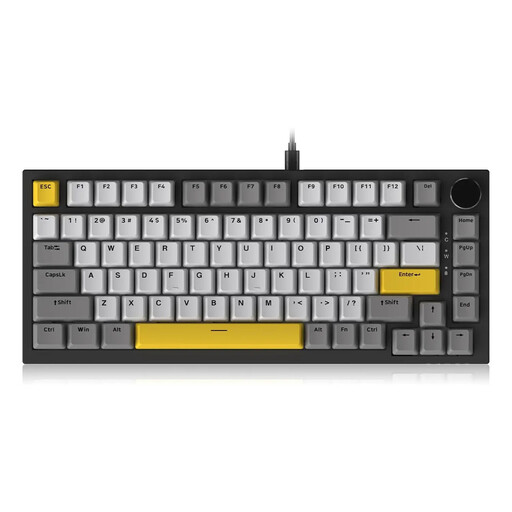
MATCH FOR: Customisation-Ready Beginners
AJAZZ AK820 75% Wired Mechanical Keyboard

AJAZZ AK820 75% Wired Mechanical Keyboard

Why This Fits Their Persona: This model offers an excellent entry point into the world of customisable mechanical keyboards. It combines a compact 75% layout with features often found only in more expensive models, such as a volume knob and a gasket-mount structure.

How It Avoids the Trap

As a hot-swappable keyboard, you are not permanently tied to the factory-installed switches. You can easily swap them out later, avoiding the frustration of being stuck with an unsuitable typing feel.

Key Advantage & Pros

The hot-swap capability offers maximum future-proofing and freedom to experiment. The gasket-mount design ensures a dampened and pleasant typing experience.

Looking for More Options?

We've compiled a complete, up-to-date list of products that fully meet these strict selection criteria and German regulations.

Frequently Asked Questions (FAQ)

What distinguishes a mechanical keyboard from a conventional one?

The main difference lies in the key mechanism. Each key on a mechanical keyboard has its own spring-loaded switch. Conventional keyboards, on the other hand, use a continuous rubber sheet (membrane) under the keys. This results in a more precise actuation point, a longer lifespan, and a significantly more defined typing feel for mechanical models.

Are all mechanical keyboards loud?

No, that is a common misconception. The volume depends on the chosen switch type. Clicky switches (e.g., Cherry MX Blue) produce a loud clicking sound. Linear (e.g., MX Red) and tactile switches (e.g., MX Brown) are significantly quieter. There are also special "Silent" variants that feature even lower noise levels due to integrated dampeners, making them a good choice as a quiet keyboard for office environments.

How can I identify a high-quality mechanical keyboard?

Look for objective quality indicators:

  • Switch Manufacturer: Reputable brands like Cherry MX are an indicator of high quality and durability.
  • Case Material: A case made of aluminium or high-quality ABS plastic provides stability and prevents the keyboard from flexing.
  • Keycaps: Keycaps made of PBT plastic are more resistant to wear and more durable than those made of ABS. The double-shot moulding process ensures that the legends will not fade.
  • Additional Features: Features like N-Key Rollover (allows for the simultaneous pressing of any number of keys), a stable cable connection (e.g., a detachable USB-C cable), and clean build quality are also signs of a well-designed product.