
Lieferung heute & morgen

Qualitätsgarantie

Willkommens-Angebote freischalten: KOSTENLOSE Lieferung | Bis zu 80 % RABATT | Kostenlose 30-Tage-JoyPlus-Testphase
App herunterladen
Finding the right mechanical keyboard can be a complex task. For tech enthusiasts, gamers, and professional users like programmers or designers, a keyboard is more than just an input device—it's a core tool that must deliver precision, durability, and a satisfying tactile experience. This article serves as an objective guide to help you select a model that meets your specific needs for performance and customisation.
Before making a decision, several technical features should be considered. These factors are crucial in determining the functionality, typing feel, and longevity of your future keyboard.
The keyboard layout is critical for daily use. In Germany, the ISO-DE layout, with its characteristic large Enter key and German umlauts (?, ?, ?), is the established standard. In addition to the classic full-size (100%) format, there are more compact variations:
Modern mechanical keyboards offer a high degree of flexibility.
The choice of materials influences not only the aesthetics but also the weight, stability, and sound profile.
Here, we present three models that stand out with different features and are suited for various user profiles.
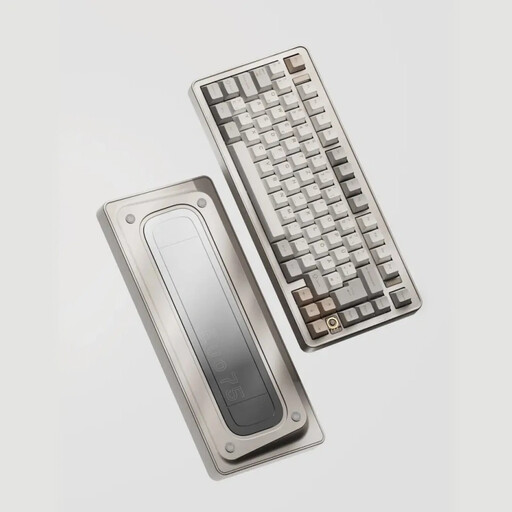
Why It Stands Out: The EVO75 combines a high-quality aluminium chassis with a compact 75% layout and the sought-after ISO-DE layout. Its leaf-spring mount structure provides a flexible, pleasant typing feel. Thanks to VIA compatibility and hot-swap capability, it offers maximum customisation options for enthusiasts.
Pros:
Who It's For: Users seeking an uncompromising, highly customisable, and durable keyboard in a compact form factor. Ideal for programmers and typing enthusiasts who value premium materials and an optimised typing experience.
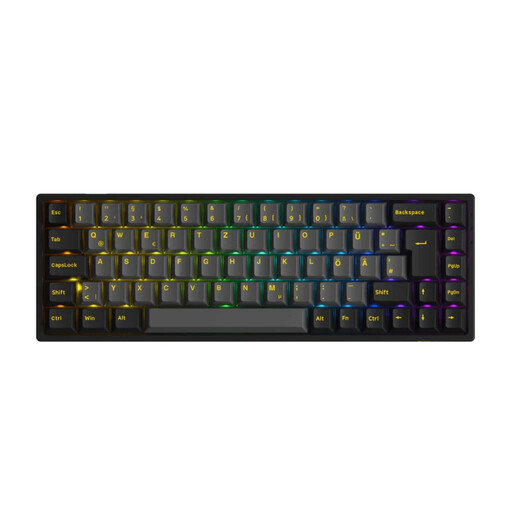
Why It Stands Out: This model from Akko offers an excellent entry point into the world of customisable mechanical keyboards. With its 65% ISO-DE layout, it is extremely compact. The combination of tri-mode connectivity, a hot-swap PCB, and customisable RGB keyboard lighting makes it a versatile option for gaming and mobile use.
Pros:
Who It's For: Gamers and users looking for a very compact, wireless, and customisable keyboard that offers great value for money. Perfect for setups with limited space or for users who frequently transport their keyboard.
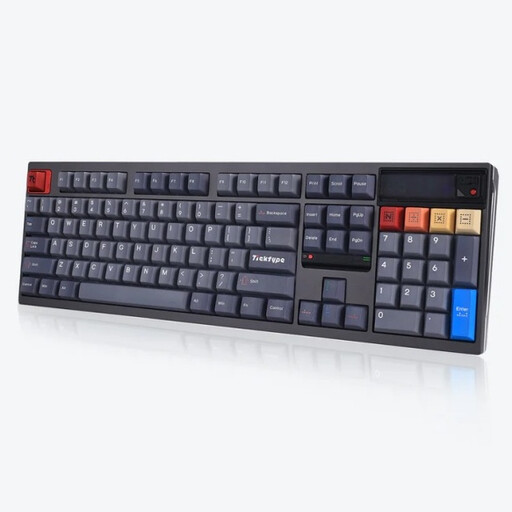
Why It Stands Out: The DP104 is a full-size aluminium keyboard aimed at users who don't want to compromise on the number of keys. It provides an extremely quiet and smooth typing experience thanks to its pre-installed silent tactile switches and leaf-spring mounting structure. A special feature is its customisable pixel screen. Please note: This model comes with a US (ANSI) layout.
Pros:
Who It's For: Professional users and enthusiasts who need a full-size layout with a number pad and place the highest value on a quiet, high-quality typing experience. Ideal for office environments or users who prefer the US layout.
If these recommendations don't include the perfect model for you, you can find a wider selection of configurations, layouts, and designs in our fully assembled keyboard category.
1. What does it mean if a mechanical keyboard is "hot-swappable"? A hot-swappable keyboard allows you to change the mechanical switches without tools or soldering. The PCB (Printed Circuit Board) is equipped with special sockets into which the switches are simply plugged. This gives you the freedom to try out different switch types to customise the typing feel and acoustics to your liking or to easily replace faulty switches.
2. Which switch type is best for a quiet mechanical keyboard? Two types of switches are particularly suitable for a quiet typing experience:
3. Is an aluminium case worth the extra cost? An aluminium case offers several advantages over plastic. It is significantly heavier and has greater torsional rigidity, which gives the keyboard high stability on the desk and prevents it from sliding. Furthermore, the density and mass of aluminium positively influence the sound profile by reducing vibrations and creating a richer, deeper sound. Whether the extra cost is worth it depends on your personal priorities regarding haptics, acoustics, and durability.