
Lieferung heute & morgen

Qualitätsgarantie

Willkommens-Angebote freischalten: KOSTENLOSE Lieferung | Bis zu 80 % RABATT | Kostenlose 30-Tage-JoyPlus-Testphase
App herunterladen
Finding the right keyboard can be a challenge. Whether you need precise input for intense gaming sessions or comfortable typing during long workdays, the requirements are diverse. A mechanical keyboard often provides a more responsive typing feel, greater durability, and extensive customisation options compared to conventional membrane models.
This article serves as a guide. It explains the most important criteria to consider when making your choice and presents a selection of models with different features to help you decide.
Choosing the right model depends on your individual needs. You should consider three key aspects in your decision: switch technology, keyboard size, and connectivity type.
The heart of any mechanical keyboard is the switches beneath each key. They determine the typing feel and acoustics. They can generally be divided into three categories:
The size of the keyboard affects both ergonomics and the available space on your desk. Common form factors include:
The choice between a wired and a wireless keyboard depends on your priorities.
Additional features like customisable RGB keyboard lighting or programmable macro keys can further personalise the user experience, especially for a mechanical gaming keyboard.
Here is a selection of mechanical keyboards that cover different needs and use cases.
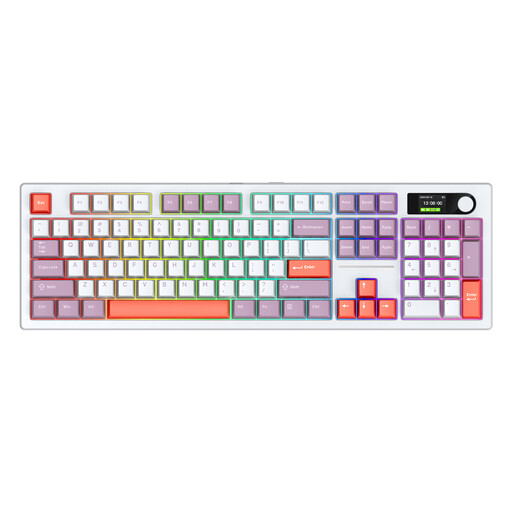
Why it stands out: This model combines a full 104-key layout with extensive features. A special feature is the integrated colour display, which can show status information. The hot-swappable function allows you to change the mechanical switches without soldering, enabling a high degree of customisation.
Pros:
Who it's for: Power users and heavy typists who need a full-featured layout with a number pad and value long battery life and maximum flexibility in connectivity and customisation.
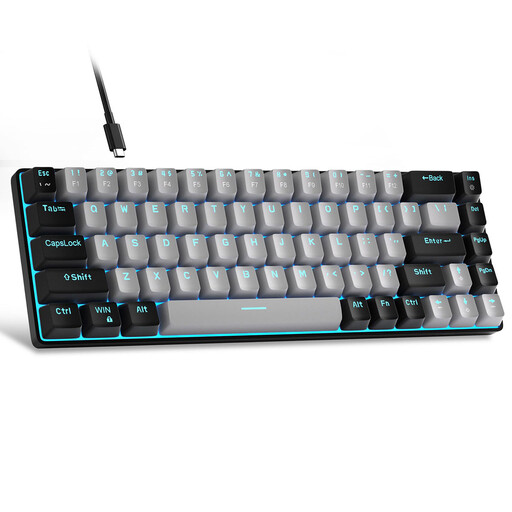
Why it stands out: The MageGee MK-Box is an extremely compact keyboard with a 60% form factor. With only 68 keys, it maximises available desk space, which is especially beneficial for gamers who use low mouse sensitivity. The blue switches provide pronounced tactile and audible feedback.
Pros:
Who it's for: PC gamers and users with limited desk space who prefer a minimalist setup and appreciate the characteristic feedback of clicky switches.
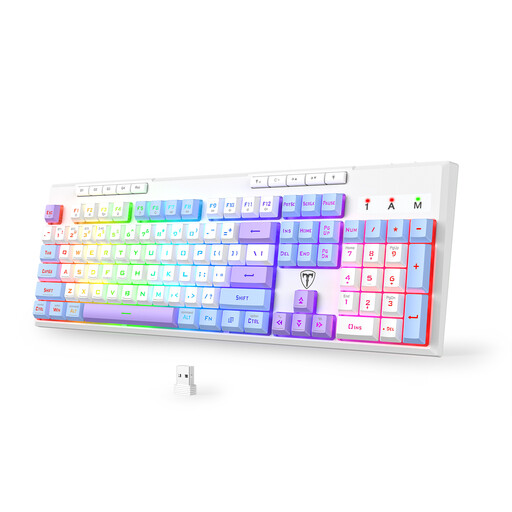
Why it stands out: This keyboard is designed as a versatile mechanical gaming keyboard. It offers tri-mode connectivity, dynamic RGB keyboard lighting, and six programmable macro keys that allow you to assign complex command sequences to a single keystroke.
Pros:
Who it's for: Gamers and streamers looking for a flexible, wireless keyboard with extensive customisation options for lighting and macros to boost their performance and productivity.
The models featured here cover a broad spectrum, but the world of keyboards is even more diverse. If you have a specific design in mind, such as a minimalist aesthetic, you can find more options and inspiration in our cute white keyboard category.
What is the advantage of a mechanical keyboard over a membrane keyboard? Mechanical keyboards use an individual spring-loaded switch for each key. This results in a more precise actuation point, better tactile feedback, and a significantly longer lifespan (often 50 million clicks or more per key). Membrane keyboards use a single rubber dome sheet, which can lead to a softer, less defined typing feel and quicker wear and tear.
Which mechanical switches are best for gaming? Linear switches (e.g., Red switches) are very popular with gamers because they allow for fast, resistance-free key travel, which is advantageous for rapid, repetitive actions. Tactile switches (e.g., Brown switches) are also a great choice, as they make the actuation point noticeable without being loud. Ultimately, the choice is a matter of personal preference.
Can I use a mechanical keyboard with a Mac? Yes, most modern mechanical keyboards are compatible with macOS. Models like the Siukie keyboard featured here are explicitly designed for use with both Windows and Mac. With some keyboards, you may need to remap the Command and Option keys in macOS System Settings, but this is a straightforward process. Pay attention to the manufacturer's specifications for compatibility.