
Lieferung heute & morgen

Qualitätsgarantie

Willkommens-Angebote freischalten: KOSTENLOSE Lieferung | Bis zu 80 % RABATT | Kostenlose 30-Tage-JoyPlus-Testphase
App herunterladen
Finding the right mechanical keyboard can be a daunting task. The market offers a vast array of options with different switches, layouts, and features. The goal of this guide is to provide you with clear direction. We'll highlight the key features you should look for and present a selection of models that cover the diverse needs of gamers and prolific typists.
To make an informed decision, it's helpful to understand a few fundamental technical aspects. These criteria crucially determine the typing feel, functionality, and ergonomics of your future keyboard.
The size of the keyboard affects not only its footprint on your desk but also the keys available to you.
The connection type is crucial for flexibility and your use case.
Modern mechanical keyboards offer extensive customisation options.
Based on the criteria above, we have curated a selection of keyboards that cater to different user profiles and requirements.

What makes it stand out: The AJAZZ AK980 V2 is a feature-packed model designed for versatility. Its standout feature is the integrated TFT colour display, which can show system information, the connection mode, or even your own GIFs. Combined with the convenient rotary knob for quick control of volume or lighting, it offers a high degree of interactivity. The tri-mode connectivity (Wired, 2.4G, Bluetooth) makes it a versatile companion for various devices.
Pros:
Who is it for? For power users, gamers, and tech enthusiasts looking for a keyboard with maximum functionality, high customisability, and flexible connection options.
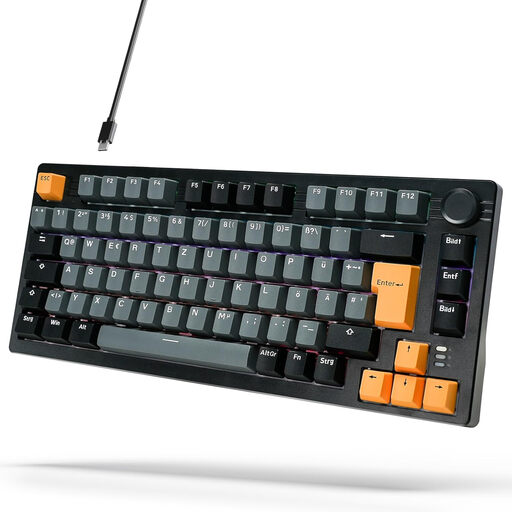
What makes it stand out: The ARZOPA K81 is aimed specifically at the German market. Its key advantage is the German QWERTZ layout, which provides a familiar typing experience right out of the box. The compact 75% format saves valuable desk space without sacrificing important keys like the arrow and function keys. The Gasket Mount construction, combined with multiple layers of sound-dampening material, ensures a soft and acoustically pleasing typing experience.
Pros:
Who is it for? For PC gamers and prolific typists in Germany who prefer a compact keyboard with a German layout and a high-quality, cushioned typing feel.
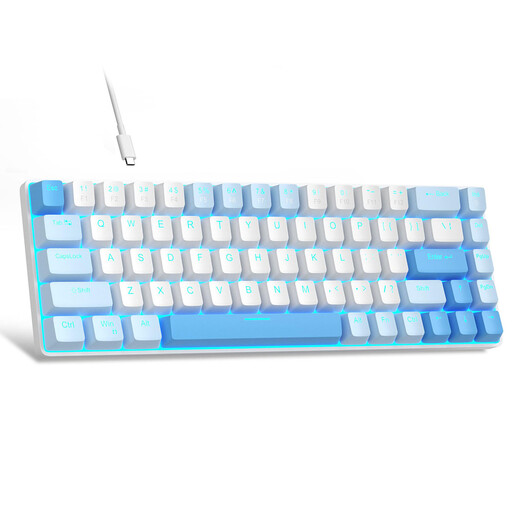
What makes it stand out: The MageGee MK-Box is an ultra-compact keyboard in a 60% format. With only 68 keys, it maximises the available desk space. Despite its small size, it retains separate arrow keys, which is a key advantage over pure 60% layouts for many users. The linear red switches enable fast and smooth input, while the blue LED backlighting provides a clean aesthetic.
Pros:
Who is it for? For users with limited desk space, minimalists, or newcomers looking for a simple and functional mechanical keyboard for gaming and everyday tasks.
If the models presented here don't quite fit your needs, or if you're specifically interested in wired setups, you can find a wider selection in our Wired Keyboard and Mouse category. There you can discover more models with different layouts and features.
Mechanical keyboards offer several advantages for gamers over conventional rubber-dome keyboards. Each keystroke is triggered by an individual mechanical switch, resulting in greater precision, faster response times, and distinct tactile feedback. They are also more durable, and features like N-key rollover ensure that even complex key combinations are registered reliably.
A hot-swap keyboard allows the user to easily change the mechanical switches without any soldering required. Using a special tool, the switches can be pulled out and replaced with others. This offers a high degree of customisation, as you can try out and mix different switch types (e.g., linear, tactile, clicky) to perfectly match the typing feel and sound of the keyboard to your personal preferences.