
Lieferung heute & morgen

Qualitätsgarantie

Willkommens-Angebote freischalten: KOSTENLOSE Lieferung | Bis zu 80 % RABATT | Kostenlose 30-Tage-JoyPlus-Testphase
App herunterladen
Finding the right mechanical keyboard can be a daunting task given the vast array of options, switch types, and layouts. Whether for productive office work, intense gaming sessions, or personalising a custom keyboard, the requirements vary widely. This guide will help you understand the features relevant to your needs and present a selection of models for different use cases.
To make an informed decision, it's helpful to understand a few fundamental technical aspects.
The physical size of the keyboard determines which keys are present. Common formats include:
The core of any mechanical keyboard are the switches beneath the keycaps. They determine the typing feel and sound level. The three main types are:
A hot-swap keyboard allows you to change the mechanical switches without soldering. This offers maximum flexibility to adjust the typing feel later or to easily replace faulty switches.
Modern keyboards offer various connection options:
Extra features like customisable RGB keyboard lighting are especially common in the gaming scene but can also be used to visually organise the key layout for work.
Here is a curated selection of models that cater to different needs and applications.

Why it stands out: The Logitech MX Mechanical is engineered from the ground up for productivity and use in professional settings. Its low-profile design and quiet tactile switches enable fast, precise typing without the noise profile of a typical gaming keyboard. The smart white backlighting automatically adjusts to ambient light conditions.
Pros:
Who is it for? Professionals, developers, and creatives looking for a reliable, wireless mechanical keyboard for daily use across multiple devices (e.g., PC and MacBook) who value a discreet design and quiet keystrokes.
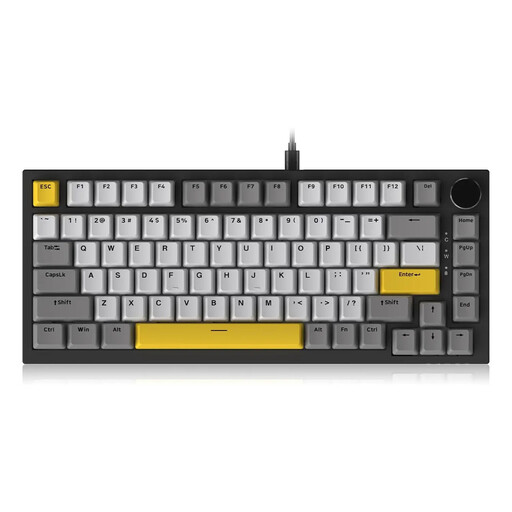
Why it stands out: The AJAZZ AK820 brings high-end features to a more accessible price point. Its gasket-mount design, where the PCB is suspended between silicone or Poron gaskets, provides a cushioned and flexible typing feel. The compact 75% layout with a convenient volume knob makes it a functional tool for both gaming and work.
Pros:
Who is it for? Users looking to enter the world of customisable keyboards and who seek a superior typing feel. The combination of a hot-swap keyboard and gasket-mount design makes it an exciting option for keyboard enthusiasts and gamers.
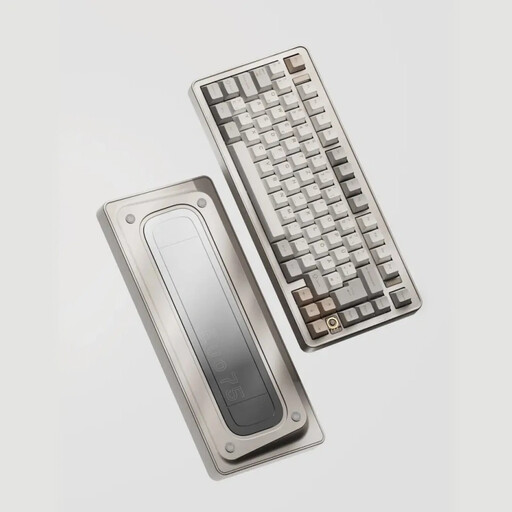
Why it stands out: The Ticktype EVO75 is a keyboard for users who refuse to compromise on materials and customisability. The solid, CNC-milled full aluminium body and innovative leaf-spring mount structure deliver a unique, flexible typing feel. With tri-mode connectivity and full VIA compatibility for key remapping, it's a powerful tool for connoisseurs.
Pros:
Who is it for? Discerning enthusiasts, programmers, and creatives who demand a keyboard with first-class build quality, maximum customisation flexibility, and an exceptional typing experience.
If the models presented here don't quite meet your needs, or if you simply want to explore other options like specialised switches or cables, you're sure to find the right accessories in our broader selection.
Discover more cables and switches here
What is the advantage of a mechanical keyboard over a regular one? Mechanical keyboards generally offer greater durability, a more precise and consistent typing feel, and extensive customisation options. Each keystroke is registered by a physical switch, resulting in better tactile feedback.
What does "hot-swap" mean on a keyboard? "Hot-swap" means that the keyboard's mechanical switches can be replaced without any soldering. This allows the user to try out different switch types (e.g., linear, tactile, clicky) or easily replace a faulty switch, increasing the keyboard's lifespan and versatility.
Are mechanical keyboards always loud? No, that is a common misconception. The volume depends entirely on the type of switch used. There are special "silent" switches (e.g., Silent Red or Silent Brown) designed for use in offices or quiet environments that are barely louder than traditional rubber-dome keyboards.