
Lieferung heute & morgen

Qualitätsgarantie

Willkommens-Angebote freischalten: KOSTENLOSE Lieferung | Bis zu 80 % RABATT | Kostenlose 30-Tage-JoyPlus-Testphase
App herunterladen
The market for mechanical keyboards can be overwhelming. Flashing lights, technical jargon, and a seemingly endless selection of models make the decision difficult. As a Joybuy Product Recommendation Officer, I see buyers fall into the same traps every day: they invest in overpriced features they don't need, or choose a model that no longer suits their needs after just a few months. This guide is designed to help you avoid these pitfalls and make an informed decision.
Two of the most common mistakes are:
Before you decide on a model, you should check three core aspects. These are crucial in determining the functionality, comfort, and longevity of your new keyboard.
The switches under each key define the typing feel. Instead of relying on colours, it's more useful to understand the basic types:
Some models also offer a hot-swap keyboard feature. This allows you to change the switches without soldering, enabling you to customize the typing feel to your preferences later on.
The size of your keyboard affects not only the space on your desk but also ergonomics and functionality.
For use in English-speaking regions, be sure to choose a standard QWERTY layout to ensure all keys and special characters are correctly labelled and positioned for your language.
The choice of connection method depends on your workspace and mobility needs.
Here are some recommendations tailored to specific user groups and their requirements.
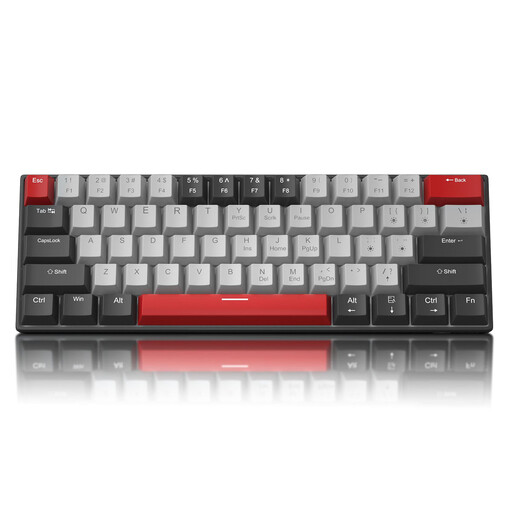
Why This Fits Their Persona: Ideal for users looking to enter the world of mechanical keyboards without a large investment. The compact 60% format is perfect for small desks or as a portable option on the go.
This model avoids the "gaming" premium by focusing on the essentials: a solid mechanical typing feel and a reliable wired connection. It forgoes complex software or expensive materials.
The main advantage is its excellent value for money. The compact 60% keyboard layout and detachable USB-C cable make it very space-saving and portable.
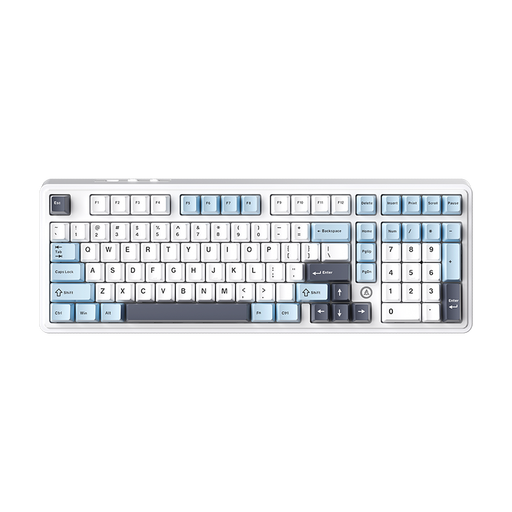
Why This Fits Their Persona: Perfect for users who want a single keyboard for both productive work and gaming. The 98% layout retains the numpad in a compact form factor, while the triple-mode connectivity offers maximum flexibility.
It avoids the "one switch fits all" trap with its hot-swap keyboard capability. Users can easily swap out the switches to adapt the typing feel to their changing needs (e.g., quiet switches for the office, linear ones for gaming).
The combination of versatile triple-mode connectivity (wireless keyboard + wired) and a functional yet compact 98% layout makes it extremely adaptable for any desk and use case.

Why This Fits Their Persona: For users deeply rooted in the Apple ecosystem who value a seamless experience across all their devices. Here, the keyboard is an integral part of a powerful and portable total package.
Instead of buying an external keyboard with potential compatibility issues, this provides a solution perfectly tuned for macOS. The Magic Keyboard with a German QWERTZ layout and Touch ID is optimized for intuitive system operation.
The seamless integration with the operating system and hardware. The performance of the MacBook Air M5 chip, combined with long battery life and a high-quality display, creates a cohesive total package for creatives and professionals.
We have compiled a complete, up-to-date list of products that fully meet these strict selection criteria and German safety regulations.
1. What is the difference between a QWERTZ and a QWERTY layout? The QWERTY layout is the standard in most of the world, including the US and UK. The QWERTZ layout is standard in Germany and Eastern Europe, where the Z and Y keys are swapped compared to QWERTY. It also features dedicated keys for German umlauts (?, ?, ?). When buying a keyboard, it's crucial to choose the layout that matches your region and language to avoid typing frustration.
2. How long does a mechanical keyboard last? The lifespan of a mechanical keyboard is often measured in millions of keystrokes per switch. Most switches are rated for 50 to 100 million keystrokes. With average use, a well-maintained mechanical keyboard can last for many years, often significantly longer than conventional rubber-dome keyboards. The robust construction and the ability to replace individual switches on some models (hot-swap keyboard) further contribute to their longevity.
3. Can a mechanical keyboard be quiet? Yes. The myth that all mechanical keyboards are loud comes from the widespread "Clicky" switches. To get a quiet mechanical keyboard, you should choose models with linear switches (e.g., Red, Black) or special "Silent" switches. Additionally, modifications like installing O-rings under the keycaps or using keyboards with integrated dampening materials can further reduce the noise level.