
Lieferung heute & morgen

Qualitätsgarantie

Willkommens-Angebote freischalten: KOSTENLOSE Lieferung | Bis zu 80 % RABATT | Kostenlose 30-Tage-JoyPlus-Testphase
App herunterladen
The search for the right mechanical keyboard can quickly become overwhelming. Countless models advertise technical jargon and supposed benefits that often create more confusion than clarity. As a Joybuy Product Recommendation Officer, I see the daily pitfalls that lead users to regret their purchase. Before you invest, you should know the most common and costly mistakes.
The two biggest frustrations for buyers in the UK are easily identified:
This guide will help you navigate these issues and make an informed decision based on technical facts, not marketing hype.
To find a mechanical keyboard that meets your needs, focus on three core aspects: the switches, the form factor, and the connectivity.
The switches under each keycap determine the typing feel, sound level, and responsiveness. Choosing the wrong type is a common reason for dissatisfaction. There are three main categories:
For maximum flexibility, consider hot-swap keyboards. On these models, the switches can be easily pulled out and replaced with others without any soldering.
The size of the keyboard directly impacts ergonomics and the available space on your desk.
For any form factor, make sure to look for the UK ISO layout specification to ensure the keyboard is designed for the UK market.
The choice between a wired and a wireless keyboard depends on your use case.
Here are a few models that represent a considered choice for specific user groups based on their objective features.
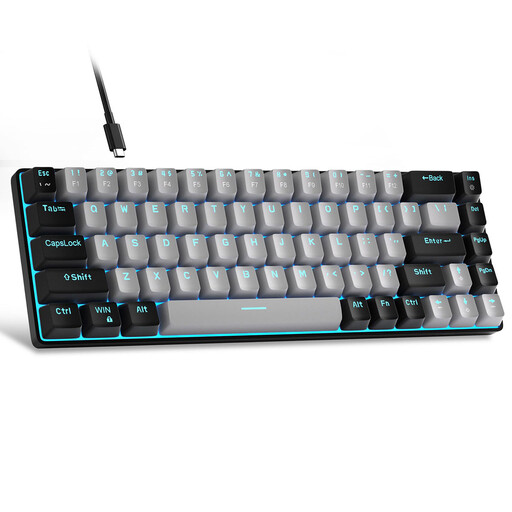
Why This Fits Their Persona: This model offers a cost-effective entry into the world of mechanical keyboards. The compact 60% format saves space, and the mechanical switches provide a significantly better typing feel than traditional rubber dome keyboards. A trade-off is the US QWERTY layout, though this may not be an issue for programmers or users accustomed to it.
It avoids the "gaming premium" by focusing on the core function: a solid mechanical typing experience at an accessible price, without costly extra features.
Compact design and genuine mechanical switches (Blue switches for crisp, tactile feedback) at a very competitive price point.
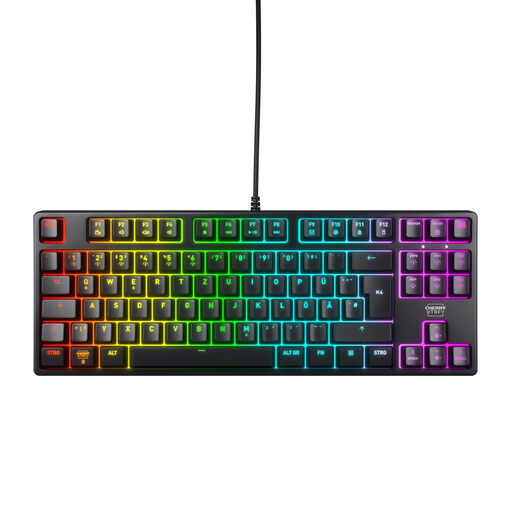
Why This Fits Their Persona: For users who value durability, precision, and a seamless experience for UK-based work and play. The keyboard combines a robust build with a metal plate and the renowned Cherry MX2A Red switches. The TKL format is a great balance of compactness and functionality.
It solves the "layout trap" by offering a proper UK ISO layout. The price is justified by verifiable quality, such as switches rated for over 100 million keystrokes (according to the manufacturer).
High-quality linear switches for fast gaming and quiet typing. Robust construction and the correct UK layout for a frustration-free experience.
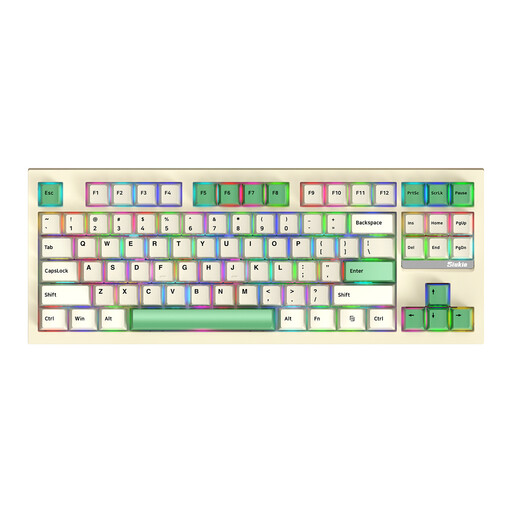
Why This Fits Their Persona: This model is aimed at users who want maximum control and customisation. It combines a popular TKL format with 3-mode connectivity (wireless via Bluetooth/2.4GHz or wired) and the crucial hot-swap feature. This allows enthusiasts to change the typing feel at any time to suit their preferences.
It fundamentally solves the problem of "choosing the wrong switch" by allowing the user to replace the switches themselves. Instead of being locked into one type, you can experiment with various linear, tactile, or clicky switches.
Ultimate flexibility thanks to hot-swap sockets and triple connectivity options. An ideal foundation for individual customisation.
We have compiled a complete, real-time list of products that fully satisfy these strict selection criteria and UK safety regulations.
1. What is the difference between UK ISO and US ANSI layouts?UK ISO is the standard keyboard layout for the United Kingdom. It features a large, L-shaped 'Enter' key, a dedicated key for the '?' symbol, and places characters like '@' and '"' in different positions compared to the American US ANSI layout. The US layout has a wide, rectangular 'Enter' key. For typing in the UK, a UK ISO layout is essential to avoid relying on shortcuts or software adjustments.
2. How long does a mechanical keyboard last? The lifespan of a mechanical keyboard is largely determined by its switches. While basic membrane keyboards are often rated for only 5-10 million keystrokes, manufacturers of mechanical switches frequently specify a lifespan of 50 to over 100 million keystrokes. With proper care and a solid case construction, a mechanical keyboard can function reliably for many years.
3. Are hot-swap keyboards suitable for beginners? Yes, absolutely. A hot-swap keyboard is actually particularly beginner-friendly. It allows you to try out different switch types without any technical knowledge or tools (other than an included puller). If a switch ever fails, it can be easily replaced without having to replace the entire keyboard. This significantly lowers the barrier to entry into the world of keyboard modification.