
Lieferung heute & morgen

Qualitätsgarantie

Willkommens-Angebote freischalten: KOSTENLOSE Lieferung | Bis zu 80 % RABATT | Kostenlose 30-Tage-JoyPlus-Testphase
App herunterladen
The search for the right mechanical gaming keyboard can quickly become overwhelming. The market is flooded with technical jargon, marketing promises, and a huge selection of models. As a Joybuy Product Recommendation Officer, I'm here to help you separate the important information from the noise and make an informed decision. Instead of falling for exaggerated advertising, you should focus on the technical fundamentals that truly make a difference.
Many buyers fall into common pitfalls that lead to frustration and unnecessary expenses. Here are the three most frequent problems you should be aware of:
To avoid these pitfalls, focus on three core aspects that determine the quality, longevity, and usability of your future keyboard.
The heart of any mechanical keyboard is its switches. They determine the typing feel and acoustics. There are three main types:
Even more important than the initial switch choice is hot-swap capability. A hot-swap keyboard features sockets on the circuit board that allow you to change switches at any time without soldering. This offers two crucial advantages: easy repairs for defective switches and the freedom to experiment with different switch types to find your perfect typing feel.
For users in many parts of the world, an ISO layout is the standard choice. Pay close attention to your regional specification (e.g., ISO-UK, ISO-DE, ISO-FR) to ensure all necessary keys are present and correctly positioned.
Besides the language layout, the form factor is crucial for ergonomics and desk space:
Modern keyboards often offer more than just a wired connection. A wireless mechanical keyboard with tri-mode connectivity (USB-C, 2.4 GHz wireless, and Bluetooth) provides maximum flexibility across different devices. For gaming, the 2.4 GHz connection is the preferred wireless option due to its low latency.
For enthusiasts, the way the circuit board is mounted inside the case also plays a role. A gasket mount keyboard, for example, suspends the board on silicone gaskets. This dampens vibrations and creates a softer, often described as "creamy" or "thocky," typing feel and sound profile.
Here are a few models that represent a smart choice based on objective criteria for different user profiles.
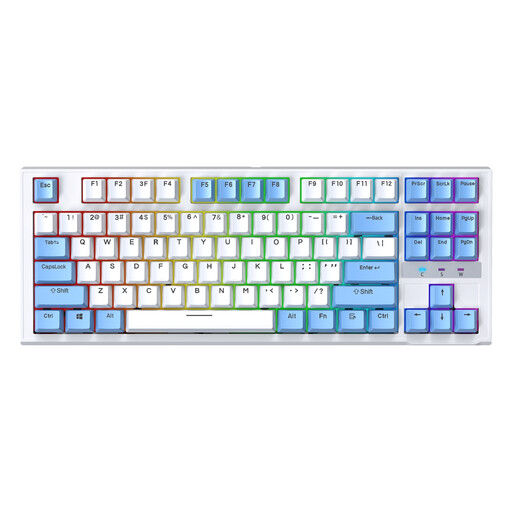
Why this model fits: It offers essential features like hot-swap capability and a space-saving TKL design at an accessible price point. Ideal for anyone looking to enter the world of mechanical keyboards without compromising on future-proofing.
Thanks to the hot-swap PCB, you can easily replace defective or disliked switches instead of having to discard the entire keyboard for a minor issue.
The compact TKL keyboard layout saves valuable desk space for sweeping mouse movements. The hot-swap feature ensures the longevity of your investment.

Why this model fits: It combines sought-after features like a gasket mount keyboard structure for a soft typing feel, tri-mode connectivity, and a unique design. Perfect for users seeking a custom mechanical keyboard experience without the hassle of a DIY build.
Instead of just relying on a "gaming" label, this model delivers tangible technical advantages like sophisticated dampening and high-quality PBT keycaps that objectively improve the typing and sound experience.
The innovative gasket-mount structure provides a dampened, rich sound profile. Tri-mode connectivity offers maximum flexibility between different devices.

Why this model fits: Designed specifically for the German market, this keyboard offers a full-fledged ISO-DE mechanical keyboard layout in a premium aluminum case. Ideal for users who want to be productive and game without compromising on layout or material quality.
Solves the most common problem for German buyers: missing umlauts and the wrong key layout. You get a keyboard that is ready to use out of the box, with no learning curve or software workarounds.
A true ISO-DE layout in a robust aluminum case. The leaf-spring mounting system provides a flexible and comfortable typing experience for long-term use.
If you'd like to explore more models selected based on these objective criteria, you can find a comprehensive selection here.
The main difference lies in the feel and sound of the keystroke.
Yes, modern wireless models are absolutely viable for gaming. A wireless mechanical keyboard that uses a 2.4 GHz radio frequency (RF) connection offers latency that is practically indistinguishable from a wired connection. Bluetooth connections tend to have higher latency and are therefore better suited for work or casual gaming.
For a basic cleaning, remove the keycaps with a keycap puller. Then, you can remove dust and crumbs from between the switches with compressed air or a soft brush. The keycaps themselves can be cleaned in lukewarm soapy water, depending on the material (PBT or ABS). Make sure they are completely dry before reattaching them. Avoid spraying any liquids directly onto the keyboard housing.