
Lieferung heute & morgen

Qualitätsgarantie

Willkommens-Angebote freischalten: KOSTENLOSE Lieferung | Bis zu 80 % RABATT | Kostenlose 30-Tage-JoyPlus-Testphase
App herunterladen
The search for the right mechanical gaming keyboard can quickly become overwhelming. The market is flooded with technical jargon, marketing promises, and an enormous selection of products. Many buyers invest in expensive models only to find they don't meet their needs or have fundamental flaws. As your Joybuy Product Recommendation Officer, I'll help you identify the crucial features and steer clear of common purchasing pitfalls.
Before we dive into the technical details, let's look at the most common mistakes that lead to disappointment. Understanding these will help you make a more informed decision.
To make an informed choice, focus on three fundamental aspects: switch technology, case material, and connectivity.
The switches determine the typing feel, sound level, and response speed. The main types are:
The case affects not only durability but also the acoustics and typing feel.
The right size and connection type are crucial for ergonomics and flexibility.
Here are a few models tailored to specific user groups that embody the quality features mentioned above.
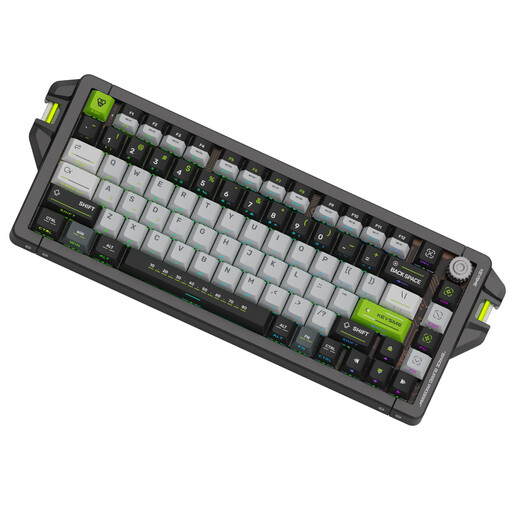
Why This Fits Their Persona: This model is engineered for maximum performance. For players of FPS titles like CS or Valorant, where milliseconds matter, its technical specifications are directly aimed at providing a competitive edge.
It bypasses the pitfall of vague performance claims with clearly defined specs: an 8kHz polling rate for 0.125ms latency and magnetic switches with an adjustable actuation point and Rapid Trigger.
The main advantage is the extreme customisability of the key response. The solid CNC-aluminium case also ensures absolute stability during intense gaming sessions.

Why This Fits Their Persona: For users who want to customise their keyboard down to the last detail, this model provides the ideal foundation. It combines high-quality materials with all the key features of the custom scene, without forcing compromises on the layout.
It solves the wrong-layout problem by offering a full-featured ISO-DE layout in a custom chassis. Its hot-swap capability and VIA compatibility also guarantee full control over keymaps and switches.
The combination of an aluminium case, leaf-spring mount, and tri-mode connectivity creates a high-quality, flexible, and customisable package that is rarely found in this form.
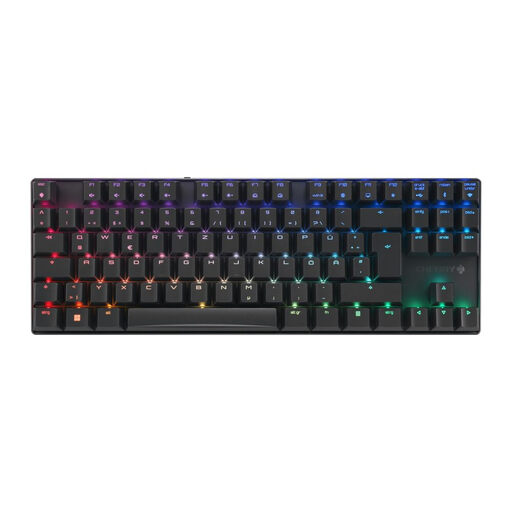
Why This Fits Their Persona: Ideal for users who need a reliable keyboard for gaming, programming, and everyday typing. The compact TKL format saves space without sacrificing ergonomics, and the CHERRY brand stands for proven quality and durability.
Instead of flashy aesthetics, this model focuses on a sturdy aluminium frame and high-quality CHERRY MX2A switches. The sub-1ms latency in 2.4GHz mode is a concrete, verifiable performance metric.
The tri-mode connectivity offers maximum flexibility for various use cases. The German TKL ISO-DE keyboard layout is ideal for users who appreciate a clean desk setup.
We have compiled a complete, up-to-date list of products that fully meet these strict selection criteria and German safety regulations.
1. What is the difference between ISO and ANSI layouts? The ISO layout is the standard in many parts of Europe. It has a two-row, tall Enter key, a short left Shift key, and an extra key next to it. Regional variants like ISO-DE (German) use this layout to add dedicated keys for umlauts (?, ?, ?) and the ?. In contrast, the American ANSI layout has a single-row, wide Enter key and a long left Shift key; special characters like umlauts must be typed using key combinations. For typing in languages that require them, an ISO layout is the more practical choice.
2. How long do mechanical switches really last? The lifespan is measured in millions of keystrokes. Standard switches from manufacturers like Cherry or Gateron are often rated for 50 to 100 million actuations. According to Cherry, their new MX2A switches, for example, last for over 100 million actuations. In normal use, this translates to a lifespan of many years. With a hot-swap keyboard, individual switches can also be easily replaced if they fail.
3. Is a hot-swap keyboard worthwhile for beginners? Yes, a hot-swap keyboard can be worthwhile even for beginners. It gives you the ability to change the typing feel later by swapping out the switches, without having to buy a whole new keyboard. This is ideal for figuring out whether you prefer linear, tactile, or clicky switches. It also simplifies repairs if a single switch should ever fail.