
Lieferung heute & morgen

Qualitätsgarantie

Willkommens-Angebote freischalten: KOSTENLOSE Lieferung | Bis zu 80 % RABATT | Kostenlose 30-Tage-JoyPlus-Testphase
App herunterladen
For many PC gamers and heavy typists, a mechanical gaming keyboard is a core component of their setup. However, the market is flooded with marketing buzzwords and technical specs that can make an informed decision difficult. False assumptions often lead to disappointment and unnecessary expense. This guide will help you understand the crucial features and find a keyboard that truly fits your needs.
As a Joybuy Product Recommendation Officer, my job is to filter market information and provide you with objective, practical advice so you can make an informed choice.
Before we dive into the technical details, let's look at three common misconceptions that often lead to a bad purchase.
To avoid these pitfalls, focus on the following three core aspects. These are the primary determinants of your future keyboard's performance, feel, and durability.
Mechanical switches define the typing feel and response speed. The three main types are:
Newer technologies like Hall effect magnetic switches enable features such as Rapid Trigger, where the key's actuation and reset points can be adjusted dynamically and with extreme precision. This provides a noticeable advantage, especially in fast-paced games.
The size of the keyboard affects not only the space on your desk but also its functionality.
Here are some recommendations tailored to specific user profiles, taking the above criteria into account.
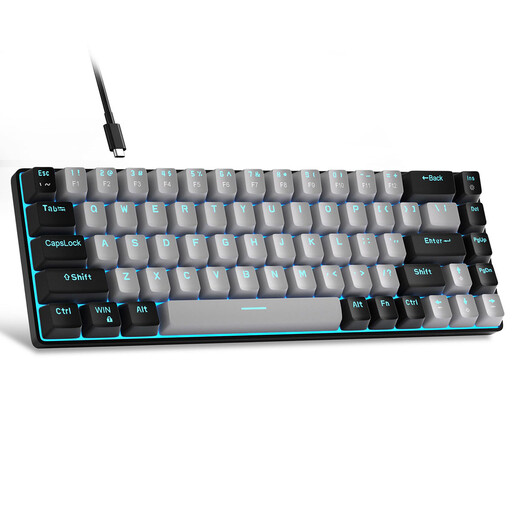
Why This Fits Their Persona: Ideal for users looking to enter the world of mechanical keyboards without a large budget. The compact 60% format creates plenty of desk space, and the blue switches provide the classic, tactile, and clicky feedback that many associate with mechanical keyboards.
This model bypasses the "gaming" trap by using genuine mechanical switches instead of a membrane. It offers an authentic mechanical experience, not just a cosmetic upgrade.
Compact 68-key layout with separate arrow keys. Detachable USB-C cable for easy portability. A solid entry-level feature set for gaming and typing.
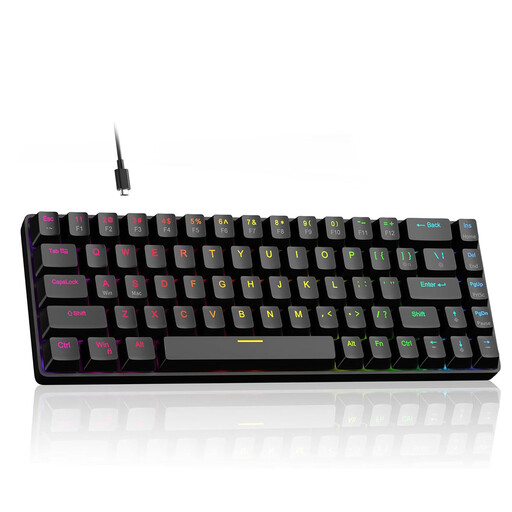
Why This Fits Their Persona: For gamers where every millisecond counts. This keyboard is equipped with cutting-edge technology designed for maximum speed and responsiveness. The magnetic switches with Rapid Trigger are specifically engineered for demanding PC gaming.
This model delivers more than just a "gaming" label. It offers objectively measurable performance advantages like an adjustable actuation point (0.1mm - 4.0mm) and an 8000Hz polling rate that minimises input lag.
Rapid Trigger technology for instant key reset. Hot-swappable with compatible 3-pin switches. Despite the 60% format, it includes dedicated arrow keys.
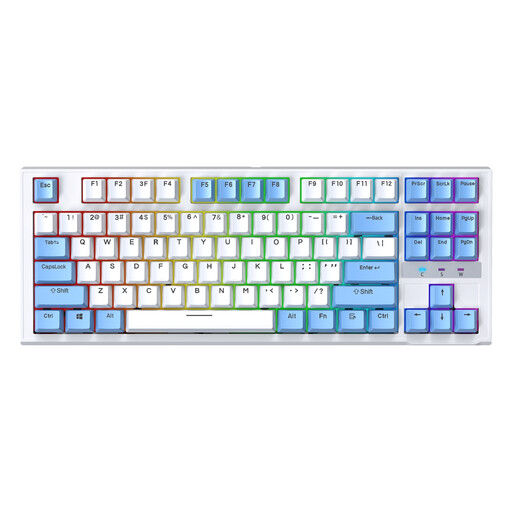
Why This Fits Their Persona: Perfect for users who need a keyboard for both gaming and productive work and who value customisation. The TKL format is an excellent compromise, saving desk space without sacrificing essential navigation keys.
The hot-swappable feature directly addresses the "wrong switch choice" pitfall. Users are not locked into one switch type and can customise their typing experience later or easily replace faulty switches.
Full flexibility with hot-swappable switches. The balanced TKL keyboard form factor is ideal for mixed-use scenarios. Ergonomic design for longer sessions.
We have compiled a complete, up-to-date list of products that fully meet these strict selection criteria and German safety regulations.
The main difference lies in the feedback:
A hot-swappable keyboard is especially useful if you enjoy experimenting and want to try different typing feels without having to buy a new keyboard. It also increases longevity, as you can easily replace a single faulty switch yourself instead of having to dispose of the entire device. For beginners who haven't yet settled on a switch type, this is a very useful feature.
Regular care preserves function and appearance. Remove dust and crumbs with compressed air or a small brush. The keycaps can be removed and cleaned in lukewarm soapy water (let them dry completely before reattaching). Wipe the case with a slightly damp microfibre cloth. Avoid aggressive cleaning agents and prevent liquid from getting into the switch mechanism.